





Enterprise customer operations cannot afford downtime. For a Chief Information Officer (CIO) or Vice President of Customer Success, managing a high-volume help desk is a balancing act between maintaining strict SLAs and driving operational efficiency. Yet, many organizations discover that their legacy ticketing systems act like digital silos. They trap valuable customer data in complex webs of custom tags and fragmented apps. When you try to layer modern artificial intelligence on top of these messy systems, the technology struggles to deliver accurate results.
 Migrating from Zendesk to HubSpot Service Hub is no longer just about switching your ticketing software. It represents a fundamental infrastructure upgrade. The core challenge is clear: how do you move years of legacy ticketing data, complex custom objects, and historical customer interactions into a new ecosystem without disrupting live, high-value enterprise client operations?
The answer lies in an AI-first migration strategy. Traditional data migrations focus entirely on database replication—simply copying a disorganized database from one platform to another. Conversely, an AI-first approach restructures, cleanses, and maps your data at the exact moment of ingestion. This ensures that the destination architecture is immediately ready to fuel autonomous customer agents, machine learning models, and generative AI engines.
The strategic pressure to execute this transition is growing rapidly.
According to a Gartner study, 91% of customer service leaders face intense corporate pressure to implement AI within their support environments.
Furthermore, Gartner benchmarking data highlights the stark financial realities driving this shift:
A traditional, agent-assisted customer interaction costs a median of $13.50 per contact, whereas a well-optimized self-service channel costs just $1.84 per contact.
By transforming a routine platform migration into an intentional data-cleansing initiative, you can protect your active enterprise operations during the transition. Simultaneously, you build a high-performance foundation for automation.
The Anatomy of an AI-First Migration Strategy
What makes a platform migration truly "AI-first"? It means designing your data destination around the precise structure that AI engines require to function effectively. Artificial intelligence does not think like a human agent; it relies on structured patterns, clean relational data, and unambiguous context. If you feed an AI system messy data, you will get poor, inaccurate results.
Comparing the Data Architectures
To build a successful migration roadmap, you must understand how the underlying data models of Zendesk and HubSpot differ:
-
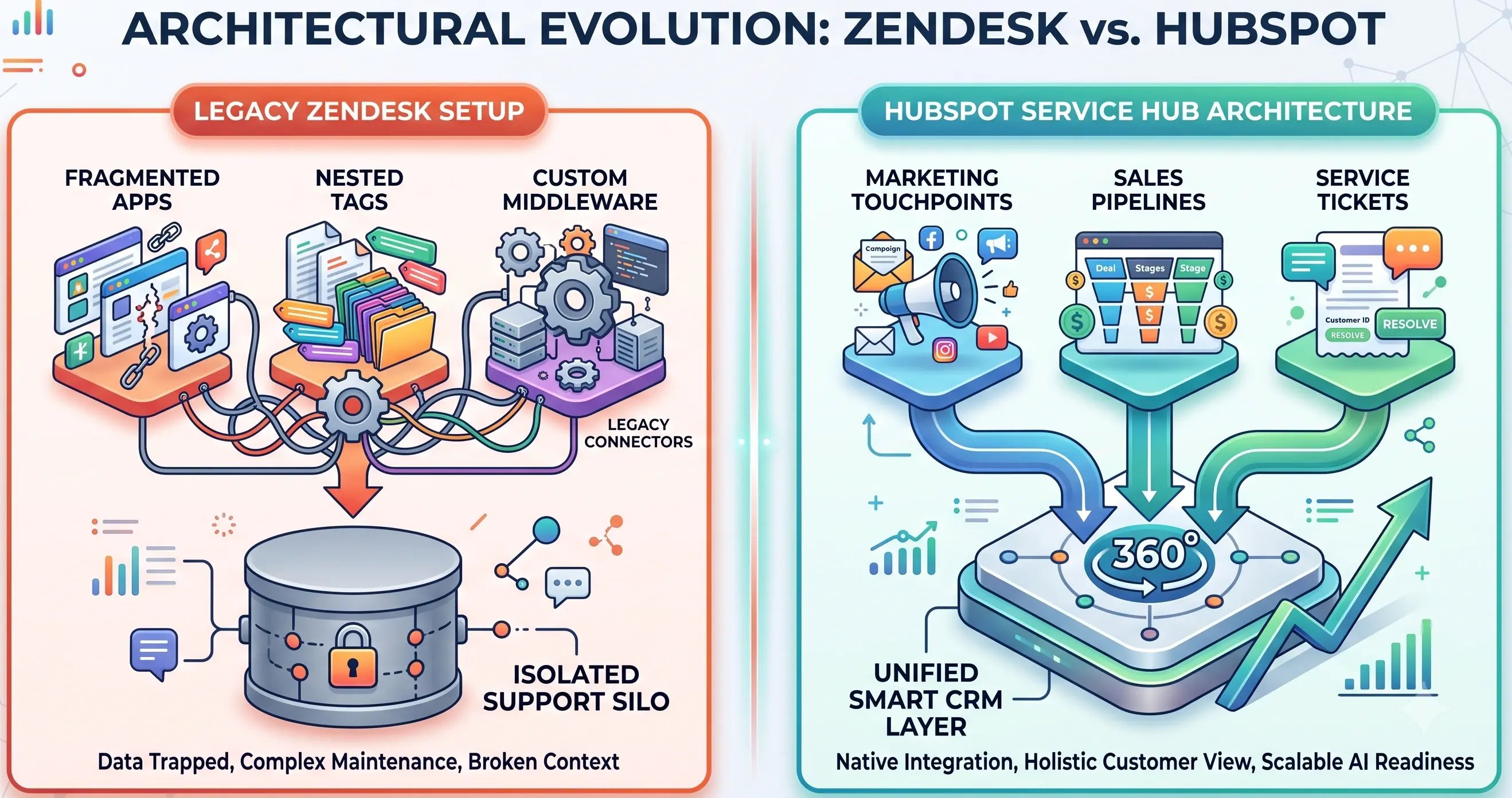
Zendesk's Legacy Footprint: Over the years, enterprise Zendesk instances frequently accumulate significant technical debt. Data is often scattered across disconnected applications, deeply nested custom ticket fields, and inconsistent ticket tags. To make sense of this information, organizations regularly rely on complex third-party middleware or custom APIs.
-
HubSpot Service Hub's Unified Codebase: HubSpot is built completely from the ground up on a single, unified database layer called the Smart CRM. Service data natively interacts with sales pipelines, marketing touchpoints, and core company records on a single timeline. According to comparative user insights published by HubSpot, support teams rate Service Hub 11% better than Zendesk at delivering a true, 360-degree view of the customer journey.
Driving ROI Through Alignment
When you transition support data into a unified CRM, you remove the barriers between your customer service team and the rest of your company. Autonomous customer agents need this broad context to resolve complex client issues. If an AI agent understands a customer's contract value, active sales deals, and marketing interactions, it can provide highly personalized support.
This structural alignment directly influences customer retention.
In fact, HubSpot reports that 75% of service leaders using their platform saw a measurable increase in overall customer retention.
Clean data empowers your teams—and your automated systems—to work faster and smarter.
Phase 1: Data Cleansing and Structural Mapping
The first operational step of an AI-first migration strategy is data preparation. Enterprise Zendesk instances often suffer from "tag bloat"—a situation where human agents have created hundreds of redundant or contradictory tags over time. If your team trains an AI model on historical tickets with conflicting tags, the system will produce unreliable answers.

Mapping the Core Database Schema
Before moving any records, you must map your Zendesk schema to the HubSpot Smart CRM architecture. This process requires a precise layout for both standard and custom objects:
| Legacy Zendesk Object | HubSpot Smart CRM Destination | Mapping Strategy for AI Readiness |
|---|---|---|
| Users | Contacts | Standardize email addresses as unique identifiers; strip obsolete contact notes. |
| Organizations | Companies | Link parent-child company accounts to preserve enterprise account hierarchies. |
| Tickets | Tickets | Map historical tickets to specific pipelines; isolate clear intent-and-resolution text pairs. |
| Custom Ticket Fields | Custom Properties | Convert unstructured text fields into drop-down menus or standardized strings. |
For custom objects, such as software license keys, hardware asset numbers, or enterprise service contracts, you must establish clear data relationships within HubSpot before importing records. This ensures that when an automated agent pulls a ticket, it can immediately access the associated asset data.
Isolating Intent-Resolution Pairs
To train an AI model effectively, you must isolate clean customer interactions. A typical enterprise support ticket might contain 40 internal team updates, automated system notifications, and side conversations. An AI agent trying to read that chaotic history will struggle to identify the real solution.
As part of your data extraction process, strip away internal chatter and system noise. Focus exclusively on the customer's original question and the final verified solution. This clean pair is what your AI systems need to learn effectively.
Phase 2: Mitigating Risk and Maintaining Active Operations
For a Vice President of Customer Success, the greatest risk during a platform migration is a disruption to live customer service. If an enterprise client submits a high-priority ticket during a chaotic system switch and it falls through the cracks, you risk breaching your SLA and damaging the client relationship. An AI-first migration strategy eliminates this risk by using a phased transition model.
Utilizing Delta and Interval Migrations
Never attempt a "big bang" migration that shuts down one system and turns on another all at once. Instead, break the transfer into controlled intervals:
-
The Baseline Transfer: Migrate the bulk of your historical data—such as closed tickets from past years—in the background while your live support agents continue working out of Zendesk.
-
The Interval Sync: Move recent data over in structured batches, ensuring that both databases stay synchronized without affecting system performance.
-
The Delta Sync: Run a final delta sync right before you switch user access to HubSpot. This process captures only the newest tickets, updates, and customer interactions created during the final migration window.
Implementing Hybrid Operations
To guarantee zero downtime, run a hybrid support operation during the final transition period. Keep your human agents working in a stable environment while your technical team pressure-tests the new HubSpot routing rules, SLA countdowns, and automated workflows.
-
Step 1: Migrate Historical Data Background Transfer
-
Step 2: Run Interval Syncs, Keep Databases Parallel
-
Step 3: Execute Delta Sync Capture Final Live Updates
-
Step 4: Go Live on HubSpot Active Routing Engaged
During this phase, implement strict data-privacy measures. Ensure that all customer records remain protected behind your enterprise firewall throughout the migration. Your data transit pipelines must comply fully with SOC 2, GDPR, and CCPA standards to safeguard sensitive customer information.
Phase 3: Launching and Fine-Tuning the AI-Ready Layer
Once your historical data is safely organized within the HubSpot Smart CRM, you can activate your automated customer support tools. This is where your thorough data cleansing pays off.
Training Your AI Customer Agents
With your structured data in place, you can confidently connect HubSpot's Breeze AI and autonomous customer agents to your knowledge base and historical ticket archives. Because you eliminated redundant tags and messy text logs during Phase 1, the AI agent can scan your resources and deliver accurate answers immediately.
To ensure safety, establish clear operational guardrails. If a customer asks a complex question about contract terms or custom pricing, configure the system to route that conversation directly to a senior human agent.
Measuring the Financial Impact
The operational benefits of this strategy show up quickly in your performance metrics.
While traditional self-service channels like simple web forms or basic FAQs rarely resolve more than 14% of incoming support requests,
Optimized AI-native support models regularly achieve
55% to 70% first-contact resolution (FCR), according to Lorikeet and Gartner research.
This high-resolution rate allows enterprise organizations to expand their global support infrastructure and manage sudden spikes in ticket volume without hiring a proportional number of new staff members.
Maximizing Search Visibility for Enterprise Support Queries
To ensure your internal teams and technical stakeholders can easily find documentation throughout this transition, it is helpful to structure your content for Answer Engine Optimization (AEO). Modern platforms look for direct, clear answers to specific technical questions.
AEO is the modern evolution of the traditional search strategy. Traditional SEO focuses on ranking landing pages for broad keyword terms. Conversely, AEO focuses on providing immediate, structurally unambiguous answers to highly specific queries parsed by AI-driven search models and automated discovery layers. When a technical leader or enterprise client asks an AI discovery engine for a specific migration protocol, the engine does not scrape vague marketing prose. It looks for highly structured, authoritative data fragments.
Structuring Content for AI Parsing and Search Visibility
To maximize discoverability during a platform shift, technical operations leaders must enforce a strict documentation structure across both internal wikis and customer-facing knowledge bases:
-
Implement Schema Markup and Microdata: Use clear Product, HowTo, and technical schema tags behind the scenes. This code allows automated search crawlers to immediately categorize your technical documentation as authoritative solutions rather than generic blog content.
-
Design Clean Header Hierarchies: Use an explicit, sequential heading architecture (H2 to H3 to H4). AI search agents read headings as a structural map. A disorganized heading setup can break the logical chain, causing AI models to drop your documentation from their primary query indexes.
-
Write for Contextual Retrieval: Modern conversational platforms use Vector Search and Retrieval-Augmented Generation (RAG). To rank as a top-tier answer source, your paragraphs must contain the exact context needed to answer a query within a tight, 100-word window. Avoid fluff, remove corporate clichés, and front-load your technical facts.
By shifting your documentation from a standard text archive into an AEO-optimized repository, you make your transition smoother. This strategy ensures your technical stakeholders find the exact migration workflows they need, precisely when they need them.
Embracing Next-Generation Support Infrastructure
Transitioning from Zendesk to HubSpot Service Hub offers a major operational upgrade for growing enterprises. By committing to an AI-first migration strategy, CIOs, VPs of Customer Success, and RevOps leaders can safeguard live client operations, remove data silos, and lower their overall cost per contact. Taking a disciplined, data-centric approach ensures your support team moves away from reactive troubleshooting and transitions into a proactive center for customer retention.
Successfully bridging the gap between legacy ticketing infrastructure and modern AI capabilities requires specialized architectural expertise. At Aspiration Marketing, we help enterprise organizations navigate complex data migrations, optimize HubSpot Service Hub implementations, and deploy autonomous customer agents that deliver clear financial returns.
Contact our technical migration team today to schedule your comprehensive infrastructure review and unlock the full potential of your support operations.






Leave a Comment
Have thoughts on this article?
Share your feedback, ask questions, or join the discussion with our community.