





Are your customer support queues growing faster than your engineering or service teams can scale? If so, you are not alone. As organizations transition from rigid, rules-based legacy chatbots to dynamic, generative AI agents, a pivotal question arises: How do we securely and precisely hand control over to an autonomous system without sacrificing customer trust or brand integrity?
.webp?width=800&height=450&name=HubSpot%20Customer%20Agent%20Set%20Up%20(1).webp) The urgency to solve this problem is clear.
The urgency to solve this problem is clear.
According to the 2026 Intercom Customer Transformation Report, 87% of senior leaders plan to invest in customer service AI this year.
However, launching a tool is completely different from mastering it. While simple AI adoption is everywhere, very few companies have fully optimized their approach. The gap between basic automation and true enterprise optimization lies entirely in your technical implementation.
To bridge this gap, you need a precise strategy. This architectural guide provides a meticulous implementation blueprint for deploying the HubSpot Customer Agent (powered by HubSpot Breeze AI). By focusing on smart grounding and tight security boundaries, your organization can deliver rapid support that remains accurate, safe, and helpful.
Phase 1: Pre-Requisites and Account-Level Architecture
Before you can begin deploying the HubSpot Customer Agent, you must establish a secure foundation. This setup runs in your HubSpot Smart CRM, completely behind your enterprise firewall. Protecting data privacy is your first priority.
To start, log in to your HubSpot portal with super-admin credentials.
Navigate to the main settings menu by clicking the gear icon in the top right corner. From there, go to Settings> Account Management > AI.
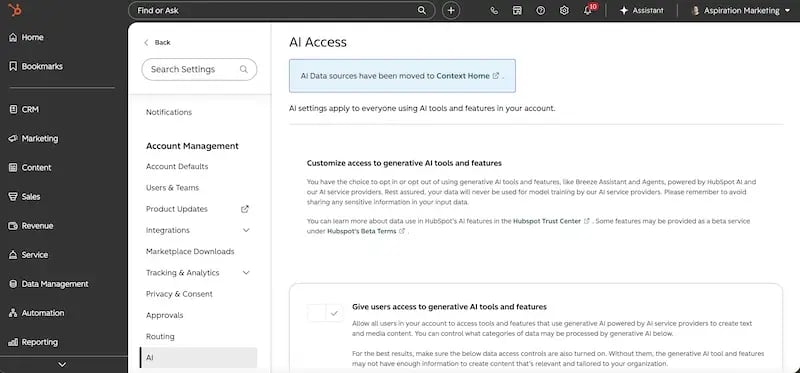 Here, you must activate the enterprise generative AI toggles. Turning on these switches grants HubSpot permission to utilize advanced large language models to process service data.
Once those toggles are active, you must configure your data access parameters. An autonomous agent is only as strong as its underlying ecosystem. To avoid shallow interactions, you must build a clean connection to your single source of truth. Within the HubSpot system, this requires structuring a clear data access matrix across three main pillars:
1. CRM Property Records
Granting access to historical custom fields allows the agent to pull contextual customer data. This ensures that every response is personalized. For example, if a customer asks about their order status, the agent can instantly check their unique lifecycle stage or custom shipping properties.
2. Customer Conversation History
Syncing historical tickets and old communication threads helps the agent map the customer journey. The system can see what was promised in the past, preventing conflicting answers. It reviews closed tickets from your shared inbox to see how your human reps have historically handled similar issues.
3. File Manager Access
Giving the agent permission to view specified folders in your HubSpot File Manager allows it to ingest unstructured documents. This includes technical product specs, updated user guides, and internal policy documents.
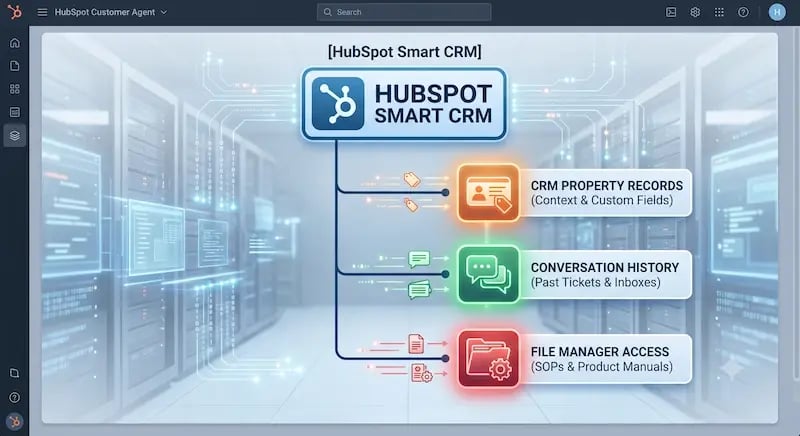
By isolating your data pools from day one, you prevent data leaks. You ensure the AI has exactly what it needs to resolve tickets without accessing sensitive, non-service information such as your primary sales pipeline or executive financial documents.
Phase 2: Building the Agent Foundations & Tone Configuration
With your backend infrastructure secured, you can now build the visible layer of your customer agent. The goal here is to translate your brand guidelines into concrete algorithmic guardrails within HubSpot Service Hub.
To begin configuration, open your main dashboard and navigate to Service > Customer Agent.
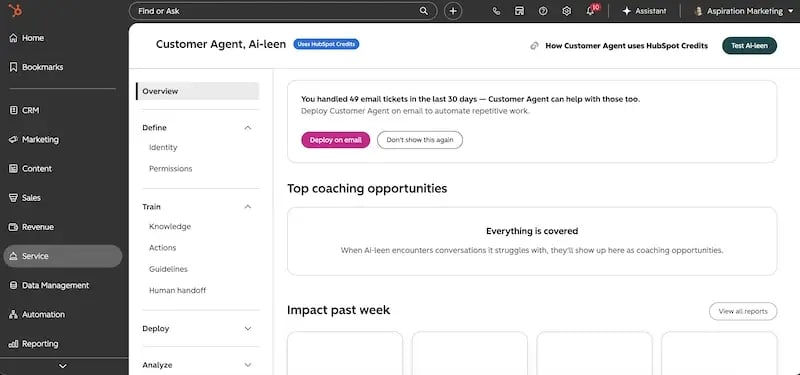 Click on the initialization button to launch the setup interface. The system will immediately prompt you to map your personality and brand voice engine.
HubSpot provides several default foundational personas, including Professional, Friendly, Empathetic, and Witty. You can also select a Custom Brand Voice. If your brand relies on a specific tone, you can paste examples of previous marketing or support materials directly into the model to train it.

However, choosing a personality is not enough. You must write specific directives within the agent profile to dictate what the system can and cannot say. These algorithmic guardrails serve as the behavioral boundaries for your agent. You must outline these directives in clear, plain language that leaves no room for misinterpretation.
Technical Implementation Tip: When writing behavioral directives, use direct, explicit commands. For instance, if you run a B2B SaaS enterprise, add a directive stating: "Do not quote custom pricing discounts or negotiate contract terms under any circumstances. If a user asks for a discount, route them directly to a human representative."
This approach eliminates confusion. It prevents the model from hallucinating or creating unapproved discount variables that are not documented in your source files. It ensures your agent always speaks like an expert extension of your existing support team.
Phase 3: Grounding the Model: Knowledge Ingestion & Reference Files
The primary reason AI implementations fail is inaccuracy. To eliminate hallucinations, you must ground your model through proper Retrieval-Augmented Generation (RAG) configuration within HubSpot. This step ensures the agent draws answers exclusively from your verified internal documentation.
First, map your primary knowledge sources. If you use the native HubSpot Knowledge Base, the agent can automatically sync with your public help articles. If your documentation lives on external public URLs, you can input those root domains into the crawling settings.
Next, you need to manage unstructured data ingestion by uploading reference files. This is where you feed the agent internal standard operating procedures (SOPs), specialized data tables, and specific policy documents.
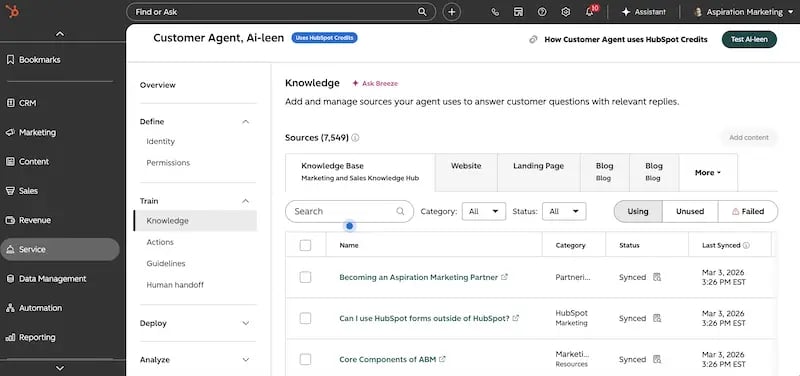 To do this properly, navigate to the data sources tab inside the agent configuration screen and follow these steps:
Step 1: Clean and Prepare Your Source Documentation
Before uploading any file, review the content to remove messy formatting, broken images, markdown errors, or outdated text. The quality of your data input determines the quality of your agent's response.
Step 2: Convert Files into Approved Formats
Convert your internal policy documents, onboarding packets, and product manuals into searchable PDFs or text files. Ensure that the text is fully readable and not trapped inside locked image formats.
Step 3: Upload Files to the Context Window
Upload these files directly into the agent's context window through the secure file uploader. Label each file clearly so your administrative team can easily track which source documents are currently active.
Once uploaded, configure your data-pulling mechanisms to continuously crawl these files. This setup allows the system to check for internal updates automatically without leaking proprietary intellectual property outside your network firewall.
Furthermore, this setup creates an organic self-correction loop. As the system operates, modern HubSpot agents can autonomously draft new knowledge base articles based on recurring, unresolved user queries. The agent identifies a gap in your documentation, writes a draft solution, and drops it into your pipeline for human review. This allows your support ecosystem to scale its own knowledge over time without putting an extra burden on your authors.
Phase 4: Setting Access Permissions and Security Boundaries
An automated agent should never operate without supervision. Managing risk requires role-based access control, clear confidence thresholds, and ironclad human escalation protocols.
First, establish Role-Based Access Control (RBAC). Limit the ability to alter your agent's core instructions or upload new reference files. Only senior support managers or CRM administrators should hold these permissions. Frontline human agents should have view-only access to the agent's performance metrics so they can review conversations without accidentally changing the backend configuration.
Second, configure your confidence thresholds. This technical setting determines how certain the AI must be before it sends a response to a customer. HubSpot lets you tune this slider to match your risk tolerance. If the agent's internal scoring model falls below your specified threshold, it will withhold the answer and flag the ticket for human verification.
Finally, design your invisible pass-off logic inside HubSpot Chatflows. When a query becomes too complex or customer sentiment turns negative, the agent must seamlessly transfer the live session to your active human routing queues.
![A detailed HubSpot technical architecture diagram demonstrating the data connection and decision logic for deploying an AI-powered HubSpot Customer Agent in Toronto, ON. The illustration maps the seamless integration from a '[HubSpot Smart CRM]' (with text, logo, and icons) to three key grounding sources: 'CRM Property Records (Context & Custom Fields)', 'Conversation History (Past Tickets & Inboxes)', and 'File Manager Access (SOPs & Product Manuals)' via secure, in-house servers. The diagram includes a specific AEO-optimized logic flowchart for processing customer queries: starting with '[Customer Query]', moving to '[Evaluate Confidence]', and defining two paths: 'Below Threshold' leading to '[Trigger Chatflow Escalation]' and finally '[Live Human Rep]'; and 'Above Threshold' leading to '[Send Automated Response]'. This blueprint ensures a private, secure single source of truth behind an enterprise firewall.](https://blog.aspiration.marketing/hs-fs/hubfs/Hubspot%20confidence%20workflow.webp?width=800&height=436&name=Hubspot%20confidence%20workflow.webp)
This safety net is vital for maintaining customer trust.
According to a 2026 SurveyMonkey CX Study, 89% of consumers believe companies must always offer a seamless option to speak with a human agent.
Furthermore,
78% explicitly prioritize the ability to switch from a bot to a live human.
If your technical blueprint lacks tight handoff routing rules, your customers will feel trapped in an endless loop. A broken handoff harms your customer satisfaction scores, causes frustration, and drives users away from your brand.
Phase 5: Testing and Going Live with Native HubSpot Service Agents
The final phase of deploying the HubSpot Customer Agent is moving from a safe, sandboxed staging environment to public production. Never push an agent live without running it through a strict testing workflow.
Start by utilizing HubSpot's built-in preview pane to run simulated sandbox testing. This tool allows your engineering and support teams to conduct adversarial testing. Try to confuse the agent with prompt injection attempts, out-of-bounds questions, and conflicting statements. This process helps you identify flaws in your reference data without spending conversation credits or impacting real users.
Once the agent passes adversarial testing, bind it to your active omnichannel streams. You can deploy the agent across multiple front-ends simultaneously, including:
-
Your website's live chat widget
-
Shared company email inbox routing
-
WhatsApp Business accounts
-
Facebook Messenger and Instagram DMs
To ensure a smooth launch, use a phased rollout strategy. Do not immediately open the floodgates to all incoming traffic.
Instead, route only 10%-15% of basic tier-1 support queries to the agent during the first week. Monitor the resolution rates, read the transcripts daily, and check for any conversational errors. Once you verify that the agent behaves correctly under real-world conditions, you can safely scale its exposure to 100%.
Detailed Step-by-Step Deployment Checklist
To ensure your implementation team does not miss any critical configurations, follow this comprehensive technical checklist during your rollout sequence:
| Deployment Step | Target Location in HubSpot | Primary Objective |
|---|---|---|
| Activate AI Toggles | Settings > Account Management > AI | Grant account-level generative AI permissions. |
| Configure Access Matrix | Settings > Properties > Service | Restrict data access to designated service records. |
| Set Brand Voice | Service > Customer Agent > Setup | Select or paste your custom company tone profile. |
| Define Guardrails | Service > Customer Agent > Instructions | Hardcode specific topics the agent must avoid. |
| Ingest Reference Files | Customer Agent > Data Sources > Upload | Ground the model with clean internal manuals and SOPs. |
| Establish RBAC | Settings > Users & Teams | Set administrative permissions for model updates. |
| Set Confidence Sliders | Customer Agent > Settings > Automation | Define threshold scores for automatic responses. |
| Build Handoff Logic | Service > Chatflows | Configure smooth fallback routing to human agents. |
| Sandbox Testing | Customer Agent > Preview Pane | Run adversarial test scripts to check for errors. |
| Live Phased Rollout | Service > Chatflows > Live Settings | Route initial 10-15% of chat traffic to production. |
Troubleshooting Common Configuration Pitfalls
Even with a detailed blueprint, technical teams often run into specific hurdles during deployment. Knowing how to troubleshoot these roadblocks in advance keeps your implementation on track.
1. The Agent Provides Vague or General Responses
If your agent responds with generic phrases instead of specific technical answers, the problem usually stems from poor grounding.
Check your data sources tab. Ensure your reference files are properly parsed and that the system has finished indexing them. If your files contain complex tables, try reformatting them into clear, bulleted lists that the model can parse more easily.
2. Escalation Loops and Dropped Chats
If chats fail to transition to live human representatives, your underlying Chatflow routing is likely broken.
Check your routing rules under Service > Chatflows. Verify that the target team inbox is set to "Active" and that your human agents are marked as available during testing hours. If HubSpot cannot find a human available, it may drop the chat or restart the conversation loop.
3. Tone Inconsistencies and Hallucinations
When an agent uses inappropriate phrasing, review your custom brand voice settings.
If your behavioral instructions are too vague, the underlying LLM will default to its base training data. Avoid loose phrases like "Be helpful." Instead, use precise constraints like "Always use a professional, neutral tone. Never use slang, and always sign off by asking if the customer needs further technical assistance."
Optimizing Your Agentic Architecture
Successfully deploying the HubSpot Customer Agent requires moving beyond basic out-of-the-box defaults. True optimization demands a strict approach to file ingestion, role-based security permissions, intentional tone configuration, and clear human escalation paths. When you connect these elements correctly, you build a support machine that works around the clock, slashes your resolution times, and satisfies your customers.
Of course, building a secure, high-containment AI support structure can feel daunting if your internal resources are already stretched thin. If you want to maximize your HubSpot investment and transform your support operations into an automated single source of truth, partnering with a certified technical expert makes all the difference.
At Aspiration Marketing, we specialize in architecting enterprise-grade CRM automation, securely integrating conversational AI engines, and maximizing your team's capacity without inflating your overhead. We can help you configure your data pipelines, set up your guardrails, and launch your automated agents smoothly.
Contact Aspiration Marketing today to map out your custom AI implementation strategy and scale your service operations for the future.







Leave a Comment
Have thoughts on this article?
Share your feedback, ask questions, or join the discussion with our community.