





Why do high-converting technical layouts fail to hold readers' attention? Many marketing teams build incredible, text-rich assets only to watch bounce rates climb. The truth is simple: text alone struggles to carry heavy technical concepts anymore. An image generation prompt is a set of text-based instructions that guides an AI model to create a specific visual asset. Visual content has changed from a nice design addition into a structural necessity.

I. The Technical & Visual Shift in Modern Content Marketing
On the plus side, producing creative assets is no longer the bottleneck it once was. The rapid rise of AI in Content Marketing has completely changed the game. Generative tools allow teams to build visual assets at lightning speed.
According to recent data from Business Research Insights, global image processing makes up 29% of the overall AI-Generated Content (AIGC) market.
In fact,
Image generation platforms processed over 19 billion prompts globally in recent years.
With billions of visuals flooding the web, a new challenge emerges: generic content. Unrefined AI outputs create a bland "sameness" across competing technology web pages. If every cloud computing company uses the exact same generic graphic of a glowing blue server rack, no one stands out.
This is exactly why smart brands rely on a human-in-the-loop content workflow. Humans must guide the AI to ensure it adheres to the brand style guidelines. By combining human creativity with smart tools, you protect brand trust while scaling content.
For buyers near the end of their purchasing journey, generic stock photos can kill a deal. They want clarity, deep expertise, and visual proof of your knowledge. This guide will show you how to master image generation prompts to create custom, brand-compliant graphics that perfectly match your technical layouts.
II. The Anatomy of an Executive-Level Image Generation Prompt
Many people start using generative AI by typing very basic ideas. A user might type "cloud security system" and hope for the best. This casual approach works fine for quick brainstorming, but it falls short for enterprise content layouts.
What separates a casual prompter from an expert content architect? The difference lies in descriptive structure.
Research published by Adobe reveals a clear gap in how different groups write prompts.
Casual creators write short prompts that average roughly 17 words.
On the flip side,
Expert prompters create descriptive, contextual strings that average 19.6 words, dedicating 77% of their effort to highly specific descriptive keywords.
To create clean, brand-compliant technical graphics, you need a structured framework. Think of a prompt as a blueprint. A reliable, professional prompt framework uses four distinct parts:
- Core Subject and Action: State exactly what the main object is and what it is doing. Avoid vague words. Use clear terms like:
"An isolated 3D rendering of a database firewall blocking an entry exploit."
- Structural Context and Medium: Define the artistic style and format. For clean corporate blogs, you might specify:
"Minimalist vector illustration, high-fidelity technical line art, flat design."
- Lighting and Dimensional Array: Control how light and depth appear. To avoid messy or dramatic graphics, use terms like:
"Flat 2D layout, soft diffused accent lighting, no high-contrast harsh shadows."
- Composition and Layout Boundaries: Tell the tool where to position the items. This is crucial for web design. Use instructions like:
"Centered framing, clean margin padding, isolated white background."
By using this 4-part structure, you remove the guesswork for the AI. You stop wasting your marketing budget on endless variations that do not match your site. Instead, you get precise graphics that fit your exact page design on the first try.
III. Integrating Brand Constraints into HubSpot's Native AI Image Tools
For many marketing teams, downloading images from third-party tools and re-uploading them to a CMS is a major time sink. To work faster, you can build custom graphics directly inside your existing marketing hub using HubSpot Breeze AI and the Content Hub. This approach keeps your workflows smooth and efficient.
Before your content creators start typing image generation prompts, you need to set up your backend rules. Follow these steps to ensure your team creates cohesive, on-brand graphics inside HubSpot:
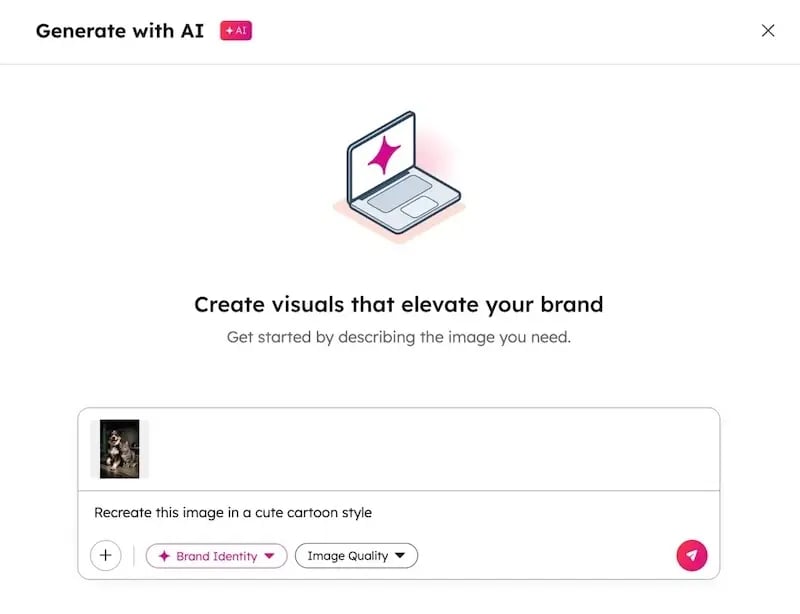
1. Activate Generative AI Permissions: Have your portal administrator navigate to Settings > Partners & Integrations > AI Assistants. Toggle the image generation capabilities to "On."
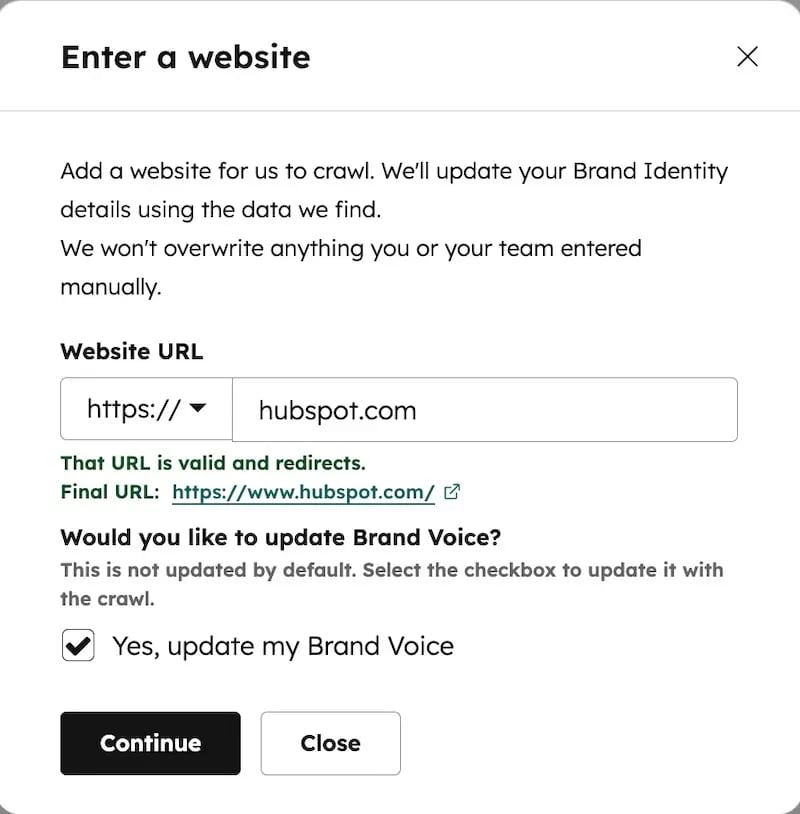
2. Establish the Brand Identity Framework: In your HubSpot account settings, input your exact brand guidelines. Add your official color hex codes, primary fonts, and overall brand voice metrics.
3. Deploy the Brand Identity Toggle: When working inside HubSpot Content Hub Professional or Enterprise, make sure the "Brand Identity Switch" is turned on. This feature automatically applies your brand colors and styles to any new AI image you create.
4. Execute the Text-to-Image Canvas Workflow: Open any blog post or landing page draft. Click on the rich text area, choose the AI image icon, and paste your structured prompt blueprint into the right-hand design panel.

5. Utilize Image-to-Image Referencing: If you already have a great technical chart or graphic design file, upload it as a reference seed. This tells the AI to match the geometric shapes and style of your existing file.
6. Apply Fine-Tuning via Adobe Express: If you need to crop an image or add text overlays, click the edit button to use HubSpot's native Adobe Express integration. This allows you to polish your graphics without leaving your portal.
Using these tools saves hours of manual work. Because your brand rules are built directly into the system, your content creators can build graphics that look like they came straight from an agency.
IV. The Technical Imperative: Machine-Readability and AEO Compliance
Modern content marketing is no longer just about writing for human readers. It is also about writing for machines. With the rise of AI search tools and voice assistants, optimizing your content for AEO compliance (Answer Engine Optimization) is critical.
If search engines cannot understand your graphics, your content loses visibility. Answer engines analyze your text and images as a unified package to determine whether your site is machine-readable.
Data from Business Research Insights shows that 74% of enterprises are experiencing a significant increase in daily content demand across multiple digital channels.
However,
Brands that optimize their asset pipelines achieve a 47% reduction in graphic design turnaround times.
To ensure your custom graphics rank well and support your technical articles, follow these three core practices:
Optimization Focus |
Technical Action Required |
Strategic Value for AEO |
|---|---|---|
Alt-Text Blueprinting |
Convert your core image prompt into a clear, descriptive alt-text tag. Avoid keyword stuffing. |
Helps search crawlers understand the exact context of your graphic for visual search results. |
Schema Markup |
Apply structured data types (like ImageObject or TechArticle) to your page code. |
Feeds exact data details directly to AI answer engines. |
The Technical Remix |
Pass your approved, brand-compliant graphics into the HubSpot AI Content Remix tool. |
Automatically spins out micro-content for social media and emails while keeping your visuals consistent. |
When your graphics are clean, fast-loading, and clearly labeled with proper alt-text, search engines view your page as an authority. This boosts your chances of being featured in rich snippets and AI-generated search answers.
V. Maximizing ROI and Eliminating Bottlenecks in the Creative Pipeline
Every marketing department faces budget choices. Traditional technical graphics can cost hundreds of dollars per asset and take days of back-and-forth edits with designers. Moving this process into a structured AI workflow changes your return on investment (ROI) entirely.
According to market studies by Business Research Insights, B2B and retail enterprises that adopt integrated generative AI systems reduce custom asset curation costs by an average of 31%. At the same time, they accelerate design team productivity metrics by 49%.
To maintain high quality while working quickly, every content architect needs a clear quality check before hitting publish. Use this simple 3-point checklist for every new asset:
-
Legal Compliance: Is the image safe to use and compliant with HubSpot's AI Trust parameters? Does it avoid using copyrighted characters or logos?
-
Contextual Value: Does the graphic actually clarify the technical text next to it, or is it just taking up space? Every image should make your complex ideas easier to understand.
-
Technical Health: Is the file size small enough to keep your page loading quickly? Is it fully optimized and correctly labeled to remain machine-readable?
By following these guidelines, you can scale your visual production without sacrificing quality. Your design team can focus on big-picture creative strategy, while your content team builds day-to-day graphics right inside HubSpot.
VI. Bridging the Gap Between Intent and Execution
Scaling your visual content is no longer about finding the right tools. It is about architectural precision. The marketing teams that master structured image generation prompts will win the battle for reader attention, clear data representation, and search visibility.
Building a flawless, multi-channel content machine requires deep experience. This is especially true when handling complex technical changes, managing human-in-the-loop workflows, and optimizing for AEO compliance.
This is where Aspiration Marketing comes in. We help businesses navigate the complexities of the modern HubSpot ecosystem. Our team helps you optimize the HubSpot AI Content Remix tool, set up your technical SEO, and build workflows that deliver real business growth. Contact Aspiration Marketing today to transform your technical layouts into high-converting digital assets.







Leave a Comment
Have thoughts on this article?
Share your feedback, ask questions, or join the discussion with our community.