





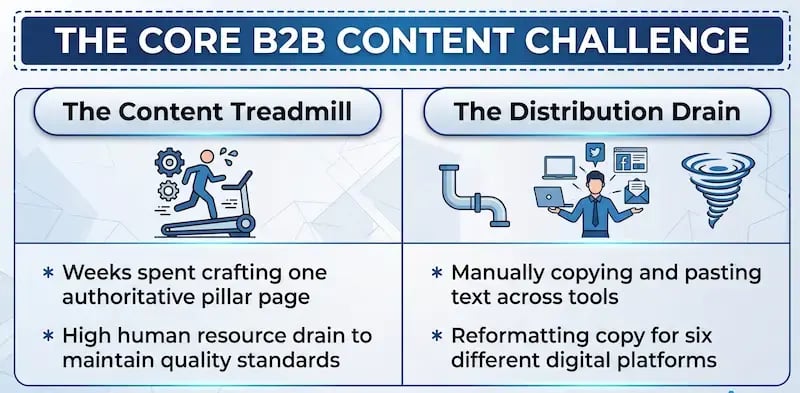
Does it feel like your marketing team is running on a content production treadmill that never stops? You spend weeks researching, interviewing subject matter experts, writing, and polishing an authoritative, 3,000-word pillar page. It is a masterpiece of thought leadership.
But the moment it goes live, the clock resets. The relentless demand for daily social media updates, bi-weekly email newsletters, and targeted case studies begins all over again.

This is the central operational friction of modern digital marketing. Teams are caught between the need to create deep, high-quality assets and the equally demanding need to feed an ever-growing number of distribution channels. The traditional answer to this problem has always been linear. If you want more content across more channels, you need more hours, more writers, and a larger budget.
However, scaling your digital output shouldn't mean depleting your human resources.
According to the HubSpot State of Marketing Report, website content, blogging, and organic SEO remain the top ROI-generating marketing channels across industries.
Yet, that same data reveals that,
Nearly 30% of marketing professionals still must dedicate between 10 and 15 hours every single week purely to content production.
When your highly skilled operational teams spend more than a quarter of their workweek manually copying and pasting, reformatting, and tweaking text for different platforms, strategic growth stalls.
What if you could permanently break this operational bottleneck? The shift toward efficient content scaling lies in automation that respects your brand's authentic voice. It also requires optimization for the modern search landscape, where traditional search boxes are rapidly evolving into AI-driven discovery platforms.
This evolution demands a new strategy. Answer Engine Optimization (AEO) is the practice of structuring your content so artificial intelligence engines can easily extract, comprehend, and deliver your insights as direct answers to user queries.
To succeed in this environment, your brand must maintain a highly consistent, multi-channel presence built upon verified source data. This is where the HubSpot AI Content Remix tool becomes indispensable. Built directly into the HubSpot Content Hub and powered by Breeze AI, this enterprise-grade engine allows operational teams to take a single, definitive piece of content and do the following:
- Turn it into 20 distinct social media fragments.
- Create tailored email newsletters.
- Generate cross-channel case studies.
All with a single click.
Let's explore exactly how you can master this tool to multiply your reach, satisfy modern answer engines, and reclaim your team's creative time.
The Strategic Imperative of Content Repurposing
Why has systematic content repurposing shifted from a tactical shortcut to an absolute strategic imperative? The answer is rooted entirely in operational efficiency and shifting buyer behaviors. Creating original content for every single marketing channel from scratch is no longer just inefficient; it is financially unsustainable.
Data shows that active content repurposing programs save 60% to 80% of content creation time compared to building isolated assets from the ground up.
By reusing the core research, structural frameworks, and data points already embedded in your pillar assets, your team eliminates the friction of starting from zero.
Furthermore, your target audience is far from monolithic. A Chief Technology Officer might prefer a dense, data-heavy case study downloaded as a PDF, while a VP of Operations might engage more deeply with a quick, punchy breakdown on LinkedIn or a concise summary in their Friday morning inbox. If your insights only exist in one long-form format on your website, you are invisible to large segments of your target market.
This multi-channel reality is why 49.4% of top-performing marketing teams now actively reuse and adapt their content across multiple platforms to align with diverse consumer habits.
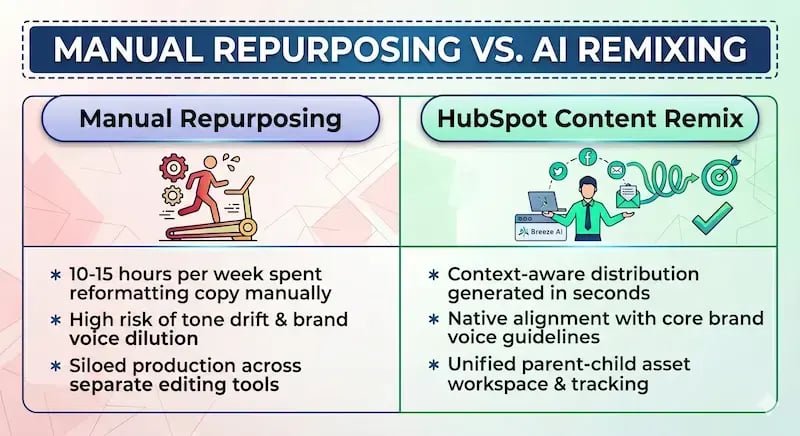
Historically, the hurdle preventing teams from achieving this level of omni-channel distribution was the sheer operational tax of manual modification. Manually breaking down a comprehensive article requires an editor to:
- Dissect the text.
- Rewrite hooks for specific social algorithms.
- Strip out formatting.
- Adjust lengths for email layouts.
- Manage dozens of separate drafts across disconnected platforms.
This process creates immense opportunities for brand dilution, message drift, and costly project management delays.
By contrast, moving to an automated, AI-assisted model solves both the cost and velocity equations.
Organizations leveraging intelligent, automated content repurposing are seeing a reduction in overall content production costs of up to 65%.
Rather than replacing human creativity, AI serves as an operational force multiplier. It handles the repetitive, mechanical steps of reformatting, summarizing, and adjusting lengths, freeing your strategic marketers to focus entirely on high-level quality control, accurate data verification, and final brand alignment.
Demystifying HubSpot Content Remix: Architecture and Prerequisites
Before diving into the step-by-step execution, it is important to understand what the HubSpot AI Content Remix tool actually is and what infrastructure is needed to use it effectively. The HubSpot AI Content Remix tool is an AI-powered workspace within the HubSpot Content Hub that ingests core brand assets and outputs context-optimized content variations. Rather than executing a series of disconnected prompts in an external chat interface, the HubSpot AI Content Remix tool treats your original text as the absolute source of truth. This architecture ensures that all derivative outputs inherit the verified facts, style, and vocabulary of the parent document, which is vital for maintaining factual authority across the web.
Because this tool plugs directly into your enterprise database, certain technical prerequisites and permissions must be established by your operations team before launch:
- Global AI Activation: A HubSpot Super Admin must first navigate to your portal's AI Settings and toggle on the switch labeled "Give users access to generative AI tools and features." Without this global authorization, the remix infrastructure remains offline.
- Granular User Permissions: Operational team members tasked with building campaigns must be granted specific Content Remix permissions within their user profiles to view, build, and modify remixes.
- Cross-Hub Dependencies: While the HubSpot AI Content Remix tool can generate text across a wide range of formats, publishing those pieces natively requires access to standard HubSpot tools. For example, generating and directly scheduling social media fragments requires an active Marketing Hub Professional or Enterprise seat, while generating SMS touchpoints requires the appropriate Marketing SMS add-on.
It is also vital to understand the tool's data ingestion capabilities and operational limits. The HubSpot AI Content Remix tool allows you to upload or reference up to six starting assets simultaneously to build a single campaign cluster. The engine supports a diverse array of input formats.
You can feed it live web URLs, raw text blocks, or native media files from your computer or connected Google Drive accounts. This includes audio files and video formats (.mp4, .mov), meaning your foundational pillar asset doesn't even have to be written—it can easily be a recorded keynote presentation, a webinar, or a detailed customer video interview.
Step-by-Step Technical Guide: Ingesting Your Authority Pillar
With your technical foundations in place, your operational team can transition from planning to execution. Follow this step-by-step technical guide to ingest your core authority pillar asset and configure your multi-channel output engine.

Step 1: Access the Remix Interface
Log in to your central HubSpot portal. Using the primary left-hand navigation sidebar, click on Content, and select Remix. This will bring you to your central Content Remix dashboard, which displays your active historical campaigns and saved templates. 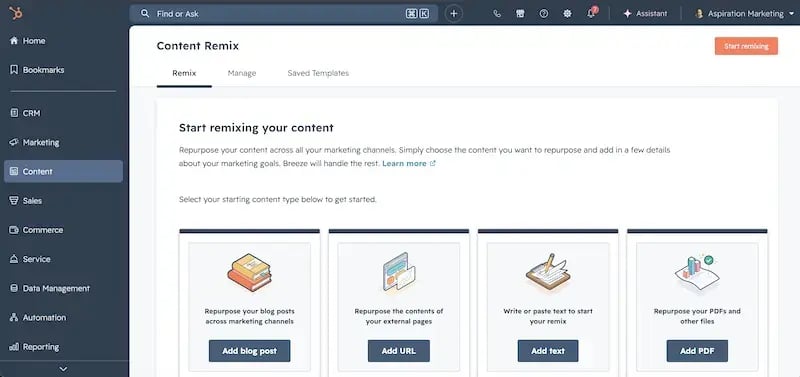 To begin a brand-new project, look to the upper right-hand corner and click the Start remixing button. Once inside the new project canvas, select the pencil icon at the top of the screen to give your remix campaign a clear, searchable, and descriptive title.
Step 2: Ingest the Core Source Material
In the center of the canvas, locate and click the Add content target box. A contextual left-hand panel will slide into view, offering four distinct technical pathways for data ingestion. Choose the option that fits your current operational setup:
- Select from existing content: Use this option to select a long-form pillar page, landing page, or case study already hosted natively on the HubSpot CMS. Filter by content type, use the dropdown search menu, and select the file.
- Start from a URL: If your definitive pillar content lives on an external website, paste the live, public URL directly into the field. HubSpot's parser will crawl the target page and cleanly extract the core body copy, stripping away extraneous header and footer scripts.
- Upload new document file / Google Drive: Choose this option to upload text documents, transcripts, or multimedia files directly from your local machine or a linked Google Workspace account.
- Start from a new text: Paste the raw copy directly into the text editor box.
Once your primary asset is selected, click Add content. If your campaign relies on multiple sources—such as a written blog post combined with a complementary video interview transcript—click the Add content button within the source material box to chain up to six source files together.
Step 3: Map the Multi-Channel Asset Output
With your source material successfully locked in, click the + Add icon below the primary content box. This action triggers the output configuration panel on the left side of the screen. Here, your team maps out the exact destination formats for the campaign. Check the boxes next to each asset type you need to generate.
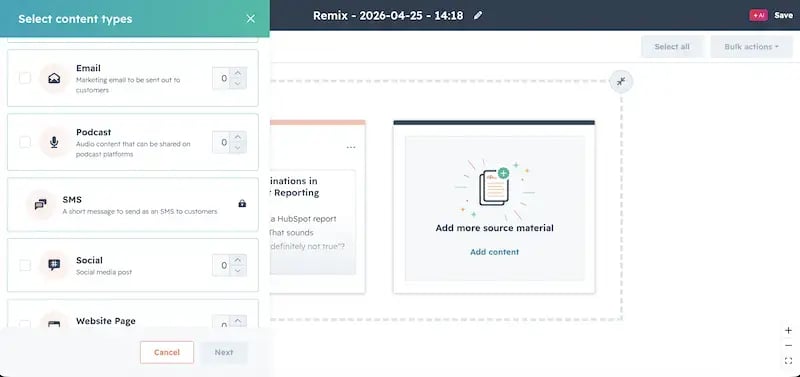 If you need to build multiple variants of a single format—such as four distinct social media updates for different stages of awareness—simply use the up and down arrow icons next to the asset label to increase the quantity of your output. The interface allows you to select up to six distinct asset types in a single processing run. Once your mapping matches your distribution requirements, click Next.
Step 4: Inject Contextual Objectives and Brand Rules
Before the AI processes your data, HubSpot presents an attribute customization screen. This is a critical step for operational compliance; it allows you to set specific guidelines for each chosen channel so the output matches its platform's unique requirements.
- Blog Posts: Select your precise target sub-blog folder, establish the target length (Short, Medium, or Long), provide a descriptive objective (e.g., "Write an educational summary focusing on operational efficiency"), and choose whether to generate a matching AI-featured image.
- Social Posts: Select your target social channels (e.g., LinkedIn or Facebook), define the primary objective, and decide whether to automatically generate accompanying social graphics.
- Marketing Emails: Map the generated text to a specific HubSpot drag-and-drop email layout template, assign your specific brand kit parameters, and write a clear campaign objective to guide the tone of the subject lines and preview text.
Step 5: Execute the Remix Campaign
Review your configured parameters on the summary screen. When you are satisfied that your target destinations and platform-specific rules are correctly set, click the primary Generate button in the lower corner of the screen.
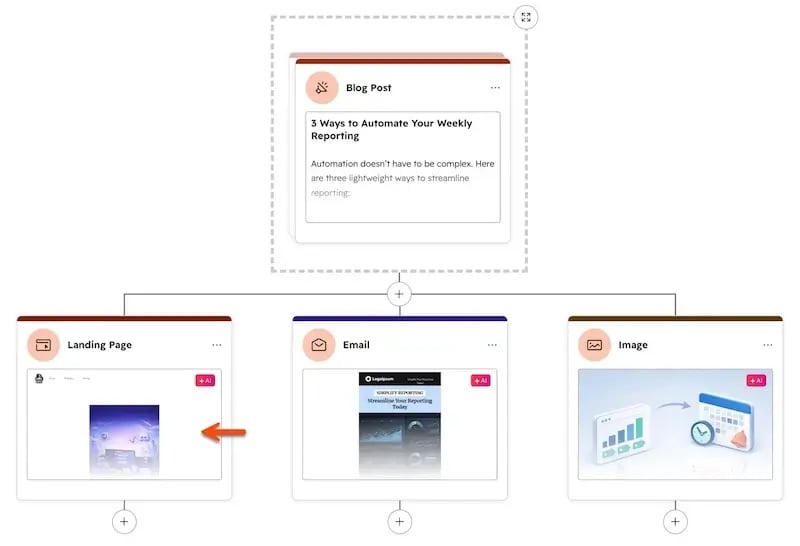
HubSpot's Breeze AI will process your source content, extract the relevant thematic threads, format the copy according to your structural rules, and populate your workspace grid with your brand-new asset cluster within seconds.
Refining, Editing, and Publishing the Modular Output
Once the generation cycle finishes, you are not left with a massive wall of unstructured text. Instead, the HubSpot AI Content Remix tool presents a clear, modular parent-child workspace. Your original authority asset sits clearly on the left side of the screen, while your newly generated social updates, email newsletters, and landing pages appear as organized tiles on the right. This layout gives you a comprehensive overview of the entire multi-channel campaign at a glance.
While Breeze AI aligns its outputs with your designated rules, automated content should always be reviewed by a human editor before going live. As with any AI agent, it's crucial to have your Human-in-the-Loop in the mix. The HubSpot AI Content Remix tool makes this review process frictionless through its built-in inline editing capabilities. Rather than forcing your team to open each social snippet or email draft in a new browser tab, you can simply click the edit pencil icon directly on any generated tile.
This opens a focused edit window right within the grid, allowing you to instantly tweak phrases, adjust internal links, verify technical terms, and insert tailored calls to action. This direct inline editing feature is fully compatible across social updates, blog entries, ads, freeform text blocks, and SMS drafts.
For larger campaigns that require processing dozens of assets simultaneously, your operations team can save hours by using built-in bulk actions. By selecting the checkboxes in the upper corners of the generated asset tiles—or clicking Select all at the top right of the workspace—you can open a unified Bulk actions dropdown menu. From this menu, you can execute three vital operational actions across your entire asset cluster simultaneously:
- Bulk Delete: Instantly remove variations that don't align with your current campaign goals.
- Bulk Regenerate: Re-run the AI generation process with adjusted contextual prompts for a group of assets if the initial tone missed the mark.
- Bulk Save: Lock in your approved text variants across all platforms simultaneously.
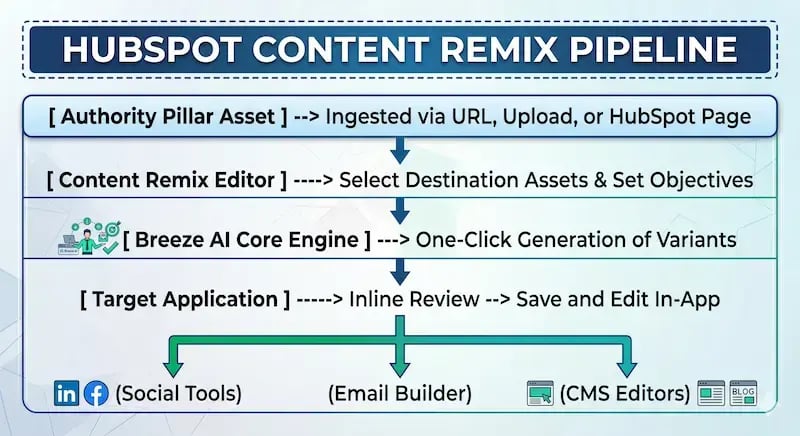
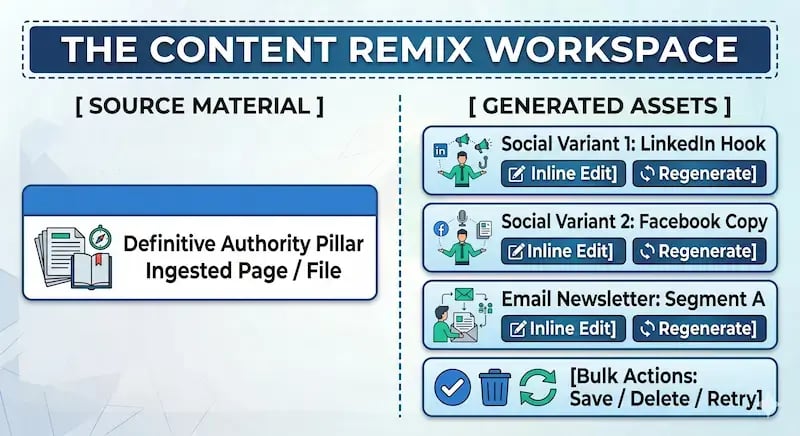 Once an asset's copy is finalized and saved, it is time to move it into production. Click the asset preview tile, then select the Save and edit in app button in the right-hand review panel. This action instantly transfers the asset data from the remix lab to its native publishing home within the HubSpot ecosystem.
A social snippet is automatically packaged as an active draft within the HubSpot Social Publishing Tool; an email variant maps straight into the Marketing Email Builder with all formatting preserved; and micro-blogs open cleanly within the HubSpot CMS Blog Editor. Your team can then perform final layout adjustments, attach tracking parameters, verify audience lists, and schedule the content for publication.
Finally, to build long-term operational velocity, don't treat every campaign as a one-off project. If you have built a multi-channel distribution mix that works perfectly for your brand, look in the upper-right corner of the dashboard and select Save as template. Give your layout a clear name and description. Now, whenever your team publishes a new pillar asset in the future, they can launch your custom template from the Saved Templates tab—instantly applying your exact distribution mix, target channels, and brand rules with zero setup time.
Real-World Application: One Pillar to 20 Multi-Channel Touchpoints
To truly appreciate the power of the HubSpot Content Remix tool, let's look at how it works in a real-world scenario.
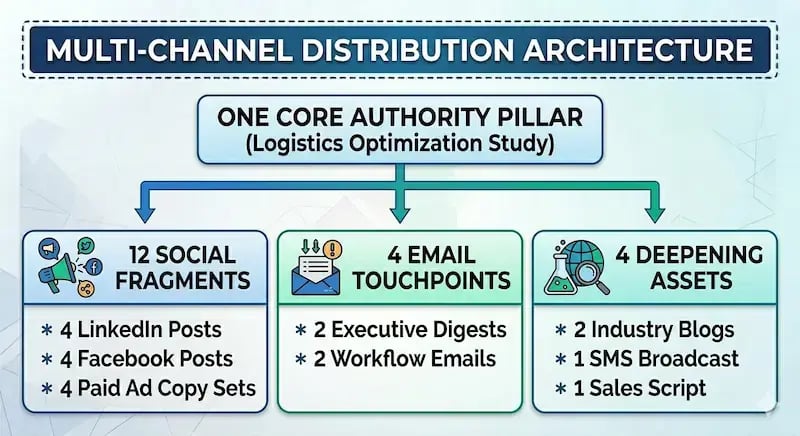
Imagine your operations team has just finalized a deep-dive, data-heavy B2B case study analyzing how an enterprise client optimized their global logistics infrastructure. This case study is your master authority pillar page. Using the HubSpot AI Content Remix tool, your team can instantly turn that single page into a comprehensive, 20-piece multi-channel campaign layout:
The Social Media Fragment Layer (12 Assets)
- 4 LinkedIn Thought-Leadership Posts: The tool parses the core study to build four text-heavy, high-value LinkedIn updates. One focuses on high-level operational statistics to appeal to executives, while the other two dive deep into technical process improvements to attract implementation managers.
- 4 Facebook Conversational Openers: Four lighter, highly engaging updates built around key human-interest quotes from the client's team, designed to spark discussion and community engagement.
- 4 Targeted Ad Copy Variants: Four distinct, punchy ad copy sets tailored to specific buyer personas, ready to be dropped straight into your paid social acquisition campaigns.
The Email Nurturing Layer (4 Assets)
- 2 Segmented Newsletter Summaries: The tool automatically strips down the case study into two distinct email newsletter formats. Variant A uses an executive summary style for C-suite subscribers, while Variant B formats the insights as a step-by-step technical checklist for hands-on practitioners.
- 2 Automated Lead-Nurturing Touchpoints: Two short, punchy follow-up email drafts built to be dropped directly into existing automated workflows, targeting prospects who have engaged with related topics in the past.
The Deepening Content Layer (4 Assets)
- 2 Localized Industry Micro-Blogs: The engine takes the core data points of the case study and reformats them into two shorter, highly focused supporting blog posts. One frames the lessons specifically for manufacturing audiences, while the other translates the data for retail distribution networks.
- 1 Conversational SMS Broadcast Copy: A tight, compliant text message notification designed to alert high-intent, opted-in leads about the new breakthroughs.
- 1 Freeform Keynote Script Outline: A clean, bulleted outline summarizing the main case study milestones, providing your sales engineering team with a pre-vetted script for live client presentations.
 This structural approach does more than just save your team days of manual writing—it ensures your message remains completely unified. In modern B2B journeys, buyers rarely convert after reading a single article.
Research shows that 67% of B2B buyers consume at least five separate pieces of content before they ever agree to speak with a sales representative.
By using the HubSpot AI Content Remix tool to deploy an interconnected web of social proof, email education, and targeted micro-blogs all stemming from a single verified source, you meet your buyers with consistent messaging at every single touchpoint in their decision-making process. This massive web of uniform text provides excellent search support, making your authority clear to the automated crawl models that dictate modern web authority.
Remix Your Next Steps
Mastering the HubSpot AI Content Remix tool transforms content repurposing from a tedious, manual operational chore into a highly scalable, one-click distribution system. By anchoring your multi-channel marketing campaigns within a single, authoritative parent asset, your team can maintain absolute message consistency while dramatically scaling your digital footprint. This approach eliminates the friction of content production, reduces overhead costs, and ensures your proven insights reach your target buyers wherever they choose to consume information.
To begin optimizing your marketing workflows, look through your current content library to identify your highest-performing authority assets. Run them through the HubSpot AI Content Remix tool pipeline to reveal hidden reach, engage new segments of your audience, and maximize your return on investment.
Of course, scaling your marketing operations successfully requires more than just cutting-edge software—it requires deep strategic positioning and experienced execution. For growing B2B organizations looking to fully optimize their HubSpot ecosystem, build high-converting content clusters, and drive predictable pipeline growth, partnering with a specialized inbound growth agency is a game-changer.
Aspiration Marketing provides the strategic roadmap, technical expertise, and operational support necessary to turn your marketing technology into a scalable revenue engine. Reach out to their team today to maximize your content strategy and unlock the full power of your HubSpot platform.







Leave a Comment
Have thoughts on this article?
Share your feedback, ask questions, or join the discussion with our community.