





When a Fortune 500 executive and a seed-stage startup founder land on your latest resource guide, why do they see the exact same introductory copy? Why do they see the same case studies and use cases? Marketers routinely spend weeks crafting deep, data-rich informational assets, only to serve them through a rigid, one-size-fits-all framework.
It doesn't take a marketing expert to see that is a mistake.
 If your website content does not immediately adapt to your visitors' specific realities, your brand is losing conversions. Modern web audiences demand experiences tailored to their exact business environment.
To solve this problem, growth engineering teams rely on real-time dynamic personalization. Real-time dynamic personalization is the programmatic, live adjustment of website text, visual assets, call-to-action buttons, and code scripts as a specific user navigates through your web properties.
This post provides a technical blueprint for configuring real-time, dynamic personalization in the HubSpot Content Hub. We will walk through:
- Building adaptive content architectures.
- Setting up smart rules.
- Balancing personalization parameters.
So that your web properties speak directly to the needs of individual decision-makers.
1. The Operational ROI of Adaptive Content Environments
Why should marketing leaders treat real-time personalization as an operational priority rather than a luxury line item? The answer lies in structural shifts in buyer behavior and the performance metrics of web properties. Traditional static websites expect users to dig through vast asset tables or multi-page resource centers to find material relevant to their specific industry or company scale. Dynamic systems reverse this burden. They automatically bring the exact required data block forward.
The data highlight the direct commercial impact of this shift.
The HubSpot State of Marketing Report identifies personalizing content via integrated AI engines as the top trend for growth marketers.
This report confirms that 93.2% of professionals see a direct correlation between tailored content experiences and lead conversion spikes.
Independent data compiled by Amra & Elma indicates that:
Deploying real-time personalization structures drives a 23% average lift in incremental revenue lines across core enterprise digital properties.
When you configure smart setups, your content hubs work harder. They turn cold web traffic into highly qualified leads by solving the specific pain points of individual target accounts on their very first visit.
2. The Functional Architecture of HubSpot Content Hub Personalization
To run real-time personalization smoothly, you must understand how HubSpot Content Hub handles dynamic web requests. At its core, the software does not generate thousands of individual static page templates. Instead, it maintains a single, highly flexible parent page structure containing individual container modules known as smart content blocks.
When a browser requests a page, Content Hub parses the user's available tracking cookies, IP address, and historical CRM profile data. The system compares those traits against your active rule criteria, compiles the matching text and image variants, and delivers the custom webpage layout in milliseconds.
To build these smart rules, Content Hub relies on three primary data pillars:
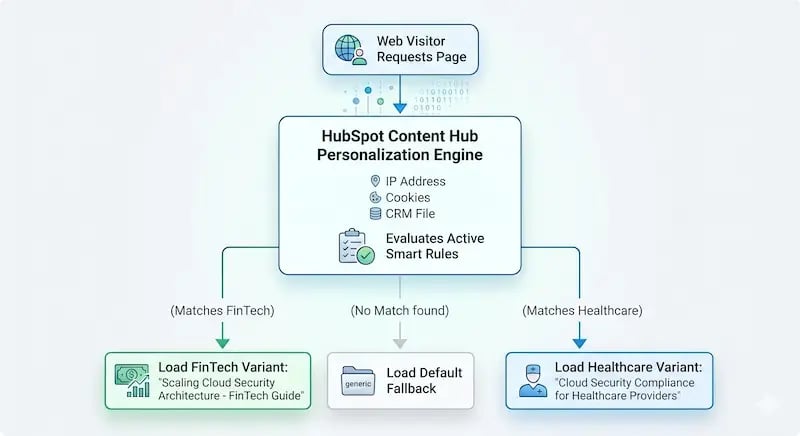
Firmographic Identifiers
Firmographic parameters allow you to segment traffic using company attributes rather than individual personas. Content Hub extracts this data by checking corporate IP subnets against global databases or parsing active form submissions. The most common firmographic filters include target industry verticals (such as FinTech vs. Manufacturing) and explicit company size brackets (such as mid-market firms vs. global enterprises).
Lifecycle Stages
A lead downloading an initial educational eBook should never see the same messaging as an active sales-qualified lead (SQL) reviewing pricing structures. By syncing web modules with your HubSpot CRM lifecycle properties, your content blocks automatically shift. They can hide basic awareness copy and surface technical trial steps or custom product proof-of-concept worksheets the moment an SQL returns to your portal.
Behavioral and Channel Context
This layer looks at exactly how the visitor arrived at your web resource. The engine checks the exact referring domain, custom UTM parameter strings, or the specific device class being used. For instance, a buyer arriving from a highly technical LinkedIn campaign can immediately receive deep architectural breakdowns, while an organic mobile searcher receives shorter, scannable summaries.
Balancing Technical Readability and AEO Mechanics
As search habits evolve toward Answer Engine Optimization (AEO), structuring these dynamic variations correctly is vital. Modern AI search bots and large language models extract web data by scanning structural logic, crisp formatting, and clean code paths.
If your dynamic text variations are cluttered with poorly written code or messy script blocks, search engines will struggle to crawl your content hub. To protect your search visibility, your core text variations must remain highly readable. They should use direct sentences, clean header tags, and descriptive tables. This structure makes your content valuable for human visitors while ensuring search bots can easily parse your text blocks.
3. Implementation Steps: Building Smart Content Blocks
Let us walk through configuring a real-time responsive informational guide within Content Hub. For this tactical guide, our goal is to modify a primary web guide so that its introductory paragraphs and focus statistics change dynamically based on a visitor's industry vertical.
System Prerequisites
Before writing code or editing text layouts, verify that your account has the correct access levels. This system requires an active HubSpot Content Hub Professional or Enterprise subscription and edit permissions on your target page designs. You will use the unified HubSpot Personalization Tool interface to construct these rules.
Follow these structural steps to implement your first responsive page variation:
Step 1: Isolate the High-Value Asset Module
Open your chosen pillar page or resource guide within the Content Hub page designer. Rather than attempting to make the entire page dynamic, select specific text modules where tailored messaging will have the highest impact.
The primary page header, introduction text, and final call-to-action areas are the ideal places to deploy smart rules.
Step 2: Establish the Primary Criteria Matrix
Click the module options icon and select Add Smart Rule. The system will prompt you to choose the foundational logic rule for your content variations.
Select Contact List Membership or Lifecycle Stage if you are targeting existing database records.
For net-new anonymous traffic, select Country or Referral Source to segment your users.
Step 3: Write Specialized Content Variants
Once you define your rule criteria, Content Hub creates a series of tabbed text-variant containers within the single-page block. Write highly specific text copies for each target segment.
Avoid making minor tweaks. Instead, rewrite the core value propositions to address the specific regulatory requirements, operational pain points, and the technical language of that target industry.

Step 4: Verify Personalization Tokens
To increase engagement within your target segments, insert programmatic personalization tokens directly into your text fields.
For example, you can embed a contact property token, such as your organization, into your headers.
This allows the page to display the visitor's actual corporate name if it exists in your CRM database, falling back cleanly to generic terms if the user is anonymous.
Step 5: Configure the Default Fallback Layer
The fallback layer is your safety net. If a web visitor uses strict tracking blockers or arrives via a clean IP address with zero CRM history, the page must still render a top-tier generic experience. Ensure your fallback content uses broad, universally appealing language that communicates your core product value clearly without relying on segment data.
4. Real-World B2B Use Cases
To see how these setups work in production, let us look at a common B2B example. Imagine a software enterprise offering an enterprise-grade cloud security platform.
They host a central cornerstone guide titled:
"The Complete Guide to Modern Cloud Architecture Audits"
Using smart content blocks, the marketing team can split a single URL into three distinct, real-time web variations:
| Visitor Segment | Smart Rule Trigger | Dynamic Text Adjustment | Visual & Asset Variation |
|---|---|---|---|
| FinTech Enterprise Prospect | CRM Segment: Financial Services + Employee Count over 1,000 | The introduction focuses entirely on passing SOC2 audits, meeting FINRA data standards, and handling institutional encryption rules. | The page swaps a standard eBook download for an interactive PDF download titled: "The Institutional FinTech Risk Management Playbook." |
| Healthcare Mid-Market Prospect | Corporate IP Lookup: Hospital & Healthcare Networks | The text shifts to focus on health data privacy, electronic health record integrations, and maintaining HIPAA compliance. | The inline case study section automatically pulls a success story from a major regional hospital network system. |
| Anonymous Organic Traffic | Default System Fallback (No tracking match found) | The introduction uses clear, high-level messaging around lowering cloud architecture costs and preventing infrastructure data leaks. | The main form serves as a standard product brochure and prompts the visitor to enter their work email address to unlock deep segment personalization. |
Review this layout. The core URL stays exactly the same, which protects your search engine rankings and keeps your technical management simple. However, the actual text, evidence, and conversion paths adapt in real time to each visiting buyer's profile.
5. Optimizing the Surrounding Conversion Ecosystem
True real-time personalization goes far beyond simply swapping out introductory paragraphs. If a user receives tailored text but encounters a generic, disconnected conversion form, the user experience falls apart. To maximize your conversion lifts, the entire landing page environment must work together.
Dynamic Calls to Action (CTAs)
Static, generic buttons like "Submit Form" or "Download Now" underperform when compared to responsive conversion systems. Growth teams need to deploy intelligent, adaptive buttons that change based on user context.
Data analyzed by Amra & Elma shows that interactive, personalized CTAs that match a user's company profile out-convert static, generic buttons by 318%.
For instance, an early-stage lead should see a button reading:
"Get Free Framework Guide."
Meanwhile, an active product-qualified prospect on the exact same page should see:
"Book Architectural Discovery Session."
Connecting Conversion Loops and Search Strategies
Your dynamic personalization matrices should not live in an isolated silo. They must link directly into your broader optimization frameworks:
- Continuous Optimization Loops: The behavioral conversion data generated by your smart content variants should feed directly back into your core editorial planning. The critical moment here is ensuring that you're automating content optimization. By studying which industry text variations secure the highest click-through rates, your team can programmatically refine your overarching content refresh cycles.
- Insulation Against Zero-Click Environments: As modern search engines pull more answers directly into AI-generated search result overlays, driving organic traffic down to your native domains is becoming harder. When a user does click through to your domain, you must make that session count. Deploying hyper-personalized elements maximizes the return on your hard-earned traffic.
6. Variant Governance and Long-Term Matrix Management
One of the largest risks in advanced content engineering is "variant bloat." This happens when an over-eager team builds distinct page variations for every minor sub-industry, micro-persona, and geographic region. Within months, a single resource guide can mutate into 40 distinct variations, making structural updates, messaging alignment, and quality assurance audits almost impossible.
To maintain strict control over your content ecosystem, use these clear governance guidelines:
- Launch with a 2x2 Matrix Framework: Limit your initial personalization experiments to two primary industries and two core lifecycle stages. Do not add deeper target tracks until your foundational setup shows clear statistical conversion lifts.
- Conduct Scheduled Link and Text Audits: When your product lines pivot or your branding guidelines change, all active content variations must be updated. Run structural audits every 90 days to ensure out-of-date product stats or old logos are completely scrubbed from your dynamic modules.
- Monitor Segment Sample Sizes: Keep an eye on your traffic distributions. If a specialized smart rule target segment accounts for less than 2% of your overall page traffic, delete that custom block variation. Revert those visitors back to your default fallback copy to keep your technical infrastructure clean.
- Enforce Compliance Controls: As global data privacy regulations tighten, verify that your personalization rules respect regional consent preferences. Ensure your data collection models integrate with HubSpot's native cookie banner consent mechanisms before tracking anonymous user IP addresses or deploying firmographic lookups.
7. Maximizing Dynamic Personalization Metrics
Setting up your smart content blocks is only part of the process; you must also build a clean tracking environment to measure their performance. To run a clear optimization test, never evaluate your personalized page as a single generic entity. Instead, use the reporting tools in Content Hub to track how individual variants perform compared to your control group.
To evaluate performance correctly, look beyond basic traffic volume. Focus your analytical tracking on these core conversion metrics:
- Variant Lift Delta: This is the direct conversion rate variance between your tailored content blocks and your default fallback text layer. If your FinTech variation yields a 6.8% form completion rate while the fallback text stays at 2.4%, you have clear evidence that your custom copy is working.
- Content Consumption Depth: Track how long users spend on the page and how deep they scroll when viewing tailored text versus generic text. When copy matches a visitor's exact business environment, bounce rates typically drop while overall time on page increases.
- Downstream Pipeline Velocity: Track how fast targeted leads move through your sales pipelines. Measure whether users who engage with dynamic, industry-specific content blocks move to booked meetings faster than those who consume standard, non-personalized content.
By regularly reviewing these data points, you can safely phase out low-performing copy tracks and allocate your marketing resources to variations that drive measurable growth in the revenue pipeline.
Realizing the Personalization Advantage
Building and scaling a real-time responsive website demands far more than just clicking a few settings inside a content editor. It requires clean CRM data architectures, deep strategic alignment in copywriting, and structured technical execution.
If your marketing organization wants to move past generic static landing pages and transform your web properties into a responsive engine that adapts to user profiles in real time, you do not have to tackle this journey alone.
Partner with the certified deployment specialists at Aspiration Marketing. Our technical teams help B2B organizations integrate complex CRM platforms, configure high-converting HubSpot Content Hub environments, and design advanced web optimization programs that capture hidden revenue waiting within your digital footprint. Let us turn your static web assets into a performance-driven conversion engine.







Leave a Comment
Have thoughts on this article?
Share your feedback, ask questions, or join the discussion with our community.