





The HubSpot Content Hub is a powerful content management system (CMS) built on one of the industry-leading CRM solutions, ideal for businesses looking to build or upgrade their website. It offers a meaningful way to streamline, organize, and optimize your website content while involving team members across the organization. How can the HubSpot Content Hub revolutionize your content management efforts?

The HubSpot Content Hub is an integral part of HubSpot's comprehensive suite of tools, serving as a dynamic Content Management System (CMS). It is designed to empower businesses with inbound marketing and exceptional content management capabilities. As a platform, it goes beyond traditional CMS solutions by offering seamless integration with HubSpot's marketing, sales, and service tools, providing a unified approach to managing a company's online presence.
With the HubSpot Content Hub, you can access easy-to-use features, customizable website themes, and powerful SEO recommendations, all contributing to a firm foundation for your CRM efforts. This integration allows you to streamline lead generation, marketing automation, and analytics, creating a unified suite of products to support your business operations.
In addition to the Content Hub, other components within the HubSpot platform include:
- HubSpot Marketing Hub: The Marketing Hub facilitates lead generation, content publication, and promotion with marketing process automation and analytics. The Marketing Hub fully integrates with the overall HubSpot Sales and Marketing Platform, supporting a unified suite of products to base your business operations.
- HubSpot Operations Hub: The Operations Hub enables awareness and customer attraction within your target demographic by syncing apps, curating and cleaning customer data, and automating various processes.
- HubSpot Sales Hub: The Sales Hub provides detailed revenue insights throughout the sales campaign, fostering improved communication between marketing and sales teams with advanced CRM, meeting scheduling opportunities, payment processing, and aligned marketing and sales efforts.
- HubSpot Service Hub: The Service Hub focuses on customer service experiences that build brand loyalty and foster long-lasting relationships by maintaining two-way connections with customers, tracking service tickets and feedback, and developing a knowledge base benefiting various areas of operations, including marketing.
- HubSpot Revenue Hub: The HubSpot Revenue Hub empowers businesses with an integrated suite of features to revolutionize commerce management. From automating tedious tasks to expanding revenue streams, these capabilities collectively equip you to optimize every facet of your commerce operations.
With the comprehensive capabilities of HubSpot's Content Hub and its seamless integration with other HubSpot tools, businesses can enhance their content management, streamline operations, and deliver exceptional customer experiences, ultimately driving growth and success in the competitive digital landscape.
Functions, Options, and Uses
A Content Management System (CMS) is a software application that enables users to create, manage, and organize digital content without requiring extensive technical knowledge. The HubSpot Content Hub takes this concept to the next level by offering a user-friendly, intuitive interface that enables marketers and content creators to quickly build, modify, and optimize websites with minimal effort. Whether for a simple landing page or a complex website, the HubSpot Content Hub caters to diverse business needs, from small enterprises to large corporations.
The HubSpot Content Hub comes equipped with an array of tools that empower businesses to create, manage, and optimize their digital content effectively:
Drag-and-Drop Editor
The Drag-and-Drop Editor is an intuitive tool within the Content Hub that allows users to create and modify content effortlessly. With pre-built modules and templates, marketers can rapidly design web and landing pages, saving time and effort.
Personalization and Smart Content
Personalization and Smart Content are features that enable marketers to deliver personalized content to visitors based on their behavior, preferences, and lifecycle stage by leveraging customer data from HubSpot's CRM. This targeted approach increases engagement and conversions.
Search Engine Optimization Tools
The HubSpot Content Hub includes powerful SEO tools like content performance tracking, keyword research, and on-page SEO recommendations. These tools help businesses improve their search engine rankings and drive organic website traffic.
Mobile Optimization
Mobile Optimization is a critical function that ensures websites built with the HubSpot Content Hub are optimized for different devices and screen sizes. Recognizing the importance of mobile responsiveness in today's mobile-first world, this provides a seamless user experience across all platforms.
Security and Performance
Security and Performance are foundational aspects of the HubSpot Content Hub, which includes built-in security features and regular updates to ensure websites are safe from threats. Additionally, it offers robust hosting and Content Delivery Network (CDN) services, guaranteeing optimal performance and fast page loading times.

Core Features of the HubSpot Content Hub
The Content Hub by HubSpot is a robust platform that provides businesses with the essential tools to efficiently create, manage, and optimize their digital content. The core elements that make up all HubSpot hubs are as follows: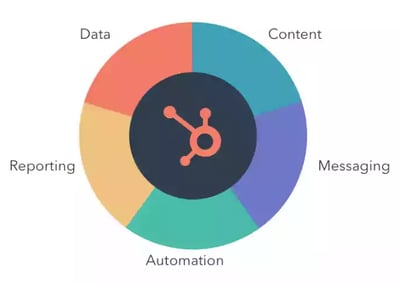
- Data
- Content
- Messaging
- Reporting
- Automation
These five components work cohesively to create a seamless and effective content management ecosystem.
Did you know how to check on new HubSpot features available to you? You can do so right in your HubSpot portal!
1. Data
Data is a powerful, data-driven component of the Content Hub, providing businesses with valuable insights that foster informed decision-making and a deeper understanding of their audience. By leveraging customer data, contact lists, audience segmentation, and tracking capabilities, businesses can enhance their marketing efforts and deliver targeted content that aligns with their customers' preferences and needs. These data-driven strategies empower businesses to create personalized and engaging experiences, fostering stronger relationships with their audience and driving better results.
Product Library
The Product Library is a feature that allows you to build a product library, reference products within your content, and report on the performance of different products. You can use this data to see which products and services are selling best.
2. Content
Content is a core component of the HubSpot Content Hub that empowers businesses with seamless content creation, organization, and management capabilities. With user-friendly tools, companies can effortlessly build visually appealing web pages and deliver consistent, engaging brand experiences to their audience. This streamlined approach optimizes content strategies, allowing marketers and content creators to manage their website content and enhance their online presence efficiently.
Blog
The Blog feature allows you to create search engine-optimized content for your blog based on best practices.
Landing Pages
The Landing Pages tool enables the creation of responsive landing pages built to convert using a drag-and-drop editor.
Website Pages
The Website Pages feature allows you to create responsive website pages with built-in assets and editors, or work with developers to create custom pages that keep editing simple.
Forms
The Forms tool is used to create standalone, pop-up, embedded, and collected forms to gather the contact details that your business needs.
SEO Recommendations and Optimizations
SEO Recommendations and Optimizations is a feature that identifies SEO issues across your entire website and provides guidance on how to optimize your pages to get more organic traffic.
AI Website Builder
The AI Website Builder is an AI-powered onboarding experience for CMS users that minimizes decision-making and provides a seamless setup process. After users sign up and answer questions about their business, HubSpot's AI technology creates a single-page site aligned with their vision and goals, simplifying initial setup.
AI-Generated Social Copy Within Blog Editor
AI-Generated Social Copy is a solution that allows marketers to generate social media posts directly within the blog post editor. Marketers can use the social composer side panel to seamlessly create engaging and tailored social media content, saving time and reducing errors.
AI-Powered Content Ideas for Blog with Semrush Data
This AI-powered tool for blogging helps combat writer's block by using ChatGPT and Semrush keyword data to simplify the process of generating blog post topics, titles, descriptions, and outlines. By providing a brief overview of a broad subject, this tool delivers specific ideas tailored to your audience, scored on ranking potential and popularity.
AI Content Assistant: One Click Title and Meta Description Generation for Pages and Blog
This AI Content Assistant feature allows users to effortlessly generate SEO-friendly titles and meta descriptions for website pages, landing pages, and blog posts. By clicking a button, the system analyzes the page content and uses AI to generate compelling titles and meta descriptions.
AI Content Assistant: Image Generation
The Image Generation feature uses AI to generate images based on a prompt or context from the task, helping marketers create custom imagery for their content.
AI Content Assistant: Slash and Highlight Commands for Text Editors Across HubSpot Platform
With Slash and Highlight Commands, content creators can now generate blog outlines, paragraphs, ideas, or conclusions directly within the blog editor. They can also edit existing text to rewrite, shorten, expand, or change the tone of the selected content, providing enhanced flexibility and efficiency.
3. Messaging
Messaging is a core component of the Content Hub, enabling businesses to establish meaningful connections with their customers through personalized and targeted communication. Companies can use these powerful tools to tailor content based on customer behavior and characteristics, facilitate direct and interactive communication through various channels, and nurture leads while enhancing overall customer satisfaction.
CTA
The Call-to-Action (CTA) tool allows you to create embedded and pop-up CTAs that match your website's look and feel, guiding visitors toward conversion points. You can use personalization to reach different target audiences with the right message and track visitor actions across multiple web pages.
Email Marketing
Email Marketing tools enable you to send bulk emails that are tested and optimized for different devices. You can create better emails with a drag-and-drop editor and personalization tokens.
4. Reporting
Reporting is a feature set in the Content Hub that provides businesses with valuable performance insights. Content performance tracking helps marketers gauge the impact of their content, while SEO recommendations offer guidance to improve search engine rankings. Analytics and reporting tools provide data-driven feedback, empowering businesses to optimize their marketing strategies and achieve better results.
Reporting Dashboard
The Reporting Dashboard provides data on your marketing, sales, and customer service performance. You can use this data to understand how you're doing and where to improve.
Website Traffic Analytics
Website Traffic Analytics lets you see how your content performs with detailed filters like bounce rate, average time on page, and more.
5. Automation
Automation is a powerful capability of the Content Hub that streamlines repetitive tasks, saving businesses time and effort. Automated workflows enable the automation of lead nurturing and customer engagement, ensuring timely and personalized interactions. With automation, companies can focus on strategic initiatives, maximize efficiency, and deliver consistent experiences to their audience.
Content Management Can Thrive with the HubSpot Content Hub
Our team of certified and accredited professionals and certified HubSpot Trainers has experience leveraging the HubSpot platform suite to increase your website's visibility, convert anonymous website traffic into leads, and nurture prospects into satisfied customers. Various subscription levels are available up to the Enterprise level, starting with Free.

HubSpot Content Hub FAQs






Leave a Comment
Have thoughts on this article?
Share your feedback, ask questions, or join the discussion with our community.