





Why do vendor dashboards show a 75% containment rate while your customer satisfaction scores are slipping? Why are your human support teams still drowning in complex reopened tickets?
The explanation is pretty simple. Your customer service agents aren't doing a good job. At all.
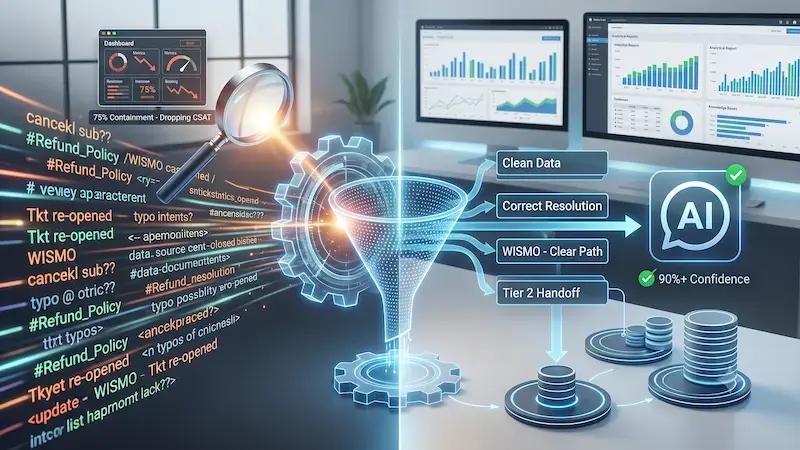 There is a massive, costly difference between containment and true resolution. Containment merely means an automated tool stopped a user from reaching a human agent. It doesn't mean the system actually solved the customer's problem.
This issue is widespread in modern support setups.
Market data from Calabrio reveals that up to 98% of contact centers now deploy some form of artificial intelligence within their workflows.
However,
Only 12% of those organizations have a fully optimized data strategy to back it up.
Furthermore,
Gartner reports indicate that while 91% of customer support leaders face severe executive pressure to deploy automated tools, many struggle to report their true AI resolution accuracy confidently to the board.
In fact,
Nearly 71% of customer service leaders admit they cannot confidently verify their true autonomous resolution rates to the executive board.
This lack of transparency occurs because manual audits often reveal that automated metrics look twice as good as reality when you do not track repeat contacts or hidden escalations.
You cannot fix your automated support systems if your customer support data is dirty. When you train or ground an AI system on messy, unverified historical ticket logs, performance drops immediately. The system inherits your past data mistakes. To unlock true efficiency, you must look past simple deflection stats. This deep-dive guide provides a rigorous framework for auditing your conversational transcripts, isolating hidden edge-case errors, and cleaning your underlying support data.
What is AI Resolution Accuracy?
To fix your automated platform, you must establish exactly what you're measuring. AI resolution accuracy is the percentage of total customer interactions that an AI agent resolves completely on the first attempt, without human intervention, hallucinations, or requiring the user to re-contact your team.
This is distinct from the automated resolution rate (ARR) or deflection rate that you see on standard software dashboards. Consider this formula: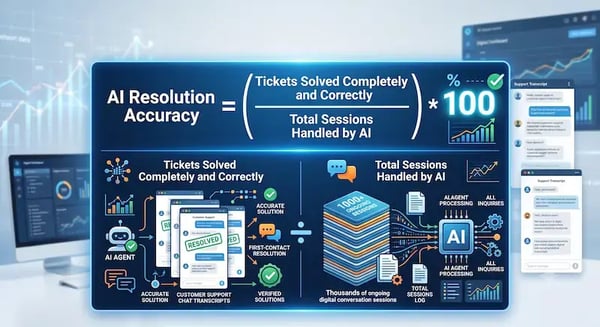 Standard software platforms often record a successful deflection whenever a customer closes a chat widget. But did that customer actually get their answer? Or did they close the window out of pure frustration? True resolution accuracy requires real data validation. It confirms that the customer's intent was met accurately, safely, and in full compliance with your current business policies.
Why "Dirty" Support Data Distorts AI Performance
Customer support data is chaotic by nature. Real customer tickets are packed with typos, complex formatting, system-generated alert text, and conversational noise. Customers often bundle three completely unrelated requests into a single text thread.
When raw, uncleaned text logs go into a Large Language Model (LLM) or a Retrieval-Augmented Generation (RAG) knowledge base, performance suffers. The automation absorbs outdated answers, dead web links, and improper human routing habits.
It's as simple as this:
Dirty Support Logs ➔ RAG Knowledge Pipeline ➔ AI Hallucinations & Wrong Resolutions
The enterprise risk here is measurable.
An industry report from RevSure reveals that 49% of executives cite data inaccuracies and structural bias as the primary barriers to scaling agentic AI successfully.
Poor data hygiene also forces companies to abandon advanced features entirely.
Gartner research indicates that through 2026, organizations will abandon up to 60% of AI projects due to a lack of "AI-ready" data.
If your baseline support data is structurally flawed, your automated logic will be broken too.
The 4-Step Framework to Audit and Clean Customer Support Data
You can systematically eliminate these performance issues. Use this four-step framework to audit your current transcripts, wash away dirty data, and protect your automated customer experience. This way, your goal-oriented customer agents can actually achieve their goals.

Step 1: Establish Your Ground Truth via Manual Transcript Review
You cannot fix an automated system without a clear baseline for what a perfect response looks like. You must build a "Ground Truth" dataset. This is a curated collection of verified customer inquiries, each paired with their exact, ideal resolution.
Begin by pulling a random sample of 500 recent autonomous customer interactions. Do not just look at whether the ticket status is marked as closed. Read the conversational text directly. Look closely for these three hidden failure modes:
-
Silent Abandonment: The customer stopped responding entirely because the automated replies were confusing, circular, or repetitive. They left without a solution.
-
The Policy Loop: The system stated a generic company policy correctly, but failed to address the specific, practical exception the user requested. This leaves the core issue unresolved.
-
The 24-Hour Re-contact: The system closed the chat session cleanly, but the customer opened an identical email or phone ticket within 24 hours because the initial answer failed.
Documenting these failures helps you map where your system's understanding breaks down in real-world scenarios. When you uncover these trends, you can clearly see the gap between what your dashboard calls a "deflection" and what your customer calls a "failure."
Step 2: Clean and De-Noise Your Historical Support Data
Once you understand your common system errors, you must clean your database. This process acts like a washing machine for your customer support data before it feeds your live automation engine. Think of it as purging the noise so the model can see the signal.
Data Issue |
Visual Presentation in Logs |
Technical Cleaning Action |
|---|---|---|
Intent Bleeding |
Overlapping tags like #Refund_Policy and #Return_Instructions are confusing the model. |
Merge identical categories into a single, mutually exclusive intent map. |
Outdated Context |
Old pricing structures, dead platform links, or expired product documentation. |
Purge legacy files from your RAG knowledge directories completely. |
System Text Noise |
Internal CRM automation messages, such as "Ticket moved to Tier 2 Queue," in user transcripts. |
Run automated script filters to strip out internal system metadata. |
Cleaning these records ensures that your system relies only on accurate, modern information. This minimizes the risk of delivering conflicting answers to customers.
In fact, technical evaluations from Atlan show that,
Grounding your models in a highly clean, well-maintained RAG framework can drop hallucination rates by up to 85% compared to ungrounded systems.
Step 3: Isolate and Classify Edge-Case Inaccuracies
Simple customer queries are easy to automate.
Standard inquiries like "Where is my order?" (WISMO) typically make up 35% to 40% of all online retail support volume, according to WISMO.
Automated systems handle these baseline tasks effortlessly because they connect directly to predictable API data streams. The true test of your AI resolution accuracy lies in the remaining 60% of complex, long-tail customer scenarios.
When you spot an automated error during your data audit, classify it into one of these three specific operational categories:
-
Context Misalignment: The automated agent missed a critical detail in the user's message, such as confusing a cancellation request with a temporary pause request.
-
Knowledge Gaps: The precise information required to solve the user's problem was never documented in your official knowledge base articles. The AI was forced to guess.
-
Guardrail Failures: The system adopted an improper conversational style, shared unverified rumors about product updates, or provided unauthorized transactional advice.
Categorizing your errors helps you target your technical fixes precisely. Instead of guessing why the system failed, you can pinpoint exactly which module, prompt, or article caused the breakdown. This saves your development team hours of aimless troubleshooting.
Step 4: Deploy Confidence-Based Triage Controls
You do not have to force your automated platform to resolve every single ticket. Doing so is a recipe for customer frustration. Instead, use real-time confidence scores to build a dynamic triage framework. Most advanced conversational engines calculate an internal probability score for every answer they generate based on how well the user's prompt matches existing data.
-
Calculate Response Confidence: The system evaluates the incoming customer text against its available knowledge data and assigns a precision percentage score.
-
Execute High-Confidence Automation: If the calculated score is comfortably above 90%, the system sends the reply instantly and resolves the issue without human intervention.
-
Route Medium Confidence Drafts: If the score falls between 70% and 90%, the system drafts a response and routes it to a human team member for review, editing, and approval before the customer sees it.
-
Trigger Low Confidence Handoff: If the score drops below 70%, the system bypasses automation entirely and transfers the customer to a live human agent seamlessly with full context.
This triage approach ensures you maintain high quality. By keeping a human in the loop for ambiguous queries, you prevent the AI from making confident mistakes in public.
Turning Audit Insights into Prompt Guardrails
Once you identify your core data gaps, you do not need to retrain your foundational models from scratch. Retraining is expensive and time-consuming. Instead, adjust the prompt guardrails and system instructions that govern how your live agent behaves daily.
Implement strict negative constraints within your system prompts. Tell the system exactly what it must not do or say. These boundaries prevent the model from taking creative liberties with your corporate policies. For example, you can insert a precise operational directive like this into your system core parameters:
"If a customer asks to modify an enterprise subscription plan, you must never quote standard retail pricing tiers. Transfer the interaction to the account management team immediately."
Additionally, focus your optimization efforts directly on your source documentation. If an automated agent hallucinates an answer regarding your warranty process, the root cause is almost always an ambiguous, confusing, or outdated help center article. AI agents do not invent things out of nowhere; they amplify the contradictions already present in your files. When you clean the source documentation text, your live AI resolution accuracy improves automatically.
Continuous Quality Assurance for Long-Term Success
Data cleaning is never a one-time project. It is a continuous operational habit. Your internal product catalogs update, your corporate software tools evolve, and real-world customer behaviors shift over time. If you treat data hygiene as a single milestone, your automation accuracy will degrade within three to six months.
Establish a structured, ongoing quality assurance rhythm. Have your support quality managers dedicate just 5% of their working hours to auditing low-confidence automated interactions.
This ongoing review process builds a continuous optimization loop that protects your brand:
Identify Edge-Case Bug ➔ Clean Source Support Data ➔ Adjust Prompt Guardrails ➔ Increase Resolution Accuracy
This ongoing refinement ensures that your automated systems scale safely as your business operations grow. It changes QA from a defensive cost center into a proactive growth engine for your entire customer service organization.
The Strategic Path to Trusted Automation
Building a successful automated support system requires more than simply deploying a flashy new software tool. True digital transformation demands:
-
Clean text data
-
Structured knowledge bases
-
A disciplined, metric-driven audit framework.
By prioritizing true AI resolution accuracy over deceptive containment metrics, you protect your customer relationships while efficiently scaling your operations.
Transforming messy, legacy support logs into a highly accurate, automated engine takes technical depth, platform familiarity, and intense operational focus. This is where Aspiration Marketing provides critical value for your organization.
We focus directly on revenue operations, comprehensive technology integrations, and inbound service strategies. We help expanding enterprises audit their historical support data, clean complex conversational text pipelines, structure internal knowledge bases, and design reliable human-in-the-loop workflows.
Our teams work side by side with your support leaders to replace guesswork with data-driven guardrails. Let us help you convert your raw customer support data into a high-performing automated asset that drives real business efficiency, clear ROI, and lasting customer loyalty.






Leave a Comment
Have thoughts on this article?
Share your feedback, ask questions, or join the discussion with our community.