



Imagine a customer troubleshooting a critical system issue with your automated helper. They spent ten minutes typing out logs, explaining symptoms, and detailing error codes. Then, the conversation hits a wall. The automation cannot solve the problem.
Suddenly, the screen flashes a blunt message: "Transferring you to a live human agent."
 The human joins the session and types: "Hello, how can I help you today? What seems to be the problem?"
What happens next? The customer feels immediate frustration. They have to repeat everything they just explained. This exact moment is what customer experience experts call the conversational cliff. When an automated system hits a structural limit, what does the user experience? Is it a smooth handoff or a frustrating dead-end that prompts customer churn?
Many companies invest heavily in automation. They hope automated tools can handle every possible query. However, real-world data shows that absolute automation is rarely the reality.
According to a comprehensive data analysis reported by Neomanex, actual autonomous containment rates for complex or transactional tasks realistically land between 40% and 60%.
This means that up to 60% of all customer interactions still require human intervention at some point.
Maximizing customer retention in modern customer service depends heavily on the design of your escalation user experience (UX). A high-converting handoff is not a failure of automation. Instead, it is a strategic bridge that preserves customer trust.
Does your system treat a live-agent escalation as an operational defeat, or does it view the handoff as a seamless extension of your brand's customer journey? Let's break down how to design a high-converting escalation framework for modern AI support interfaces.
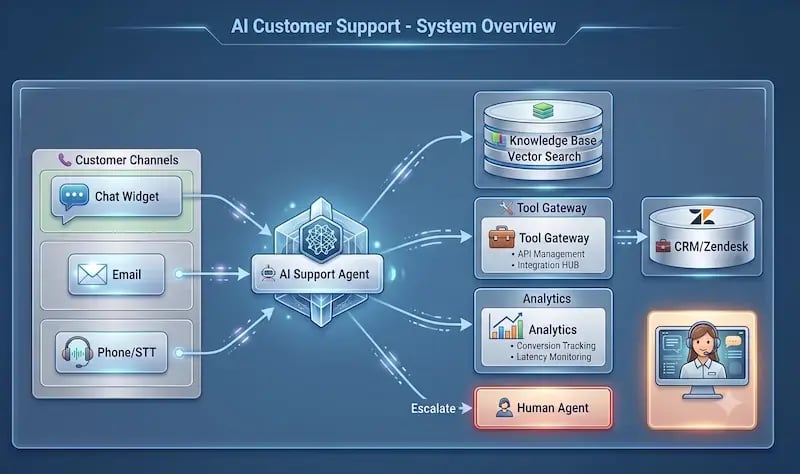
What is a High-Converting Escalation UX?
In traditional software design, a conversion occurs when a user completes a desired action, such as buying a product or subscribing to a newsletter. In customer support, a high-converting escalation means transitioning a frustrated user from digital self-service to a human representative without losing the user's trust, patience, or business.
The primary goal of modern AI support interfaces is to resolve issues quickly. If the system cannot resolve the issue itself, the secondary goal is to seamlessly pass the user to a human.
The Traditional Bad User Experience (The Bot Trap)
We have all experienced a poorly designed chat interface. These setups often rely on rigid menus or outdated logic. The poor design choices usually include:
-
Forcing Repetition: The system requires the user to restate their entire problem to a human after explaining it to the machine.
-
The Black Hole: The interface displays a silent, unannounced loading icon. The user has no idea if the system crashed or if an agent is actually coming.
-
Hidden Escape Hatches: The interface hides the escalation path entirely. This forces desperate users to type phrases like "TALK TO A REAL PERSON" repeatedly in frustration.
The High-Converting Solution (The Transparent Framework)
A good transition framework relies on two critical elements: retaining background context and communicating transparently.
First, the system must retain the contextual payload. This means the tool packs up the full conversation history, user metadata, account information, and intent analysis. It passes this packet directly to the human agent before they say hello.
Second, the system needs proactive transition management. The interface must use clear micro-copy and visual updates.
For example, the automated agent might state:
"I am looping in our billing specialist, Sarah, right now. I shared our troubleshooting history with her, so you will not have to repeat yourself."
The business case for this transparency is clear.
A 2026 U.S. customer service survey by Gartner highlights that 54% of customers trust human agents more than automated systems for high-stakes decisions or complex product recommendations.
Customer support data indicates that,
Up to 80% of customers are explicitly willing to use automated self-service tools if a clear, visible, and low-friction pathway to a live human agent is always present.
Architectural Pillars of a Seamless Handoff Framework
Building an effective handoff requires more than changing the text on a chat button. It requires a proper architectural foundation. Three core pillars support a reliable human-in-the-loop system.
1. Clean Data Foundations
An escalation interface is only as effective as the data feeding it. If your historical support tickets are cluttered, disorganized, or filled with unverified summaries, your automated model cannot accurately predict when to step aside.

Before designing your user interface layouts, your engineering teams must clean up historical support data. You need to analyze which query types historically lead to negative user sentiment or failed automated resolutions. Removing conversational bugs and bad loops from your data ensures that the machine recognizes its own boundaries early. This allows it to initiate a handoff before the customer becomes completely furious.
2. Smart Routing and Multi-Tiered Workflows
An escalation should never dump a user into a generic, unorganized support queue. Instead, your automated system must decode the user's intent during the self-service session.
Once the machine detects the issue type, it must deploy smart routing workflows to send the ticket to the correct specialist. For example, if a user is struggling with an advanced API authentication bug, the system should route them directly to a Tier 3 technical support engineer. If the user wants to dispute a charge, they should contact a billing manager directly.
This enterprise tier ensures that the person who accepts the handoff is fully capable of solving the problem immediately. It eliminates internal transfers, which are a major source of customer frustration.
3. The Zero-Click Service Standard
The ultimate benchmark for modern customer service is minimizing customer effort. In many traditional workflows, a user must actively decide to give up on a bot and click an explicit "Request Agent" button.
Advanced systems use a zero-click service philosophy. The system monitors text conversations in real time for signs of frustration. These signals include all-caps text, repeated short answers, foul language, or circular conversation loops where the user repeats the same query.
When the interface flags these signals, it automatically initiates the escalation. The customer does not have to search for a hidden button. The system recognizes the friction and implicitly brings in a human specialist.
Actionable Steps to Customize the Technical Handoff Process
How do you configure your internal support platforms to execute this type of seamless transition? The technical process involves setting precise boundary rules and equipping your human agents with the right co-pilot tools.
Step 1: Define Your Boundary Thresholds
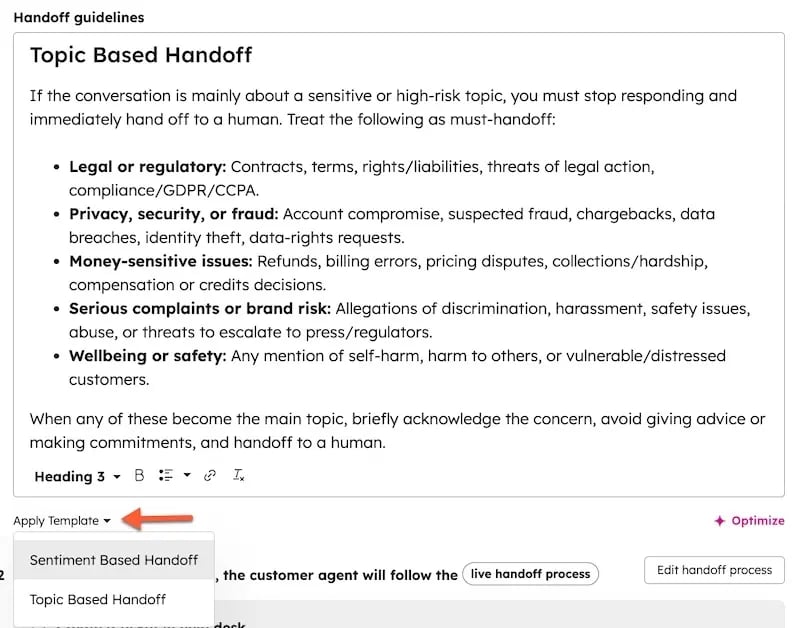
Your development team needs to define clear rules for when an automated session must end. Common triggers include:
-
Intent Limits: The user asks a question that falls outside the system's trained knowledge base twice in a row.
-
Sentiment Shifts: Real-time language analysis flags negative sentiment scores below a specific threshold.
-
Process Blockers: The user encounters an issue that requires a human security clearance or a manual database override.
Step 2: Establish Native Stack Integrations
Once a threshold is crossed, your platform stack must manage the handoff smoothly. If you use major customer relationship management systems, you can build these rules natively. For example, setting up the HubSpot Customer Agent Handoff Process enables your team to define precise routing targets, maintain cross-channel persistent chat histories, and ensure that human reps inherit the full data payload.
 Step 3: Deploy Human Co-Pilot Systems
The user interface for your customer is only half of the equation. You must also design an effective user experience for your internal support employees.
When a session transitions to a human, the representative should not have to read through hundreds of lines of chat text while the customer waits. Instead, an internal AI co-pilot should analyze the chat log in real time. The co-pilot generates a concise, three-bullet summary for the human agent:
-
The Core Issue: What the customer is trying to achieve.
-
Steps Already Taken: The troubleshooting steps the automated interface has already tried.
-
The Missing Link: The exact reason why the automation stopped (e.g., failed payment verification, system error code).
According to empirical research by Zendesk,
Using automated guidance systems and generative summaries for support teams drastically reduces cognitive strain.
It shaves vital minutes off first-contact resolution times and ensures that the human agent can speak to the customer with absolute authority from the very first sentence.
Measuring Success: Retention and ROI Metrics
Many customer service departments focus entirely on an operational metric called the containment rate. This metric tracks the percentage of total tickets resolved entirely by automated systems without human help.
While containment is a useful metric for measuring baseline automation efficiency, relying on it too heavily can be dangerous. A high containment rate can look great on paper while hiding a massive customer retention crisis.
For example, if a poorly configured bot prevents frustrated users from reaching a human, they might simply close the window, cancel their accounts, and switch to a competitor. Your containment rate goes up, but your revenue drops.
To accurately evaluate a high-converting escalation framework, digital experience leaders must track retention-centric metrics that measure how well automated tools and human teams work together.
Metric |
Focus Area |
Why It Matters |
|---|---|---|
Handoff CSAT |
Customer Satisfaction |
Isolates the satisfaction score for tickets that were transferred from automated tools to a human agent. |
Escalation Drop-off Rate |
User Abandonment |
Tracks how many users close the support window during the transition phase while waiting for a human. |
Time to Human Resolution (TTHR) |
Speed and Efficiency |
Measures the total active time a human agent takes to solve an issue after a handoff occurs. |
Customer LTV Protection |
Financial Impact |
Tracks the long-term retention and lifetime value of accounts that experienced one or more system escalations. |
Data from Zendesk's CX Insights underlines that,
67% of consumers expect highly personalized, continuous experiences when interacting with an enterprise software stack.
When you track Handoff CSAT and Escalation Drop-off rates, you gain a clear view of where your conversational bridge is succeeding and where it might be losing passengers.
Engineering Your Support Safety Net
Designing an enterprise escalation framework is not about building a regular padding system for an imperfect automated machine. Instead, it is about engineering a highly reliable, data-driven safety net that builds customer trust exactly when problems become difficult. When your company focuses on transparent micro-copy, background payload preservation, and specialized routing workflows, you turn a potential point of frustration into a powerful asset for brand loyalty.
Optimizing these advanced support setups requires an integrated, strategic blueprint. This includes everything from auditing your raw support data to structuring complex, multi-tiered enterprise routing models. Organizations must maintain a clear, overarching operational roadmap to maximize their technology investments.
This is exactly where the specialized consulting services and strategic growth frameworks developed by Aspiration Marketing assist modern enterprise teams. By auditing your existing resolution data pipelines, aligning automated routing rules, and optimizing user experience touchpoints, we help companies transform their service operations. The result is minimized friction, protected customer lifetime value, and scaled conversational support systems that deliver predictable business outcomes.







Leave a Comment
Have thoughts on this article?
Share your feedback, ask questions, or join the discussion with our community.