





How much does a missed connection cost your business? If you operate a high-volume, enterprise B2B support model, the answer is usually measured in six-figure contract churn. When a standard customer encounters a minor UI bug, a 20-minute delay in your ticketing queue is inconvenient.
But when a Tier 1 enterprise client experiences system downtime during peak operational hours, that same 20-minute delay can trigger a critical SLA breach, severe financial losses, and permanent brand damage.
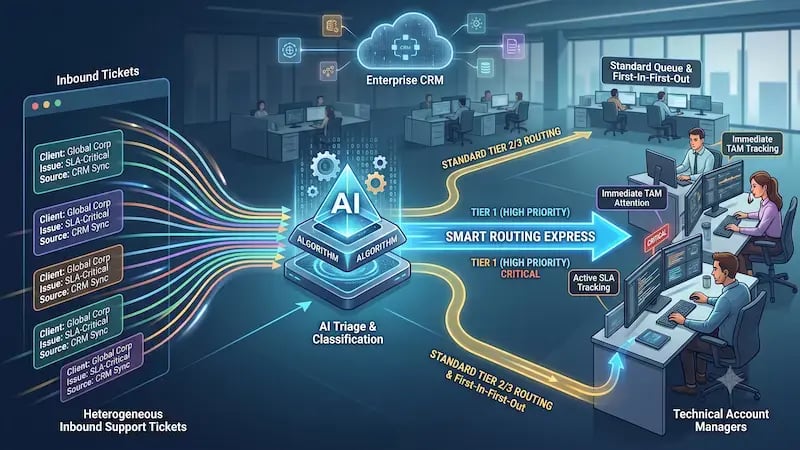 Yet, many customer service organizations still handle incoming requests on a first-come, first-served basis. They route high-value accounts through the exact same initial manual triage steps as everyone else.
Why do companies continue to accept this operational bottleneck? Mostly because building a dynamic, multi-tiered routing infrastructure has historically required extensive engineering effort, custom API integrations, and continuous manual data maintenance.
Fortunately, the combination of advanced AI classification tools and robust modern CRM automation completely changes the game. By building smart routing workflows that combine machine learning tags with conditional logic, you can construct an automated system that identifies premium accounts the exact millisecond they submit an issue. This approach completely bypasses the standard help desk line and sends critical issues straight to a dedicated human expert.
The True Cost of Ticket Routing Bottlenecks
Traditional help desk workflows rely heavily on human triage. A ticket enters a general inbox. A support coordinator reads the description, looks up the company profile in a separate database, evaluates the contract value, and manually assigns the ticket to the correct team.
This process might work when you handle twenty tickets a day. It breaks down completely when you scale to hundreds or thousands.
Manual triage creates an operational environment plagued by unpredictable response times.
According to a comprehensive data review compiled by Zendesk's CX Trends Report,
70% of consumers expect any agent they interact with to have immediate access to their full context.
Yet,
Data fragmentation remains a massive barrier for 54% of organizations globally.
When context is missing, high-priority issues get stuck at the bottom of a general inbox while agents work through non-urgent requests.
Furthermore, a study by CMSWire reveals that,
Only 7% of contact centers currently deliver seamless transitions between communication channels.
This friction leaves an "omnichannel gap" that disproportionately impacts your most profitable accounts. If an enterprise client drops an urgent note into a chat window, they expect your system to recognize their corporate identity instantly. If your infrastructure treats them like an anonymous, first-time user, you create immediate friction.
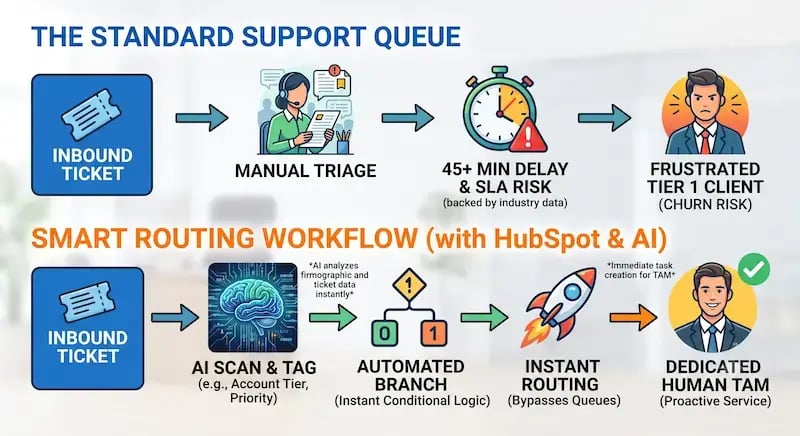 To bridge this gap, modern customer service operations are moving toward zero-click service resolutions. In this framework, the initial data collection, priority classification, and routing execution occur completely in the background. By removing manual touchpoints from the routing path, you protect your team from burnout and ensure your high-value customers receive the immediate attention they pay for.
The Economics of a Hybrid Support Floor
Building an enterprise-ready support engine does not mean replacing your human workforce with AI bots. True efficiency comes from a balanced, hybrid support model where AI operates as an intelligent air traffic controller, allowing human experts to do what they do best: solve complex, nuanced problems.
Data from CMSWire shows that
76% of contact center leaders have formally adopted human-in-the-loop models.
These models intentionally pair AI routing speed with human empathy and technical skill for critical interactions. This structure balances support floor economics perfectly. AI handles high-volume, low-complexity queries (such as password resets or basic documentation lookups), freeing up humans to focus entirely on high-stakes enterprise relationships.
When you look at user preference data, this hybrid division becomes even more critical.

Research by Avaya indicates that for complex, high-stakes technical issues,
70% of enterprise customers explicitly prefer interacting with a human agent over an AI chatbot.
Additionally,
60% of consumers expect to reach a live specialist within 6 minutes when a critical issue arises.
If your technical account managers (TAMs) are stuck manually sorting through a cluttered inbox, they cannot hit that six-minute window. Building smart routing workflows fixes this structural flaw. The AI performs the instant data analysis required for sorting, while your human experts provide the high-touch support that keeps enterprise clients loyal.
Phase 1: Setting Up the AI Classification Tag
The foundation of any automated routing engine is clean, real-time data classification. Before your system can route a high-priority account instantly, it needs a reliable way to identify exactly who that account is the moment a ticket is created. We can build this infrastructure directly inside HubSpot by pairing custom properties with automated AI classification tags.
Follow these direct steps to set up the necessary data properties within your CRM architecture:
Step 1: Open Property Settings
Log into your HubSpot portal, click the gear icon in the main navigation bar to access your settings, and navigate to Properties in the left-hand menu.
Step 2: Create a Company Property
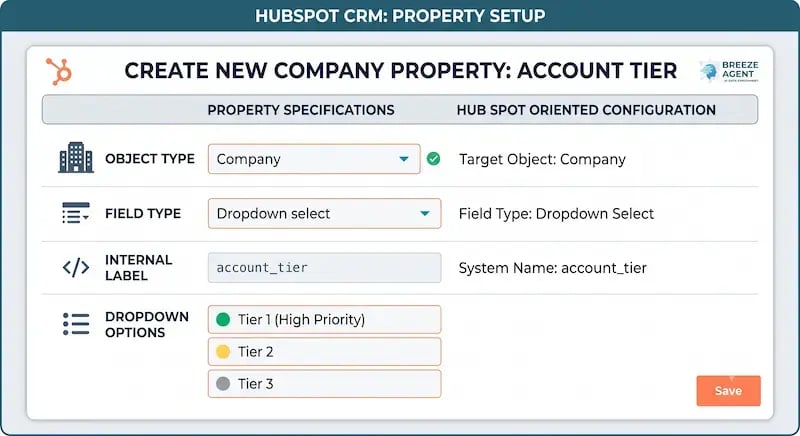
Click the Create property button in the upper right corner. Set the Object Type to Company. It is vital to attach this property to the company object rather than individual contacts. Enterprise clients often have dozens of employees submitting tickets; tagging the company ensures that any ticket originating from that corporate domain inherits the exact same priority level.
Step 3: Configure the Field and Options
Set the Field Type to Dropdown select and label the property Account Tier. In the dropdown options, create three distinct choices:
- Tier 1 (High Priority)
- Tier 2
- Tier 3
Once these options are set, save the property.
 Step 4: Automate with HubSpot Breeze
With the property structure live, you must automate its population. Instead of asking account executives or support reps to manually update this field, you can leverage HubSpot Breeze Agents or an integrated AI tool like AI Studio for Workflows.
Configure your AI tool to continuously analyze your CRM data, checking factors like:
-
Firmographic data: Annual revenue thresholds, total employee counts, or industry types.
-
Contract values: Live subscription data passed from your accounting tools or closed-won deal values.
-
Inbound intent signals: The sentiment, keyword density, and urgency patterns within incoming technical messages.
The moment a new company record is created, or an existing account passes an expansion threshold, the AI agent evaluates the data and instantly populates the Account Tier property with the correct tag. This provides a clean, automated data foundation for your downstream routing rules.
Phase 2: Building the Smart Routing Workflow
Now that your AI classification tags update your records in real-time, you can build the active automation engine that routes these accounts. This workflow serves as your express lane, instantly identifying Tier 1 accounts and routing them directly to a human specialist.
Here is the step-by-step implementation blueprint to build this out in HubSpot:
Step 1: Initialize the Canvas
Navigate to Automation > Workflows in your HubSpot account and click Create workflow. You can build this workflow completely from scratch or use the Breeze Assistant by typing a natural-language prompt like "Create a high-priority routing workflow based on company tier" to quickly draft the core logic blocks.
Step 2: Set the Enrollment Triggers
Click on the trigger block and select Company properties. Locate your newly created Account Tier property and set the enrollment condition to "Account Tier is equal to Tier 1 (High Priority)." Ensure you enable re-enrollment if you want companies to cycle through this workflow whenever their priority status changes or a new associated ticket opens.
Step 3: Add Conditional Routing and Record Assignment
Click the + icon below your trigger to add a new action step. Select Rotate record to owner from the CRM actions list. Here, you can select your dedicated team of Technical Account Managers (TAMs) or choose a specific round-robin queue that contains your senior technical engineers. This step immediately transfers ownership of the record, ensuring that any incoming request from this account is routed directly to a qualified human operator rather than a general support pool.
Step 4: Enforce Immediate Notification Actions
To ensure your team hits their response targets, you must set up clear, multi-channel alerts that bypass noisy email inboxes. Add these three downstream alert actions inside your workflow path:
-
Send an In-App Notification: Configure an immediate pop-up alert in HubSpot that displays critical account details directly in the assigned TAM's active workspace view.
-
Trigger Internal Slack or Teams Alert: Use HubSpot's native messaging integrations to send an immediate ping to your team's urgent support channel, automatically tagging the assigned owner.
-
Create a Task: Add a high-priority task assigned directly to the TAM with a strict deadline (e.g., "15-minute SLA - Initiate Contact with Tier 1 Account").
Step 5: Test and Turn On
Click the Review and turn on button in the upper right corner. Use the test feature to select a sample company record currently marked as Tier 1. Verify that the workflow accurately triggers, assigns the record, and fires the notifications correctly. Once verified, change the workflow status to On.
Optimizing for Answer Engine Optimization (AEO)
As customer support leaders look for solutions online, they increasingly rely on AI-powered search engines, conversational chat tools, and voice search systems. To make sure your internal documentation, knowledge base articles, and operational playbooks are easily discoverable by these platforms, you need to structure your content for Answer Engine Optimization (AEO).
AEO focuses on giving direct, clear answers to specific user questions so that AI models can pull your content into quick-answer summaries and voice search results. To optimize your operational frameworks for AEO platforms, build your guides using these key principles:
-
Use Clear Question-Based Headers: Structure your sections around clear questions like "How do you build a smart routing workflow?" or "What is the best way to route high-priority tickets?" AI engines favor headers that match the exact phrasing users type or say.
-
Provide Direct, Scannable Answers: Always lead your paragraphs with a direct, single-sentence summary of the answer before diving into long, technical context.
-
Use Standard Formats: Present technical processes using simple bulleted lists, numbered sequences, or straightforward tables. AI scrapers can easily parse these structures, making them much more likely to appear as featured snippets in search results.
-
Keep Text Clean and Readable: Avoid overly complex vocabulary or dense sentences. Writing clearly and simply helps search algorithms parse your instructions accurately, which naturally boosts your content's readability and search ranking.
Scaling Enterprise Support with Confidence
Building smart routing workflows does more than just speed up your response times. It fundamentally redefines how your business protects its most valuable revenue streams. When you use AI to handle data classification and instantly alert your human technical account managers, you eliminate the human errors, data silos, and queue delays that cause client frustration.
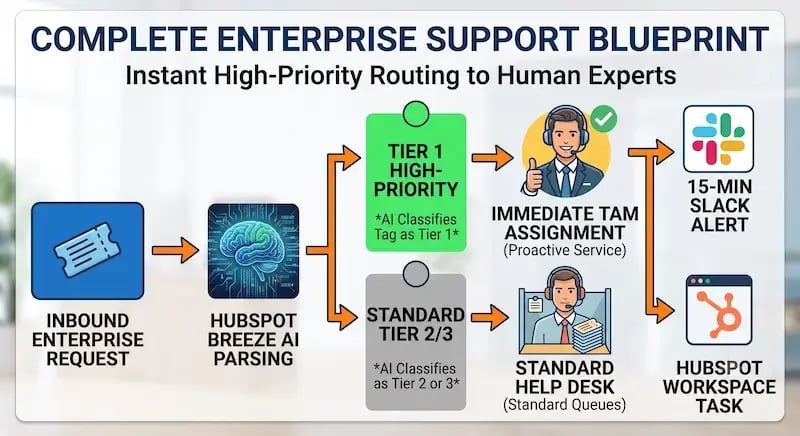 This structural shift transforms customer support from a reactive cost center into a proactive driver of customer retention. Your enterprise accounts get fast, tailored technical support, while your team gets a clean, organized environment that lets them focus on high-impact problem-solving.
Setting up these advanced systems requires a strong blend of strategic revenue operations, deep automation experience, and absolute clarity about data. Aspiration Marketing specializes in helping businesses navigate this digital transformation. By designing custom HubSpot workflows, auditing system accuracy, and fine-tuning AI tools like HubSpot Breeze, Aspiration Marketing helps you scale your support infrastructure cleanly—maximizing efficiency without forcing you to constantly add headcount.







Leave a Comment
Have thoughts on this article?
Share your feedback, ask questions, or join the discussion with our community.