



Are your AI customer support agents hallucinatory or giving generic answers, even though they have access to your best technical support articles? You're not alone. Many organizations invest heavily in AI customer service tools, only to find that their AI agents struggle to give accurate, reliable answers.
What's the point of training customer service AI if it's not offering the right answers? Why does this happen? The answer comes down to a simple gap: your knowledge base was written for human eyes, not artificial intelligence.
Human readers can easily skim past filler text, infer missing context, and interpret visual cues. Large Language Models (LLMs) and Retrieval-Augmented Generation (RAG) systems cannot. They require clear, explicit, and structured semantic data.
When you optimize your content for AI legibility, you bridge this gap. You ensure your automated tools find the right information in seconds and present it clearly to your customers.
According to HubSpot's Service Hub performance data,
Teams using integrated AI-powered customer service tools experience up to 13x faster ticket resolution times and a 42% surge in tickets closed per agent.
However, achieving these massive efficiency gains depends entirely on how effectively your AI parses your documentation.
In this guide, we will break down how to fine-tune your HubSpot Service Hub Knowledge Base for maximum AI legibility. We will cover technical formatting, structured content strategies, and practical auditing steps so your AI support tools deliver accurate results every time.
What Is AI Legibility and Why Does It Control Your Support Outcomes?
What exactly is AI legibility? Simply put, AI legibility measures how easily an AI model or vector database can read, parse, and extract answers from your written content.
To understand why AI legibility matters, it helps to look at how modern AI customer service models process your knowledge base articles:
-
Chunking: When an AI system indexes an article, it breaks the text into smaller segments called "chunks."
-
Vectorization: The system transforms these chunks into mathematical representations, called vector embeddings, that capture the text's semantic meaning.
-
Retrieval: When a customer asks a question, the AI compares the request against these chunks and retrieves the closest matching text to build a response.
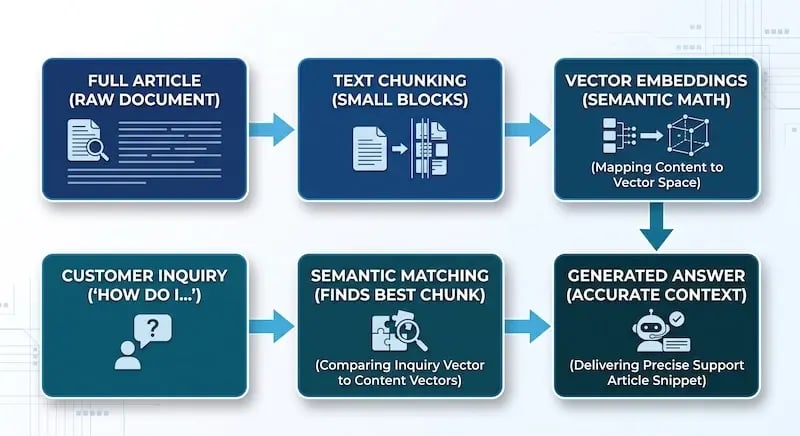
If your article relies on vague pronouns, missing context, or disorganized text, the AI retrieves the wrong chunk. This poor legibility leads to direct operational costs:
-
Context Leakage: The AI pulls incomplete steps, leaving the customer with broken instructions.
-
Hallucinations: When the AI cannot find an explicit answer in the retrieved text, it fills in the blanks with plausible-sounding errors.
-
Support Escalations: Frustrated customers abandon the AI chat and request a human agent, increasing support costs.
The Technical Formatting Playbook for AI-Legible Articles
Optimizing your articles for AI readability does not mean writing robotically. Instead, it means using clear structures that benefit both human readers and machine algorithms. Here are four foundational strategies for your technical support documentation.
1. Eliminate Fluff and Use the Direct Answer First (DAF) Framework
Does your technical article start with three paragraphs explaining why a feature is great before explaining how to use it? If so, you are hurting your AI search performance.
According to OpenAI,
LLMs pay heavy attention to the first 100 tokens (roughly 75 words) of a retrieved chunk.
If those opening words contain marketing language or polite introductory chatter, the AI may judge the chunk as irrelevant.
Use the Direct Answer First (DAF) framework instead:
-
The Rule: Place the core answer, fix, or primary instruction in the very first sentence.
-
Bad Example: "Managing user access is a critical part of maintaining workspace security. In this guide, we will explore the various ways you can update account permissions..."
-
Good Example: "To change user permissions in Service Hub, navigate to Settings > Users & Teams, select the target user, and click Edit Permissions."
By putting the direct solution upfront, you create an ideal target for AI retrieval models.
2. Enforce Strict HTML Heading Hierarchies
Header tags (<h1>, <h2>, <h3>) do more than make your page look organized. They tell the AI chunker how ideas relate to one another.
When a RAG system processes an article, it often pairs header text with the paragraphs beneath it to maintain context. If your headers are vague, the AI loses that context.
| Vague Header (Poor AI Legibility) | Intent-Explicit Header (High AI Legibility) |
|---|---|
| <h2>Setup</h2> | <h2>How to Configure SMTP Email Settings in Service Hub</h2> |
| <h3>Errors</h3> | <h3>Troubleshooting Error 404 During API Authentication</h3> |
| <h2>Next Steps</h2> | <h2>Exporting Your Resolved Ticket Reports to CSV</h2> |
Using intent-explicit headers ensures that even if a single paragraph is pulled out of context, the heading keeps the subject clear.
3. Replace Relative Pronouns with Absolute Entity Names
Consider this paragraph:
"Once you open it, click on the button in the top right corner. This will save your changes and apply them to all connected accounts."
A human reading the full page might know that "it" refers to the Settings menu and "the button" refers to Save. But if an AI retrieves only that sentence as a chunk, it has no idea what "it" or "this" refers to.
To maximize AI legibility, replace relative terms with explicit product and feature names:
"Once you open the Account Settings menu, click Save Changes in the top right corner. Clicking Save Changes updates your account configuration across all connected HubSpot Service Hub accounts."
This simple adjustment makes every sentence self-contained and clear for machine parsing.
4. Use Structured Lists and Formatting Tables
Dense blocks of text make it hard for AI models to extract step-by-step instructions. Converting technical procedures into numbered lists (<ol>) and conditional steps into bullet points (<ul>) improves parsing speed and accuracy.
Similarly, multi-variable information—like permission levels, pricing tiers, or system requirements—should always be formatted as HTML or Markdown tables.

According to industry benchmarks compiled by Filene Research Institute, failing to structure rates, terms, and technical procedures for AI discovery means AI models simply miss critical context during automated retrievals. Tables keep structured data clear and easy to pull.
Fine-Tuning Your HubSpot Service Hub Knowledge Base
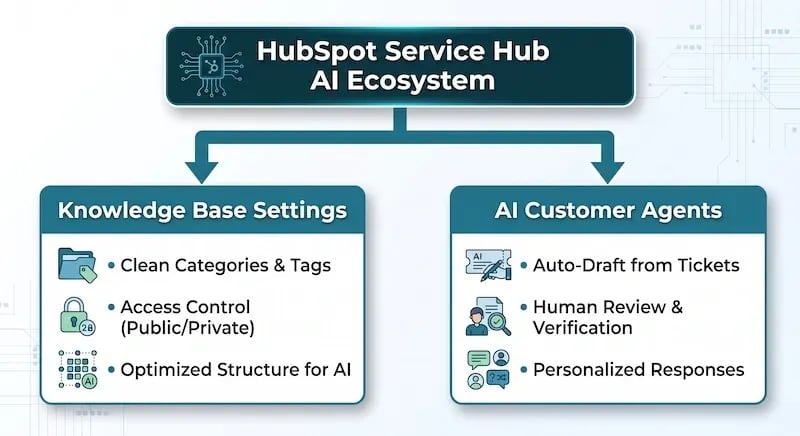
HubSpot Service Hub offers a strong foundation for managing support documentation. However, you must configure its settings and content tools thoughtfully to support AI performance.
Clean Up Categories, Tags, and Access Settings
An unorganized Knowledge Base confuses both your users and your AI. To maintain clean vector indices:
-
Standardize Categories: Group articles under clear, logical categories that match user intent (e.g., Billing & Invoicing, API Integrations, User Management).
-
Audit Tags: Avoid duplicate or overlapping tags. Use specific tags that reflect distinct topics or error types.
-
Set Clear Access Permissions: Ensure private internal documentation is marked correctly. You do not want sensitive internal workflows exposed in public AI customer answers.
Optimize Autonomously Drafted Content
HubSpot Service Hub enables AI Customer Agents to autonomously draft knowledge base articles from resolved support tickets. While this feature saves significant time, raw ticket logs are rarely optimized for AI legibility out of the box.
When reviewing AI-drafted articles before publishing:
-
Remove customer-specific details and informal conversational language.
-
Apply the Direct Answer First rule to the introduction.
-
Structure resolution steps into clear, numbered lists.
-
Add clear, descriptive headers to every section.
Secure Private Knowledge Base Models
If you run customer service models behind an enterprise firewall, keep your training pipeline secure. Ensure that proprietary technical support articles stay protected within your private HubSpot environment, so internal data is never leaked into public LLM training sets.
Structuring Troubleshooting and Code Snippets for RAG
Technical support articles often include complex conditional logic, API endpoints, and workflow diagrams. Here is how to format these elements so your AI agents can parse them without errors.
Use Conditional Troubleshooting Blocks
Instead of writing long narrative paragraphs about error fixes, use clear conditional statements:
-
Condition: If the system returns
Error 502: Bad Gateway... -
Cause: The API token has expired or is invalid.
-
Resolution: Navigate to Settings > Integrations, select Re-authenticate, and enter a new API key.
This clear format allows the AI to map customer questions directly to the correct fix.
Format Code Snippets and Diagrams
If your knowledge base includes code samples or visual diagrams, follow these best practices:
-
Use Code Blocks: Wrap all code snippets in standard Markdown or HTML code blocks with language tags (e.g.,
python orjavascript). -
Add Explicit Code Comments: Include inline comments explaining what each line or block does.
-
Provide Text Descriptions for Diagrams: AI models cannot "see" flowchart images unless you provide written context. Always include a detailed text breakdown beneath diagrams to explain the logical flow.
Before & After: Making a Support Article AI-Legible
To see how these rules work in practice, let's look at a quick comparison.
Before (Poor AI Legibility)
Configuring WebhooksWebhooks are a great way to send data between apps. If you want to set them up, you should probably go to the developer dashboard first. You can create a new payload there. Make sure you select the right events, or it won't work right. Sometimes it fails if your token is bad, so check that too. Click Save when you are done. |
After (High AI Legibility)
How to Configure Webhooks in Service HubTo configure a webhook in Service Hub, open the Developer Dashboard, select Create Webhook, enter your target endpoint URL, and click Save Webhook. Prerequisites
Step-by-Step Configuration
Troubleshooting Webhook Errors
|
Notice how the second version provides immediate clarity, clean structure, explicit steps, and a structured table. It is easy for humans to scan—and perfectly optimized for AI chunking and retrieval.
Auditing and Measuring AI Legibility in Service Hub
Fine-tuning your Knowledge Base is not a one-time project. It requires ongoing testing and iteration.
Benchmark Your AI Readiness
To evaluate how well your content supports AI agents, run regular test prompts using HubSpot Knowledge Base Analytics and your AI Help Desk tools:
-
Test Common Prompts: Ask your AI agent 20–30 real customer questions. Note where it gives precise answers and where its responses are vague or inaccurate.
-
Review Failed Searches: Check your analytics for "Search terms with no results." These gaps highlight missing content or poorly indexed articles.
-
Track Helpfulness Ratings: Review negative customer feedback on AI-generated answers to catch hallucinated steps or missing details early.
Establish a Continuous Improvement Cycle
When you find an inaccurate AI response, trace it back to the source article in Service Hub:
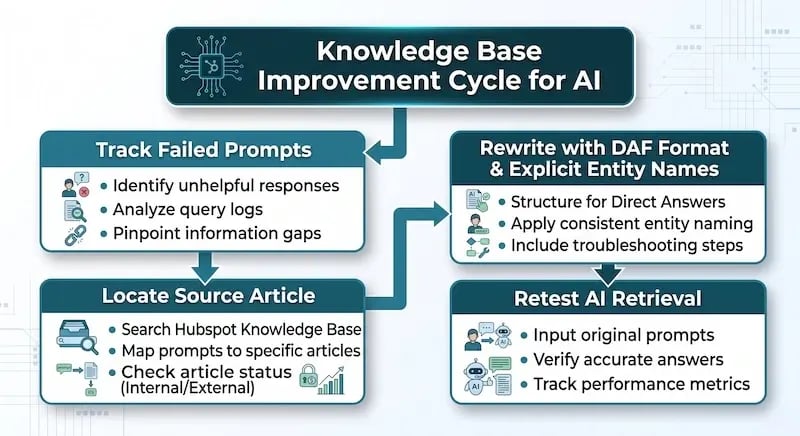
By constantly refining poorly performing articles, you systematically build a smarter, more reliable support ecosystem.
Transforming Your Knowledge Base into an AI Operational Engine
AI legibility is the bridge between having a library of support articles and delivering fast, automated, accurate help to your customers. By eliminating narrative fluff, enforcing clear header hierarchies, using explicit entity names, and organizing details into lists and tables, you empower your AI tools to work at their full potential.
Fine-tuning your HubSpot Service Hub Knowledge Base transforms your documentation from passive web pages into an active, high-performing support engine.
Optimizing complex Service Hub environments for modern AI architectures requires deep expertise in inbound support systems and technical content structuring. At Aspiration Marketing, we help organizations design, scale, and fine-tune their HubSpot ecosystems so their support operations achieve maximum efficiency, higher resolution rates, and seamless AI automation.







Leave a Comment
Have thoughts on this article?
Share your feedback, ask questions, or join the discussion with our community.