



Why does updating a single promotional banner or launching a simple campaign landing page still require a Jira ticket, a two-week sprint cycle, and a staging review?
For many marketing leaders, this question surfaces during every quarterly review. You invest heavily in digital infrastructure to move fast, test ideas, and capture market demand. Yet your team spends days waiting in an engineering queue just to fix minor errors or adjust layouts.
The Hidden Tax on Enterprise Agility
High-growth enterprise organizations often choose Drupal because of its structural depth and taxonomy controls. It is a mature framework that handles complex data models well. However, that technical depth often turns into an operational bottleneck. When routine content updates require specialized engineering intervention, your marketing agility slows down.
Consider the operational reality across modern marketing departments.
Research by Gartner reveals that,
Marketing teams utilize only 49% of their martech stack's full capabilities.
A primary driver behind this underutilization is technical friction. When everyday tools require custom code or specialized developer oversight, marketing teams abandon advanced tactics and default to slow-moving workflows.
This evaluation is not about dismissing Drupal. It is an impressive open-source framework with decades of utility. Instead, the real question is about resource allocation: Should your organization invest significant technical capital in maintaining a custom website framework, or should your team adopt an integrated platform built for direct marketing execution?
Evaluating Drupal vs. HubSpot Content Hub requires looking past surface features. It demands a clear analysis of the total cost of ownership, team velocity, infrastructure security, and long-term organizational focus.
What Is the Difference Between Drupal and HubSpot Content Hub?
Drupal is an open-source, self-hosted content management framework designed for complex, custom data structures and developer-driven workflows.
HubSpot Content Hub is an all-in-one, cloud-hosted content platform built on a unified customer relationship management (CRM) database, enabling marketers to create, personalize, and publish content without writing code, while providing developers with modern CLI tools and governance guardrails.
The primary difference lies in operational dependency: Drupal requires ongoing software patches, server maintenance, and developer support for routine page edits, whereas HubSpot Content Hub abstracts infrastructure management into a fully hosted SaaS model, giving non-technical teams direct editorial autonomy.
The Maintenance Treadmill: Deconstructing the True Cost of Drupal
The core code of Drupal is open-source and free to download. Yet every IT director and CMO knows that "free" software often carries the highest operational invoice.
Open-source enterprise websites operate much like custom-built race cars. They are fast when tuned correctly, but they require a dedicated pit crew on standby around the clock just to keep running.
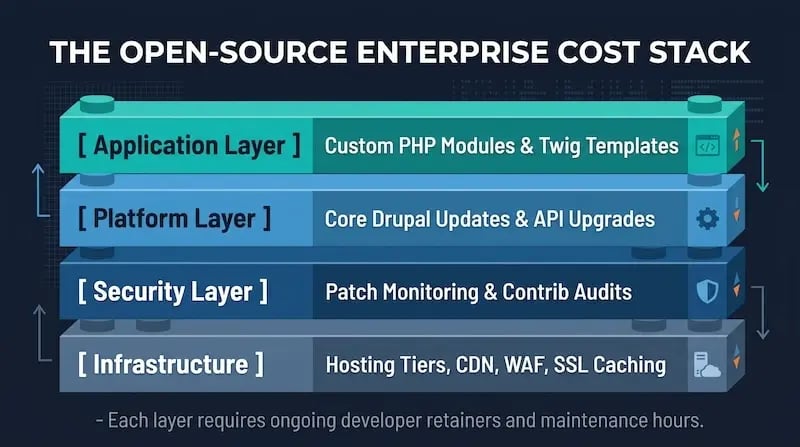
1. Major Version Deprecations and Migration Cycles
The architectural evolution of open-source platforms creates recurring capital expenses. Moving from legacy versions like Drupal 7 to modern releases was not a simple patch; it required complete architectural rebuilds, data migrations, and custom module rewrites.
Even within modern versions, the upgrade treadmill continues. For example, Drupal 10 reaches its scheduled end of life in late 2026. Each major version transition requires planning, technical audits, custom module refactoring, and extensive regression testing.
These technical projects pull engineering talent away from core revenue-generating initiatives. Instead of building customer-facing product features, software engineers spend weeks auditing deprecated database hooks and updating PHP libraries.
2. High Developer Retainers and Specialized Talent
Drupal requires specialized software engineering knowledge, particularly in modern PHP, Symfony components, and Composer package management. Because of this specialized skill set, development hours are expensive.
Enterprise organizations typically address this demand in two ways:
-
Agency Retainers: Paying tens of thousands of dollars each month simply to keep engineers on call for routine maintenance, module updates, and minor layout adjustments.
-
Internal Headcount: Hiring full-time web developers whose daily tasks consist of low-impact administrative updates, styling tweaks, and routine plugin troubleshooting.
When your talent pool spends time updating code libraries and resolving database issues, website management becomes a cost center rather than a growth driver.
3. The Content Velocity Bottleneck
What happens when an enterprise marketing team wants to launch a time-sensitive campaign? In a typical Drupal environment, creating a novel page layout involves:
|
This multi-step workflow protects code integrity but slows marketing speed. A campaign idea that should launch in two hours ends up taking three weeks. By the time the landing page goes live, the market window has narrowed, and campaign momentum has been lost.
HubSpot Content Hub: Designed for Marketer Autonomy
HubSpot Content Hub shifts this dynamic entirely. Instead of treating the website as a standalone software project, HubSpot views content as an active, integrated component of your overall customer acquisition and retention strategy.
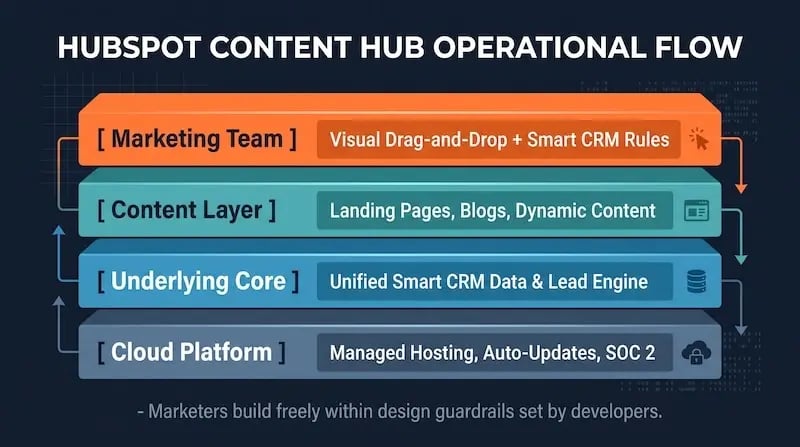 The platform uses a modular architecture. Developers build reusable, coded modules using standard HTML, CSS, JavaScript, and HubL (HubSpot's templating engine). Once an engineer builds and tests a module, they hand it over to the marketing team.
From that point forward, marketers have complete editorial control.
Drag-and-Drop Page Construction Within Brand Guardrails
Marketers do not want to write code, nor do they want to break brand guidelines. Content Hub balances these needs through visual, drag-and-drop page editing within predefined design systems.
Marketing teams can:
-
Reorder page sections, swap out media, and build custom multi-column layouts on the fly.
-
Adjust padding, background styles, and typography within global design presets.
-
Create and launch new landing pages in minutes without submitting a single development ticket.
Because developers define the global stylesheet and module constraints, non-technical team members cannot accidentally break the layout or violate brand standards. The marketing team gains autonomy, and the engineering team preserves site stability.

Direct Access to First-Party CRM Data
In an open-source CMS, personalizing web content based on user behavior usually requires complex API integrations, third-party middleware, and fragile database connections.
HubSpot Content Hub sits directly on top of the HubSpot Smart CRM. This native architecture unlocks personalized customer experiences out of the box:
-
Smart Content Rules: Show different calls to action (CTAs), hero headers, or case studies based on a visitor's industry, company size, lifecycle stage, or past interactions.
-
Dynamic Content via HubDB: Manage structured data, such as product catalogs, resource centers, or team directories, using intuitive spreadsheet-like interfaces that automatically populate dynamic page templates.
-
Behavioral Attribution: Track how specific content assets, blog posts, and interactive tools influence deal creation and closed-won revenue without installing complex tracking scripts.
True Cloud Infrastructure Without Server Upkeep
Because HubSpot operates as a managed Software-as-a-Service (SaaS) platform, administrative hosting tasks disappear from your internal queue. There are no server instances to configure, no database clusters to balance, and no manual security patches to schedule at midnight.
HubSpot provides enterprise-grade infrastructure automatically:
-
Global Content Delivery Network (CDN) distribution for fast page rendering worldwide.
-
Automated Web Application Firewall (WAF) and DDoS protection.
-
Automated SSL certificate provisioning and renewal.
-
Continuous, non-disruptive platform updates that never break custom page templates.
Side-by-Side Comparison: Drupal vs. HubSpot Content Hub
Understanding how these platforms compare across daily operations helps leaders evaluate their total cost of ownership and workflow efficiency.
| Strategic Dimension | Drupal Enterprise Build | HubSpot Content Hub Enterprise |
|---|---|---|
| Core Architecture | Open-source framework; self-hosted; code-first setup. | Managed cloud SaaS; CRM-native; visual modular framework. |
| Publishing Experience | Form-based content input; rigid layouts; structural updates require code. | Visual drag-and-drop page editor; flexible columns; real-time preview. |
| Maintenance & Patching | Manual core updates, contrib module audits, and PHP version upgrades. | Fully managed infrastructure; automatic updates without downtime. |
| Security Management | A dedicated team must track security advisories, apply patches, and run WAFs. | Built-in enterprise security, automated WAF, SSL, and continuous monitoring. |
| Developer Focus | Routine maintenance, plugin compatibility, and low-level page updates. | Strategic design systems, custom web apps, and API integrations. |
| CRM & Data Integration | Relies on custom webhooks, third-party plugins, or custom middleware. | Deep native integration with HubSpot Smart CRM data and automation. |
| Personalization Engine | Requires complex custom scripts or third-party personalization tools. | Built-in smart rules for dynamic copy, images, forms, and CTAs. |
Reframing the Developer's Role
A common misconception during any CMS evaluation is that moving away from an open-source framework diminishes the need for software developers. In reality, moving to HubSpot Content Hub elevates the developer's role from reactive maintenance to strategic value creation.
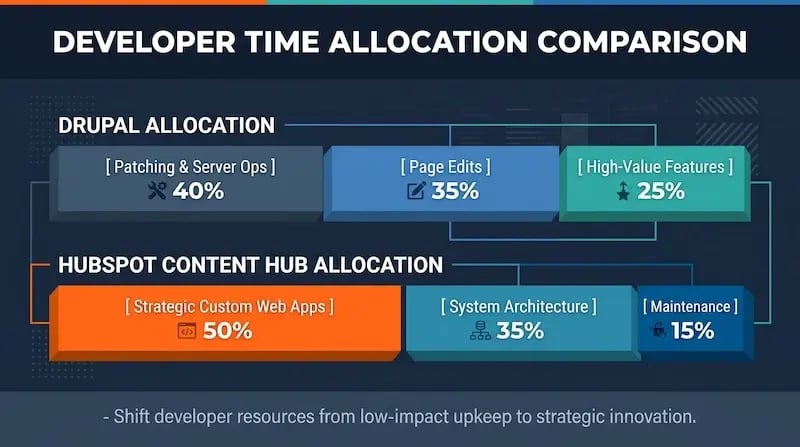
When web engineers spend their time applying database security patches, fixing CSS bugs on landing pages, and debugging broken module dependencies, their talent is underutilized. Highly skilled engineers want to solve complex business problems, not build basic web forms.
HubSpot Content Hub supports modern development practices:
-
HubSpot CLI and Local Development: Engineers write code locally using modern code editors, version control systems like Git, and automated deployment pipelines.
-
Custom React Components: Developers can build dynamic, interactive web applications using standard React frameworks directly inside HubSpot.
-
Serverless Functions: Engineering teams can build serverless endpoints to connect proprietary back-end systems, fetch dynamic data, and execute custom logic securely.
By letting the platform handle routine infrastructure and giving marketers direct publishing controls, engineering teams can focus on projects that move the needle: building ROI calculators, customer portals, interactive tools, and seamless data integrations.
Addressing Enterprise Security and Governance
When enterprise organizations consider moving from open-source to SaaS, security and access control are always primary considerations. Some teams assume that self-hosting Drupal gives them superior control over their data and application perimeter.
While self-hosting offers control, it also assigns 100% of the operational risk and security responsibility to your internal team.
The Drupal Security Model
Drupal boasts an active, dedicated security team that regularly identifies and publishes vulnerability reports. However, the discovery of a vulnerability is only step one.
Your organization is entirely responsible for:
-
Monitoring security advisories daily.
-
Testing security patches in staging environments to ensure they do not conflict with custom code.
-
Deploying emergency patches across all production environments within hours of disclosure to prevent automated zero-day exploits.
-
Securing the underlying server operating systems, web server software, and database layers.
If an unpatched module sits on your server for even a few days, your digital footprint remains exposed.
The HubSpot Enterprise Governance Model
HubSpot handles security at the platform level, protecting hundreds of thousands of websites worldwide through automated, proactive monitoring.
Key security and governance components include:
-
Turnkey Compliance: HubSpot maintains SOC 2 Type II compliance, ISO 27001 certifications, and full adherence to global privacy frameworks such as GDPR and CCPA.
-
Single Sign-On (SSO): Enforce secure team access using standard enterprise identity providers like Okta, Azure AD, or Google Workspace via SAML 2.0.
-
Granular Permission Controls: Restrict content access by brand, department, region, or role. Ensure junior editors can write copy without the ability to publish pages live or alter design templates.
-
Audit Logs and Revision History: Track every single layout modification, content update, and permission change through comprehensive, searchable audit logs. Restore prior versions of any page or global module with a single click.
Enterprise governance is not about making content harder to publish; it is about establishing smart guardrails that enable teams to move quickly without operational risk.
Evaluating Migration: Protecting Traffic, Data, and Brand Equity
Deciding to migrate from Drupal to HubSpot Content Hub is a strategic decision that requires careful planning. A website is not just a digital brochure; it is an organic search asset, a lead engine, and the central hub of your brand authority.
A successful enterprise migration follows a structured, step-by-step roadmap to protect performance.
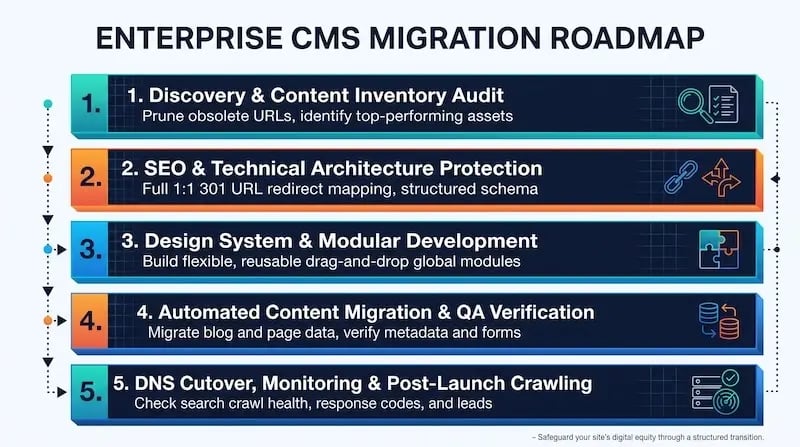 1. Perform a Comprehensive Content Audit
Never migrate an uncurated website. Moving from Drupal presents the ideal opportunity to prune outdated, low-performing, and redundant content.
Analyze your analytics data to identify:
-
High-performing organic pages that drive steady search traffic and conversions.
-
Outdated resources, retired product pages, and low-traffic blog posts that can be safely archived or consolidated.
-
Complex taxonomies and category structures should be streamlined for a cleaner user experience.
2. Protect Organic Search Equity and Technical SEO
The biggest fear during any website migration is losing organic search rankings. Mitigate this risk by carefully preparing before any DNS changes are made.
-
1:1 URL Redirect Mapping: Catalog every active Drupal URL and map it directly to its exact destination on HubSpot using permanent 301 redirects. Avoid redirecting bulk pages to the homepage, as search engines flag this practice and penalize it by dropping ranking signals.
-
Preserve On-Page SEO Elements: Ensure page titles, meta descriptions, canonical tags, Open Graph tags, and heading structures carry over accurately to the new templates.
-
Retain Structured Data: Recreate JSON-LD schema markup for organizations, articles, and products within HubSpot's global page headers.
3. Build a Sustainable Design System
Do not simply copy your old website pixel-by-pixel into static templates. Instead, use the migration to establish a clean, component-based design system.
By building versatile global modules—such as content cards, testimonial carousels, dynamic pricing tables, and interactive resource grids—you set up your marketing team with a flexible toolkit that supports new page creation for years to come.
Is It Time to Make the Transition?
Platform migrations require time, intentional investment, and executive alignment. How do you know when your organization has outgrown its current Drupal framework?
Your team is likely ready for a modern platform if:
-
Your non-technical marketing team cannot publish new campaign pages without filing engineering tickets.
-
Your monthly agency retainers are consumed by basic updates, routine security maintenance, and hosting administration.
-
Your website data sits isolated from your CRM, preventing personalized customer journeys and clear revenue attribution.
-
An impending upgrade to Drupal core is forcing you to consider an expensive, time-consuming code rewrite.
-
Your average page-creation timeline is measured in weeks rather than hours.
When your digital experience platform demands more energy to maintain than it delivers in business value, staying on a legacy architecture becomes an expensive compromise.
Unlocking Growth with Aspiration Marketing
Transitioning from an open-source Drupal build to a streamlined HubSpot Content Hub environment does not mean giving up enterprise performance or development flexibility. It means placing the right capabilities in the right hands.
Your developers get out of the maintenance routine to focus on building impactful web applications, while your marketing team gains the autonomy needed to execute campaigns without friction.
Making this transition seamlessly requires an experienced partner who understands both complex technical architecture and modern revenue operations.
Aspiration Marketing is an Elite HubSpot Solutions Partner specializing in high-stakes enterprise migrations. We help forward-thinking organizations navigate the path from Drupal to HubSpot Content Hub without compromising search rankings, data integrity, or daily business operations.
Our migration framework covers every stage of the process:
-
Rigorous SEO Protection: Comprehensive 301 redirect mapping, metadata preservation, and technical audits protect your organic visibility from day one.
-
Custom Modular Architecture: We engineer flexible, custom design systems that empower your marketers to build on-brand pages easily while keeping code clean.
-
Unified CRM Alignment: We connect your website directly to your customer data, setting up smart personalization, closed-loop attribution, and automated lead routing.
Are you ready to eliminate development bottlenecks and turn your enterprise website into an agile engine for growth?
Reach out to the team at Aspiration Marketing today to schedule an enterprise CMS migration assessment. We will analyze your current platform setup, review your operational costs, and outline a clear, predictable roadmap to HubSpot Content Hub.







Leave a Comment
Have thoughts on this article?
Share your feedback, ask questions, or join the discussion with our community.