





Why does the mention of a Content Management System (CMS) switch make marketing teams pause? Changing platforms often feels like attempting engine repair mid-flight. You want modern features, better site performance, and flexible layout tools. However, you also worry about losing search rankings, breaking lead-capture forms, or creating broken links.
 A platform transition does not need to cause business disruption. When planned carefully, moving your site can remove technical drag and unlock new growth. This guide breaks down what website migration involves, what to review before starting, and how to protect your search traffic.
What Website Migration Actually Means
Many marketers use the terms "website migration" and "website redesign" interchangeably, but they refer to completely different digital projects. Understanding this distinction saves time, budget, and internal confusion.
Defining Website Migration
A website migration is the technical process of transferring a site's underlying infrastructure, databases, content assets, design templates, and domain mappings from one platform environment to another.
Think of it as moving to a new home. A redesign is like painting the walls, replacing the furniture, and updating the decor. A migration is packing up the entire foundation, structural support, plumbing, and utilities, and transferring them to a new address.
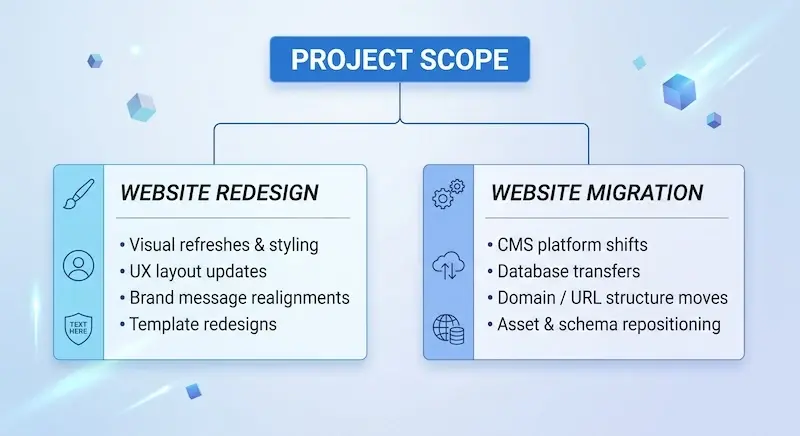 You can complete a redesign without changing your CMS platform, and you can execute a website migration while keeping your exact visual design intact. In practice, however, many organizations combine both efforts to update visual layouts while moving to a modern content platform.
Why Companies Decide to Switch CMS Platforms
Marketing leaders rarely initiate a platform change without strong operational reasons. Most migration projects stem from several recurring pain points:
-
Platform Bottlenecks: Basic site builders such as Wix and Squarespace work well for early-stage companies. As marketing teams grow, they run into platform limits around custom code, dynamic layout templates, and deep marketing automation. When you compare Wix vs. HubSpot, or Squarespace vs. HubSpot, you'll see glaring problems.
-
Plugin Bloat and Maintenance Overhead: Open-source ecosystems like WordPress offer extensive plugin libraries. However, managing dozens of active plugins often leads to software conflicts, security bugs, and heavy site maintenance fees.
-
Disconnected Customer Data: Legacy CMS platforms often operate in silos. Form submissions arrive in basic email feeds or disconnected databases, forcing teams to rely on manual imports to update their Customer Relationship Management (CRM) tools.
-
Speed and Mobile Performance: Outdated codebases slow page load times, which hurts user experience and lowers search engine rankings.
When a marketing team spends more time managing site maintenance than publishing campaign assets, it is usually time to switch platforms.
5 Critical Things to Know Before You Start
A successful platform change requires thorough technical planning. Before moving a single web page, keep these five essential factors top of mind:
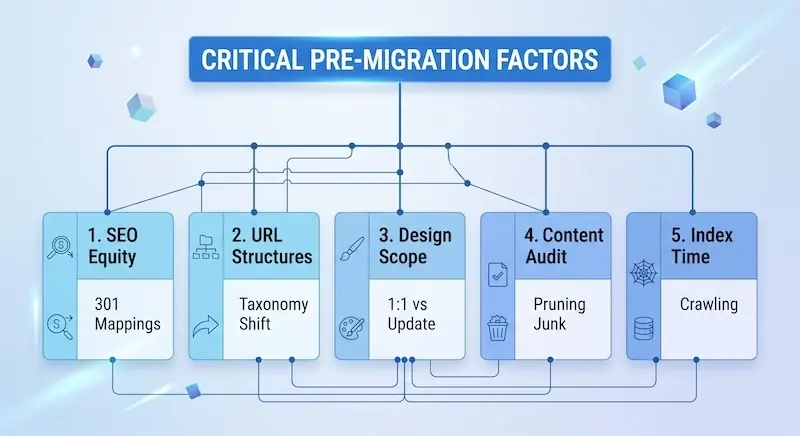 1. Your SEO and Search Rankings Are on the Line
Search engines build trust with specific page URLs over time. When you change platforms, URL paths often change too. If you change a URL without telling search crawlers where the page moved, search engines treat the old link as missing, resulting in a 404 error and lost rank authority.
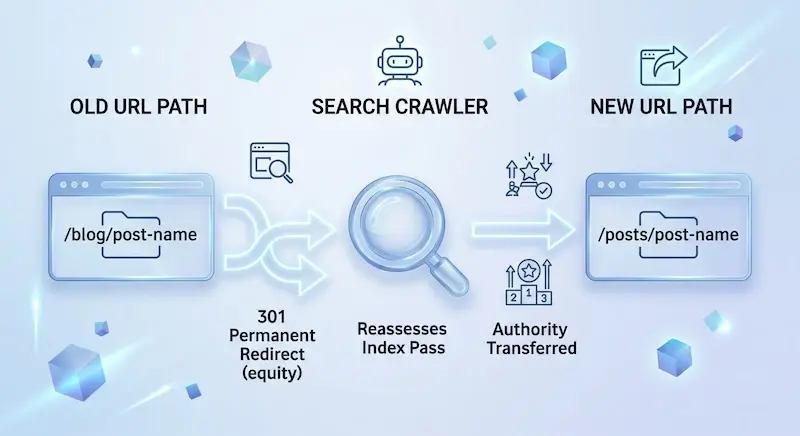 This is where 301 redirects become vital. A 301 redirect is a permanent instruction telling search engines that a page has permanently moved to a new destination. It passes search authority to the new URL path, protecting organic search rankings.
According to an SEO industry migration study published in Search Engine Journal,
Improper domain and site migrations can cause organic traffic drops that take an average of 523 days to fully recover.
Creating a clear 301 redirect mapping document before launch is essential for protecting search equity.
2. URL Structures Almost Always Change
Different CMS platforms organize web pages using distinct structural rules. For instance, WordPress might publish blog posts using a path format like:
/year/month/post-title
Whereas a modern cloud CMS might default to:
/blog/post-title
Auditing your legacy URL paths early lets you catch structural changes before going live. This audit helps ensure that every existing URL points directly to its correct destination on the new platform.
3. Design Scope: 1:1 Replication vs. Template Updates
Before starting a migration project, decide whether you want to recreate your site pixel-for-pixel or update page layouts.
-
1:1 Replication: Preserves exact visual design, fonts, spacing, and layouts on the new platform. This approach protects brand recognition, but it can carry over old UX issues into the new system.
-
Template Updates: Uses pre-built theme frameworks and modern drag-and-drop global layout templates to refresh site appearance. This choice speeds up development and improves mobile responsiveness, though it requires slightly more time for design review.
Most marketing teams opt for a hybrid approach: they maintain the primary brand styling while updating page layouts to improve mobile responsiveness.
4. Content Cleanup: Do Not Migrate Junk Pages
A website migration offers an ideal opportunity to clean up your content library. Moving every single legacy page—including outdated news posts, draft landing pages, and duplicate content—wastes migration time and bloats your new CMS.
Before moving files, complete a comprehensive content audit:
| Content Status | Metric Criteria | Action Required |
|---|---|---|
| High Value | Organic search traffic, active backlinks, and lead conversions | Migrate completely & update links |
| Outdated Content | Out-of-date product details, low traffic | Refresh content & migrate |
| Low Value / Thin | Zero traffic in 12 months, no backlinks, obsolete | Delete & 301 redirect to the relevant page |
Pruning thin, low-performing content improves your crawl budget, helping search engines discover and rank your valuable pages faster.
5. Post-Launch Indexing Takes Time
Even with a flawless technical execution, search engines like Google require time to crawl new site architectures, process 301 redirects, and update search index records.
Plan for a brief post-launch adjustment period. Organic search numbers may shift slightly for a few weeks while search crawlers process your new URL paths. Communicating this adjustment phase to internal stakeholders helps set realistic expectations during the post-launch review.
Common Pitfalls That Kill Traffic & Conversions
Site migration mistakes can damage search visibility and interrupt lead capture. Watching out for common pitfalls helps protect marketing performance during a platform move.

Broken Links and Missing Metadata
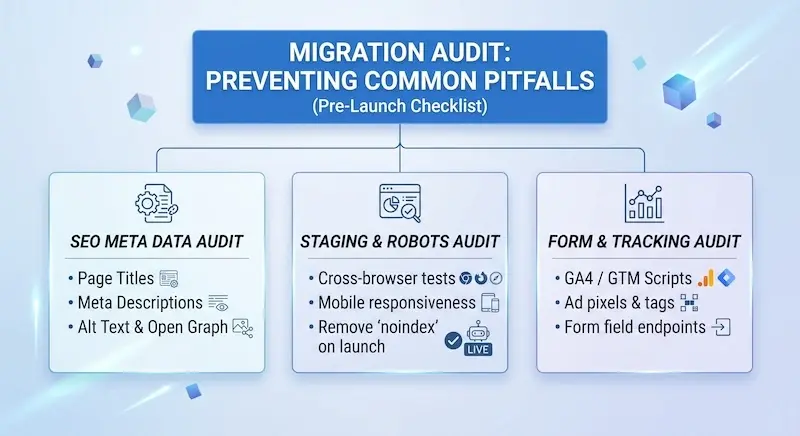
During a website migration, it is easy to forget about page titles, meta descriptions, alt text tags, and social media preview tags. If these elements drop off during content transfer, search visibility can decline quickly.
At the same time, missing internal links lead to 404 errors, frustrating site visitors and preventing search crawlers from efficiently indexing deeper pages.
Launching Without Testing Staging Environments
A staging environment is a private copy of your new website where developers build templates, migrate content, and test site logic before public launch. HubSpot calls it their Sandbox.
Launching without thorough staging reviews often brings hidden errors to light on your live site. Common mistakes include:
-
Unresponsive Mobile Layouts: Navigation menus or tables breaking on smartphones.
-
Indexing Mistakes: Forgetting to remove a noindex meta tag from staging, which accidentally tells search engines not to index your live site.
-
Broken Interactive Code: Embedded tools, interactive forms, or script tags failing to load.
Thorough testing in staging prevents visible bugs on launch day.
Forgetting Tracking Scripts and Web Forms
A site transition can accidentally break marketing tracking. If tracking scripts—such as Google Analytics 4 tags, conversion tracking tags, or tag management scripts—are omitted during code cutovers, your reporting data stops flowing.
Even worse, unmapped web forms can cause incoming leads to disappear. If form submissions on your new site do not map directly to your marketing automation tools or sales CRM, new inquiries will fail to route to your sales team.
Why Moving to a CRM-Driven CMS Matters
Modern web strategies go far beyond publishing static pages. Today's websites serve as interactive channels designed to capture interest, measure engagement, and turn visitors into buyers.
Connecting Web Pages to Customer Data
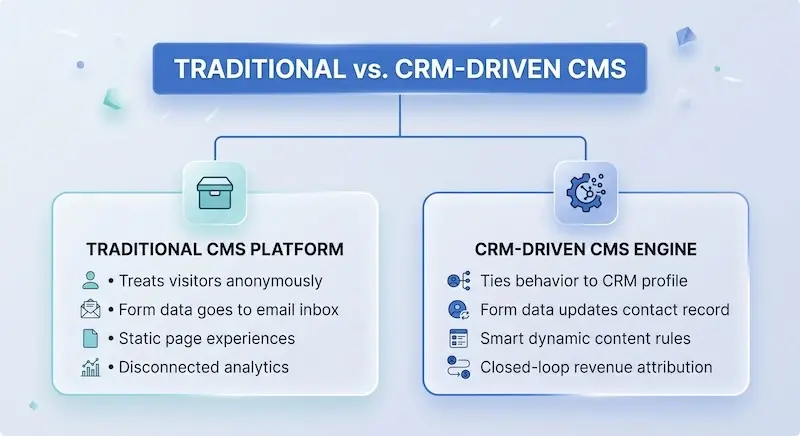
Traditional CMS platforms treat site visitors as isolated pageviews. A CRM-driven platform, by contrast, links visitor behavior directly to unified customer records.
When your website connects natively to your CRM, marketing teams gain clear operational advantages:
-
Personalized Web Experiences: Display dynamic calls-to-action (CTAs) and personalized page content based on a visitor's industry, company size, or lifecycle stage.
-
Closed-Loop Attribution: Track customer engagement from initial blog post view to final deal close, making it easy to see which marketing channels drive actual revenue.
-
Automated Lead Hand-offs: Instantly assign incoming form leads to account reps based on geographic region or company size, speeding up follow-up time.
The Advantage of HubSpot Content Hub
Upgrading to a connected system like HubSpot Content Hub replaces fragmented marketing software with a single unified platform.
Instead of juggling separate website hosts, security software, form plugins, and analytics tools, Content Hub builds your web experience directly on top of central CRM records.
According to market research published by Datanyze,
HubSpot commands a 31.6% market share in the marketing automation space, supporting over 288,000 businesses globally.
By unifying your content management system and sales database into a single workspace, your team spends less time fixing platform integrations and more time driving revenue growth.
Taking Your Next Strategic Step
A website migration is far more than an IT chore. Executed well, moving to a modern platform protects your organic search equity, simplifies marketing workflows, and turns your site into an active lead-generation engine.
By auditing existing assets, mapping 301 redirects, testing staging builds, and migrating to a CRM-driven ecosystem like HubSpot Content Hub, you position your brand for sustainable, long-term growth.
If your marketing team wants to update its digital platform without risking a loss of search traffic, expert migration support makes all the difference. Explore HubSpot CMS Migration Services from Aspiration Marketing to see how experienced migration specialists can manage your platform transition safely and efficiently.







Leave a Comment
Have thoughts on this article?
Share your feedback, ask questions, or join the discussion with our community.