





Are you building a digital brochure, or are you creating an engine for predictable business growth?
Every growing brand hits a point where its website needs to change. What starts as a simple, attractive online storefront must eventually become an active revenue driver. As your lead volume increases, your marketing needs get more complex. You suddenly need automated lead routing, smart content personalization, multi-touch analytics, and reliable customer relationship management (CRM) integration.
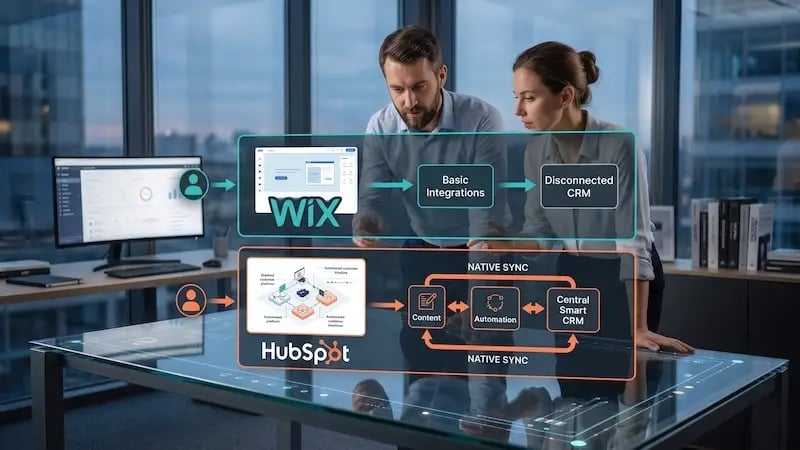 This brings decision-makers to a clear crossroad. Should you stay with a flexible, drag-and-drop website builder like Wix, or transition to an integrated growth engine like HubSpot Content Hub?
Choosing between Wix vs. HubSpot Content Hub is not just a cosmetic decision. It affects how fast your marketing team can publish pages, how well you understand your buyers, and whether your web traffic actually turns into closed deals. As we've done previously with our blog that pitted WordPress vs. HubSpot, let's compare the two platforms to see which best fits your long-term growth goals.
Overview: What Is the Difference Between Wix vs. HubSpot Content Hub?
Wix is a visual, drag-and-drop site builder designed for freelancers, local businesses, and early-stage companies that need a quick, low-cost online presence.
HubSpot Content Hub is an AI-powered content management system (CMS) built directly on a central CRM engine.
While Wix excels at easy layout edits without coding, HubSpot Content Hub is designed for scaling B2B and B2C brands that require dynamic content personalization, closed-loop revenue reporting, advanced search engine optimization (SEO), and automated lead generation.
Platform Overview: Speed vs. System Architecture
To make an informed choice, you need to look at how each platform handles core site infrastructure and user data.
Wix: The Visual Pioneer
Wix built its reputation on ultimate creative freedom. Its unstructured visual canvas lets non-technical users place text, images, and buttons anywhere on a page.
According to market research from W3Techs,
Wix powers roughly 2.5% of all websites whose content management systems are known, making it a major player in the website builder space.
It offers low starting costs, pre-built design templates, and an intuitive app store. For early-stage businesses, it provides everything needed to launch a digital presence in a single afternoon.
HubSpot Content Hub: The Growth Engine
HubSpot Content Hub approaches web management from an entirely different angle. Instead of treating your website as an isolated set of pages, HubSpot builds your site directly on top of the HubSpot Smart CRM platform.
According to research from Datanyze,
HubSpot commands a 31.6% market share in the broader marketing automation category, powering over 288,000 businesses worldwide.
Every page view, form fill, and content download instantly updates a central customer timeline. As a result, your marketing, sales, and service teams always work from the exact same real-time data source.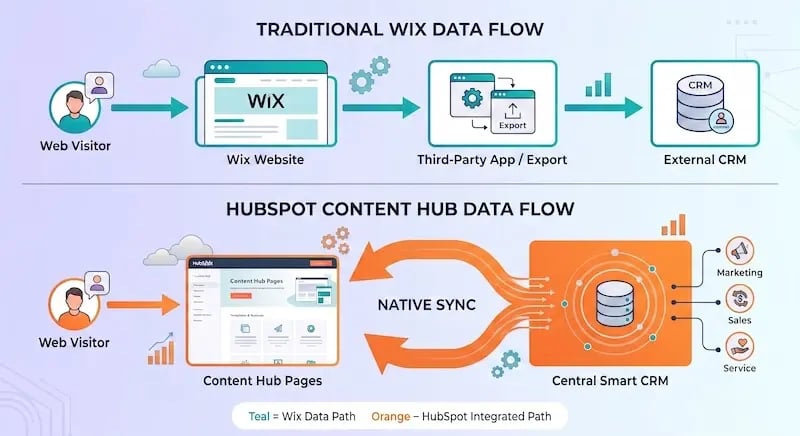
Ease of Use vs. Scalability: The Trade-Off
How much creative freedom do you actually need, and at what point does unstructured design become a liability?
Wix's Unstructured Canvas
Wix uses a free-form drag-and-drop editor. You can pick up any element and move it anywhere on your screen. While this offers total freedom for single pages, it creates challenges as your site grows:
-
Inconsistent Branding: Without strict global design guidelines, team members may inadvertently use incorrect fonts, colors, or button sizes.
-
Mobile Responsiveness Issues: Moving elements freely on the desktop view can break layout alignment on mobile screens, requiring manual tweaks for every page.
-
Code Overhead: Free-form visual editors often generate heavy background code. Over time, this bloat can slow page load times.
HubSpot's Structured System
HubSpot uses a modular design architecture. Developers build flexible, reusable themes and drag-and-drop page templates using global styling controls. Marketers can then create custom landing pages and blog posts using safe design blocks.
This means:
-
Brand Protection: Global style settings automatically enforce brand guidelines across hundreds of pages.
-
Mobile Efficiency: Page templates are mobile-responsive by default, eliminating the need for manual layout fixes.
-
Marketer Independence: Marketing teams can publish new conversion pages without hiring web developers or worrying about breaking page code.
SEO Capabilities and Content Strategy
Can search engines find, index, and trust your website content as you scale up your marketing?
 Basic SEO vs. Advanced Strategy
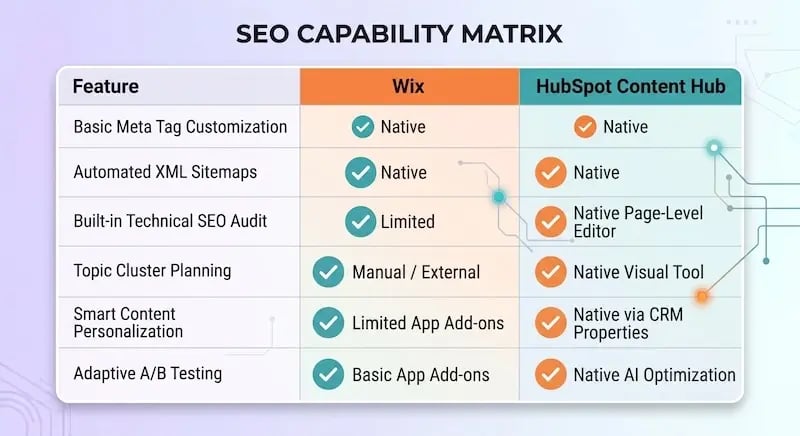
Wix has made great strides in its technical SEO features over the past few years. It offers customizable meta tags, standard URL redirects, canonical tags, and automatic XML sitemaps. For local businesses and simple content sites, these tools cover the essential bases.

However, growing brands need more than basic page tags. They need structured content strategies that build real domain authority.
Topic Clusters and Native Technical Audits
HubSpot Content Hub builds advanced SEO tools directly into the publishing interface:
-
In-Context SEO Recommendations: As you write blog posts or edit landing pages, HubSpot scans your content in real time. It alerts you to missing meta descriptions, slow image load times, broken links, and poor keyword usage before you publish
-
Native Topic Cluster Tools: Search engines favor sites that display clear topical authority. HubSpot includes visual topic cluster planning tools. These help you link core pillar pages to subtopic articles, signaling clear authority to Google's ranking algorithms.
-
Global Multi-Language Management: For brands targeting international audiences, HubSpot manages multi-language variations from a single page editor. It applies proper hreflang tags automatically so search engines display the correct language version to each reader.
Analytics, Attribution, and Data Intelligence
Do you know which specific blog post or landing page generated your highest-value customer this month?
The Wix Analytics Gap
Wix provides clean, readable analytics dashboards that track basic website activity. You can quickly view overall traffic numbers, top pages, unique visitors, bounce rates, and basic form submission counts.
The issue is that these metrics operate in isolation. Wix shows you that a user submitted a form, but it cannot easily show you what that customer did two weeks later. Did they open your follow-up emails? Did they book a sales call? Did they purchase your enterprise software tier? Answering these questions on Wix requires manual spreadsheet exports or custom API connectors.
Closed-Loop Reporting in HubSpot
Because HubSpot Content Hub runs on the central Smart CRM, it offers complete closed-loop revenue reporting. The system tracks a visitor from their very first organic search visit through every content view, form submission, and sales conversation, all the way to closed-won deals.
According to research from HubSpot's State of Sales Report,
52.2% of sales professionals report that sales-and-marketing misalignment is a primary driver of lost revenue.
HubSpot bridges this gap by offering multi-touch attribution models. Marketing leaders can directly prove which content assets drive closed revenue, allowing them to reinvest in high-performing topics with complete confidence.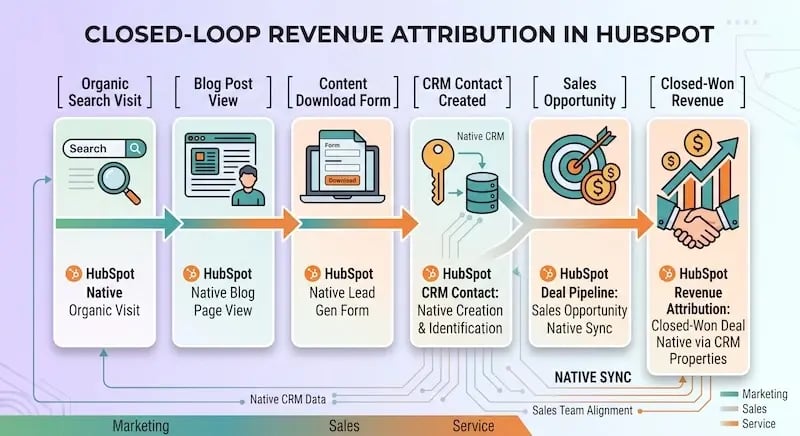
Marketing Automation and Tech Stack Ecosystem
What happens after a visitor fills out a contact form on your website?
Wix Automation
Wix includes built-in transactional automations. You can set up automated confirmation emails, basic task reminders, and abandoned cart notifications for online stores.
To build complex lead-nurturing paths, you must rely on third-party integrations from the Wix App Market. Over time, managing multiple app subscriptions leads to "plugin fatigue," potential software conflicts, and unexpected monthly software fees.
The Integrated HubSpot Ecosystem
HubSpot Content Hub connects seamlessly with Marketing Hub, Sales Hub, Service Hub, and Operations Hub. Instead of basic auto-replies, you can build multi-branch automation workflows triggered by deep visitor actions:
-
Behavioral Alerts: When a high-value prospect visits your pricing page three times in 24 hours, HubSpot automatically sends a alert to their assigned sales representative.
-
Dynamic Content Personalization: A returning client sees personalized page headers, recommended resources, and call-to-action buttons based on their industry or current lifecycle stage.
-
Lead Scoring: Combine website page views, email engagement, and CRM activity to automatically score prospects' purchase intent.
Total Cost of Ownership: Upfront Savings vs. Scaling Costs
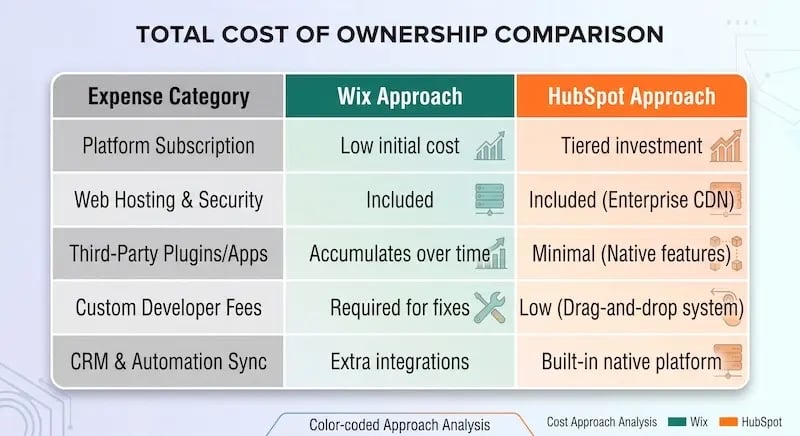
When comparing software options, looking only at the initial monthly subscription price can be misleading.
 The Real Cost of Wix at Scale
Wix appears inexpensive on paper, with accessible monthly pricing plans. However, as your business grows, hidden operational expenses tend to stack up:
-
Third-party app subscriptions for advanced forms, live chat, and pop-ups.
-
Developer fees to fix custom code or layout issues.
-
External CRM software licenses and integration tools are needed to sync lead data.
-
Lost sales revenue caused by unrouted or delayed prospect follow-ups.
The Predictable Value of HubSpot Content Hub
HubSpot Content Hub has higher subscription prices across its Starter, Professional, and Enterprise tiers. However, it consolidates your web hosting, security, form builder, SEO tools, analytics engine, and CRM database into a single, predictable platform.
By eliminating the need for separate software add-ons and custom integration maintenance, companies often reduce their overall tech stack complexity while driving higher lead conversion rates.
5 Clear Signs Your Brand Has Outgrown Wix
How do you know it is time to upgrade your content platform? Here are five common signs:
-
Manual Lead Exports: Your marketing team spends hours downloading spreadsheet contacts from Wix and manually uploading them into a separate email marketing tool or CRM.
-
Missing Revenue Attribution: You cannot prove which specific blog posts or landing pages are generating closed sales deals for your business.
-
Mobile Layout Issues: Your web pages frequently break on mobile screens, or your site's speed drops due to excessive third-party apps.
-
Static Content for Everyone: You want to deliver personalized content based on a visitor's industry or lifecycle stage, but your site builder only supports static pages.
-
Disconnected Sales Teams: Your sales representatives have no visibility into what web pages or content assets a prospect viewed before jumping on a sales call.
Making the Strategic Upgrade to HubSpot Content Hub
Upgrading your content management platform does not have to disrupt your daily business operations. A successful technology transition relies on proper planning, clear data mapping, thorough content audits, and careful migration execution. As we've demonstrated in our previous comparison of WordPress vs. HubSpot, there are key considerations to keep in mind.
Transitioning to a new content infrastructure requires carefully preserving your search engine rankings, cleanly transferring customer records, and training your team on modern marketing automation tools. This is about more than just pitting Wix vs. HubSpot in a head-to-head battle of features; it's about finding the right platform for your business to scale and grow.
To ensure your platform upgrade delivers rapid results, working with an experienced implementation team like Aspiration Marketing helps safeguard your SEO authority, streamline your data architecture, and build a scalable content engine tailored to your long-term revenue goals.






Leave a Comment
Have thoughts on this article?
Share your feedback, ask questions, or join the discussion with our community.