





Customer satisfaction and loyalty are paramount to an organization's success. Customer Effort Score (CES) surveys are a powerful tool for gauging customer experience and identifying pain points in the service process.
Businesses can streamline their feedback management and unlock valuable insights by integrating CES surveys into HubSpot Service Hub. In this blog, we delve into CES surveys, exploring their significance in measuring customer effort and loyalty.


What is a CES Survey?
A Customer Effort Score (CES) survey is a customer feedback metric designed to measure the ease of a customer's experience while interacting with a company's products, services, or support. Unlike traditional customer satisfaction surveys (CSAT) that focus on overall satisfaction, CES surveys specifically assess the level of effort a customer must exert to achieve their desired outcome.
The concept behind CES surveys is rooted in the belief that reducing customer effort leads to greater loyalty and retention. When customers encounter minimal hurdles and friction in their interactions, they are more likely to feel satisfied and inclined to continue their relationship with the brand.
CES surveys typically ask a single question, such as "How much effort did you put forth to resolve your issue?" or "On a scale of 1 to 10, how easy was it to use our service?" Customers then provide a numerical rating, with higher scores indicating a more effortless experience.
These surveys provide businesses with valuable insights into pain points in their customer journey, allowing them to identify areas for improvement and make data-driven decisions to enhance the overall customer experience. Integrating CES surveys into HubSpot Service Hub empowers businesses to gather, analyze, and act upon customer feedback effectively, ultimately fostering more robust customer relationships and driving long-term success.
Customer effort is 40% more accurate at predicting customer loyalty as opposed to customer satisfaction.
CES Surveys in HubSpot Service Hub
Businesses can leverage the HubSpot Service Hub with CES surveys to develop a robust and streamlined approach to capturing customer feedback and enhancing the overall customer experience. As a comprehensive customer service management platform, HubSpot Service Hub seamlessly integrates CES surveys into its suite of tools, making it easier for businesses to collect, analyze, and act on customer feedback.
With HubSpot's CES survey feature, setting up and deploying surveys becomes straightforward. Users can create customized CES surveys tailored to their specific business needs, incorporating branding elements to maintain consistency with their overall brand image. The flexibility in survey design ensures that businesses can align the questions with their customer journey touchpoints, capturing feedback at critical stages to gain valuable insights.
HubSpot's Service Hub provides multiple options for survey distribution, enabling businesses to send CES surveys via email, in-app messaging, or even embed them on their website. This versatility in distribution channels increases the likelihood of receiving a higher response rate, as customers can provide feedback through their preferred communication method.
The real-time feedback collection feature of CES surveys in HubSpot empowers businesses to proactively address customer issues and concerns. When a customer submits a CES survey response, the data is available in the HubSpot dashboard, facilitating prompt analysis and immediate action. This agility in response allows businesses to resolve customer problems swiftly, fostering a positive brand perception.
Moreover, integrating CES surveys with HubSpot's comprehensive customer service tools enables businesses to track customer feedback over time. This longitudinal analysis helps identify trends, patterns, and improvements in customer experience, allowing companies to make informed decisions based on historical data.
In addition to real-time insights, HubSpot Service Hub's reporting and analytics capabilities offer in-depth analysis of CES survey results. Businesses can interpret CES scores, track trends, and generate reports to identify strengths and weaknesses in their customer service approach. With this knowledge, companies can develop targeted strategies to reduce customer effort, enhance satisfaction, and improve customer loyalty.
Ultimately, CES surveys in HubSpot Service Hub empower businesses to take a customer-centric approach to service delivery. By listening to the voice of the customer and acting on their feedback, companies can build stronger relationships, foster brand advocacy, and position themselves as leaders in their respective industries.
Setting Up Your Survey
Setting up your CES survey in HubSpot Service Hub is a straightforward process allowing you to tailor the survey to your business needs. Here's a step-by-step guide to getting started:
- Define your survey objectives: Before creating the survey, clarify the goals you want to achieve. Determine the specific customer experience aspects you want to measure and improve.
- Choose the right survey tool: HubSpot's Service Hub offers a user-friendly survey tool that integrates seamlessly with your customer data. Select the CES survey option and start customizing.
- Craft clear and concise questions: Keep your survey short and focused to ensure maximum participation. Use simple language and ask questions directly about the customer's effort while interacting with your company.
- Determine the survey touchpoints: Identify the key moments in the customer journey where you want to deploy the survey. This could be after a support ticket resolution, a purchase, or a relevant touchpoint.
- Set up survey distribution: Decide how you want to send the survey—via email, in-app messaging, or embedded on your website. HubSpot's Service Hub allows you to automate survey distribution based on your chosen touchpoints.
- Test the survey: Conduct a test run before launch to ensure it functions correctly and looks appealing to respondents. Test the survey on different devices to ensure a seamless experience.
- Launch and collect feedback: Once satisfied with the survey, launch it to your target audience. Monitor responses in real time through the HubSpot dashboard.
- Analyze the results: Use HubSpot's reporting and analytics features to interpret the survey data. Identify trends, strengths, and areas for improvement to inform your customer service strategies.
Setting up your CES survey in HubSpot Service Hub is essential to gathering valuable customer feedback, enabling you to make data-driven decisions and optimize the customer experience effectively.
Survey Questions to Consider Using
Effective survey questions are crucial to gather valuable insights from your CES surveys in HubSpot Service Hub. Consider using the following types of questions:
- Effort Rating Scale: Utilize a scale (e.g., 1 to 5) to gauge the level of effort customers experience while interacting with your brand. For instance, "On a scale of 1 to 5, how easy was it to resolve your issue?"
- Open-Ended Questions: Include open-ended questions to encourage customers to elaborate on their experiences. For example, "What could we do to improve your experience with us?"
- Follow-up Probes: After an initial rating question, follow up with specific probing questions to understand the reasons behind the customer's rating. For instance, "What made it easy/difficult to complete the task?"
- Customer Demographics: Collect basic demographic information (e.g., age, location) to segment responses and identify patterns based on different customer groups.
- Net Promoter Score (NPS) Follow-up: If applicable, consider adding an NPS question to gauge overall customer loyalty. Follow it up with a CES question to measure effort specifically.
Using a mix of these survey questions, you can gain deeper insights into the customer experience and uncover actionable areas for improvement in your HubSpot Service Hub.

Analyze CES Survey Results in HubSpot
Analyzing CES survey results in HubSpot is pivotal in making data-driven decisions to enhance customer experience and service delivery. HubSpot's reporting and analytics features allow businesses to interpret survey data and derive valuable insights effectively.
The CES survey results are conveniently displayed in real-time on the HubSpot dashboard, allowing businesses to monitor customer feedback as it comes in. Companies can quickly grasp the overall trends and patterns in customer effort scores through graphical representations and data visualizations.
HubSpot's reporting capabilities also enable businesses to segment survey results based on various criteria, such as demographics, purchase history, or customer personas. This segmentation helps identify specific areas of concern or excellence, guiding businesses to implement targeted improvements and capitalize on strengths.
To gain a comprehensive understanding of customer sentiment, it's essential to analyze open-ended responses from the CES survey. HubSpot's text analysis tools can help businesses uncover common themes, sentiments, and keywords, allowing for deeper insights into customer feedback.
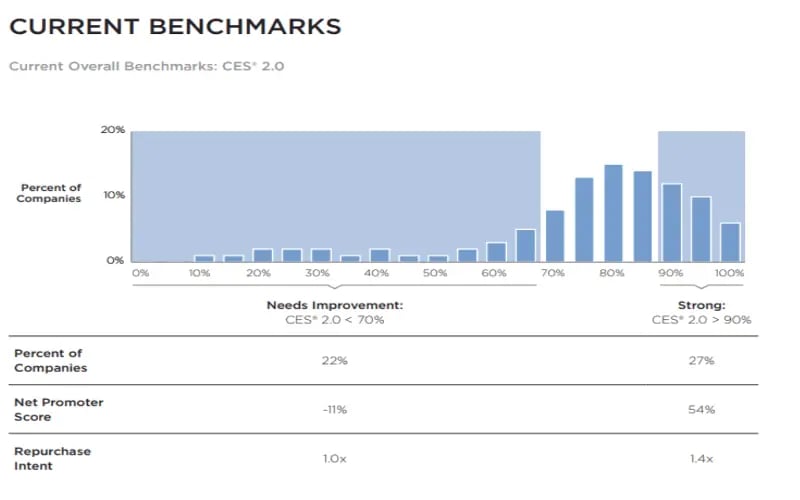
Additionally, businesses can benchmark their CES scores against industry standards and past performance, identifying progress and setting realistic improvement goals.
By leveraging HubSpot's powerful analytics features, businesses can transform raw data from CES surveys into actionable strategies. This proactive approach enables them to address pain points promptly, optimize the customer experience, and foster lasting customer loyalty while maximizing the potential of their HubSpot Service Hub platform.
Industry CES Benchmarks
Improving Customer Service with CES Surveys
CES surveys integrated with HubSpot Service Hub are indispensable tools for businesses seeking to elevate their customer service standards. By utilizing these Customer Effort Score surveys, organizations can measure and minimize customer effort, leading to enhanced customer satisfaction and increased loyalty.
Through HubSpot's user-friendly survey setup and real-time analytics, businesses can gain valuable insights to identify areas for improvement and implement targeted strategies. Embracing a customer-centric approach and leveraging CES surveys as part of the customer feedback process empowers businesses to drive continuous improvement, build strong customer relationships, and stay ahead in the competitive market.
Looking for support in your HubSpot efforts? Contact our accredited consulting team for help with HubSpot onboarding and services!






Leave a Comment
Have thoughts on this article?
Share your feedback, ask questions, or join the discussion with our community.