





Let me paint you a picture. You wake up, open Ads Manager, and see $0.00 spend. Your campaign status says "Active," but nothing is moving. You check your budget - it's fine. You check your creative - it looks good. So what the heck is going on? A Facebook ad delivery failure is an issue where an active ad campaign fails to spend its budget or reach its target audience, often showing $0.00 spend despite being approved.
My friend Marcus runs a supplement brand, and this exact thing happened to him. He had a product launch scheduled, a full creative set ready, and $3,000 in budget waiting to be spent, but everything he had was zero-spend.
This happens to almost every advertiser at some point, and it is frustrating precisely because the problem is invisible. Meta's automated system quietly decided to stop showing your ads, and the system didn't exactly leave you a sticky note explaining why.
The good news? Most Facebook ad delivery failures trace back to a handful of root causes. This checklist walks you through exactly where to look and how to resolve Facebook ad delivery failures.
Common Reasons for Facebook Ad Delivery Failure
Before you start changing things, you need to understand what's actually happening under the hood.
A Facebook ad delivery failure often occurs because Meta's delivery system, which runs on three core pillars, experiences a breakdown. When any one of these elements fails, the system pauses your campaigns. The pillars are:
- Data: The system needs a constant stream of reliable performance data from the Meta Pixel or Conversions API to optimize ad delivery.
- Money: Your budget and bid strategy must be competitive enough to win in the ad auction.
- Relevance: Your ads must maintain a high relevance score, indicating a positive user experience.
Here are the most common reasons these Facebook ad delivery failures happen.
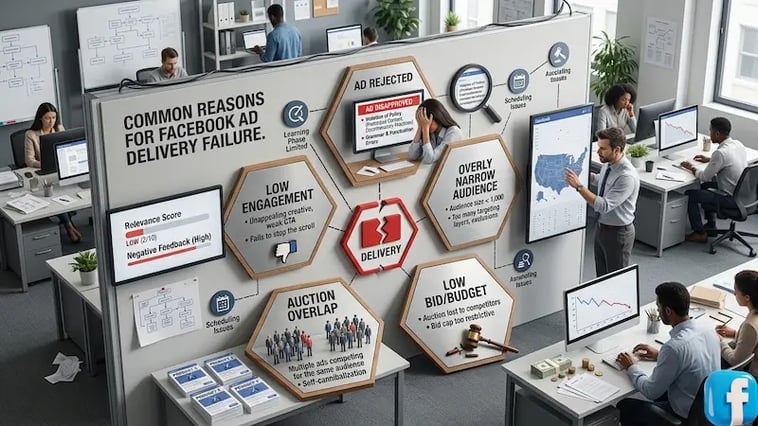
1. Facebook Ad Bid Cap Too Low: Auction Competition Failures
If you're using a manual bid strategy and competition heats up in your niche, your static bid becomes stale fast. The auction keeps moving, but your cap stays frozen. Meta skips your ad because your offer doesn't meet the floor requirements.
I know a media buyer named Sarah who managed e-commerce accounts for a living. She set a $12 Cost Cap for a client in the home decor space and walked away for a long weekend.
By Monday, Q4 competition had pushed the market rate to $18. Her ads hadn't spent a single dollar in three days. The campaign looked fine on the surface (budget available, audience size good, creative approved), but the bid was just too low for the room.
2. Your Tracking Signal Went Quiet:
Meta requires a steady stream of data to find your customers. If your Conversions API (CAPI) or Pixel loses connection, the algorithm "goes blind" and pauses delivery because it cannot verify performance.
3. Creative Fatigue and Low Quality Scores:
Creative fatigue is a phenomenon where ad performance declines because the target audience has seen the ad too many times, leading to lower engagement and negative feedback. Users now consume content faster than ever. If your "Ad Relevance Diagnostics" show high negative feedback or low engagement, Meta will deprioritize your ad in the auction to protect the user experience.
For example, a friend of mine, James, ran the same video ad for 11 weeks on a fitness offer. It worked great for the first four weeks. Then the frequency crept up, negative feedback piled in, and delivery quietly collapsed.
He thought it was a tracking issue. He rebuilt his entire pixel setup before someone finally told him to just change the creative. New video, same offer, same audience - delivery came back within 24 hours.
4. The "Shadow" Learning Phase:
The Learning Phase is an initial period where Meta's delivery system explores the best way to deliver your ad set by gathering performance data. Here's one that catches many advertisers off guard. Every time you tweak a budget, adjust targeting, or swap a creative, you push the ad set back into the Learning Phase.
If you're editing often, you can trap a campaign in a permanent state of re-learning. The status shows "Active," but delivery is basically throttled.
5. Billing and Policy Friction:
Even a temporary glitch with a primary credit card can trigger a delivery pause. Additionally, minor policy violations (such as a slow-loading landing page) can result in throttled delivery without a formal account ban.
Step-by-Step: How to Solve Facebook Ad Delivery Failures
If your ads are currently sitting at $0.00 spend or "Not Delivering," follow these steps in order. This process moves from the account level down to the individual ad level to isolate the blocker.

Step 1: Clear the Billing Blockers
This is the first place to look, and it fixes the problem more often than you'd think.
The "Pay Now" Force: Even if you have updated your card, Meta often requires a manual "Pay Now" click in the Billing & Payments section to clear a previous failed balance.
Reset Account Spending Limit (ASL): Go to Billing > Payment Settings. Check if you have reached your ASL. Today, many advertisers forget they set a limit months ago. The recommended Facebook Account Spending Limit is 2x your monthly budget to prevent delivery interruptions.

Step 2: Diagnose Auction Competition
If billing looks fine, the problem might be your bid strategy.
Switch to "Highest Volume" Bidding: If you are using a Cost Cap or Bid Cap and the ad isn't spending, your cap is likely too low for the current market. Switch the bid strategy to Highest Volume for 48 hours. If delivery resumes, your previous cap was the bottleneck.
Check Audience Overlap: If you have multiple ad sets targeting similar people, they will cannibalize each other. Use the Audience Overlap tool in the Audiences tab. If overlap exceeds 20%, pause the smaller ad sets and consolidate them into a single broad ad set to give the algorithm more room to bid.
Step 3: Fix "Learning Phase" Stalls
If the ad set shows "Active" but the spend is basically zero, you might be stuck in the Learning Phase.
Broaden your targeting: Audiences under 100,000 people are often too small for Meta to find enough of the right users. Remove interest layers and switch to Advantage+ Audience. Today, the algorithm reads creative signals better than manual targeting parameters anyway.
Lower your optimization event: If you're optimizing for Purchases but getting zero conversions, the system doesn't have enough data to find a buyer pattern. Temporarily switch to "Add to Cart" or "Initiate Checkout." Once you consistently hit 50 events per week, move back to Purchases.
Step 4: Resolve Ad-Level Errors
This is where you look at the individual ad, not the campaign.
Check for "Post Unavailable": If you see the error "The Post Associated With Your Ad Is Not Available," the source post was likely deleted, or the permissions changed. You must create a new ad using a fresh post or upload a new video/image.
Verify Landing Page Speed: Meta's crawler will pause delivery if your landing page takes longer than 3 seconds to load on mobile. Test your URL; if it fails, improve site speed, then "Request Review" in the Account Quality dashboard.
| Strategy | Best For | Risk of Delivery Failure |
|---|---|---|
| Highest Volume | Full budget spend, Max reach | Low |
| Cost Cap | Strict CPA control | High (if cap is too low) |
The 2026 Technical Checklist
Before you adjust your ads, you must verify that the underlying infrastructure is stable. Meta’s Advantage+ delivery system prioritizes accounts with strong technical signals. If your foundation is shaky, no amount of creative testing will fix your Facebook ad delivery failures.
Here is a clean, technical checklist you can use:
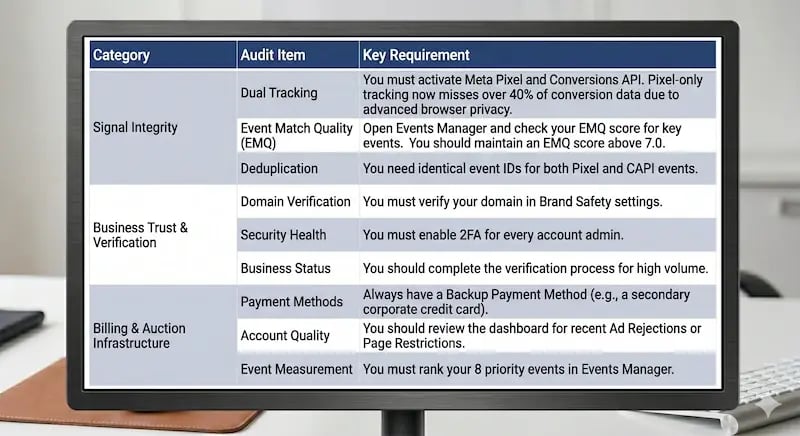
This checklist ensures that Meta's AI has the data and trust it needs to work. A successful delivery is essentially a "handshake" between your server and Meta's. If your CAPI signal is weak or your business identity is unverified, the handshake fails, and your ads stay stuck in the Starting or Limited phase.
Proactive Tips to Prevent Facebook Ad Delivery Failures in The Future
Fixing a delivery failure is one thing. Not having to fix it every month is the actual goal. Long-term success on Meta requires a shift from reactive fixing to proactive maintenance. Here's what the most stable advertisers do differently.
1. Utilize Facebook Agency Ad Accounts
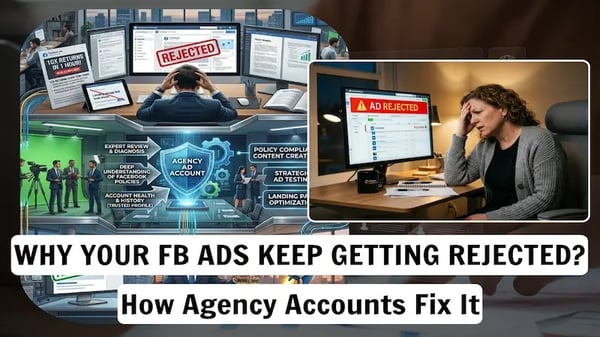
A Facebook Agency Ad Account is a high-trust ad account provided by a Meta Partner Agency, which offers significant advantages for stable ad delivery. If you're scaling aggressively or operating in a sensitive niche, a standard Business Manager can work against you. The trust score on most personal accounts isn't built for high-volume spend, and Meta's automated systems treat sudden growth as suspicious.
Switching to a Facebook Agency Ad Account (often called a Whitelisted account) provides several preventive advantages:
Higher Spending Limits from Day One: Agency accounts typically bypass the "warming up" period, allowing you to scale from $500 to $5,000+ daily without triggering an "Unusual Activity" flag.
Priority Ad Approvals: These accounts are hosted on high-trust Business Managers with direct Meta Partner status. This means your ads are often reviewed faster and are less likely to be caught in automated "shadow" rejection loops.
Dedicated Support Escalation: If a delivery failure occurs due to a technical bug, agency accounts provide a direct line to a Meta representative to resolve the issue in hours rather than weeks.
Reduced Risk of Bans: Because these accounts have a clean history of multi-million-dollar spends, Meta's AI is less aggressive in automated sweeps, keeping your marketing on Facebook campaigns running during global platform updates.
2. Implement a "Creative Refresh" Calendar
Ad fatigue is a leading cause of "silent" delivery failure. When your frequency reaches 3.0 or higher for a single audience, Meta's algorithm begins to throttle your reach to avoid a poor user experience.
The 3-Week Rule: Schedule a creative swap every 21 days for high-spend campaigns.
Dynamic Variation: Use Advantage+ Creative to allow Meta to automatically shuffle headlines and images, extending the life of your assets.
3. Maintain "Signal Health" Monitoring
Don't wait for delivery to collapse before you look at your Event Match Quality score. Open Events Manager once a week and make sure EMQ hasn't dipped below 7/10. If it has, your delivery will get less efficient before it gets bad enough to notice.
One more thing: keep a backup pixel active on your site. If your primary Pixel or CAPI connection glitches, the backup keeps your data stream alive while you fix it. Starting from zero data is a painful setback you can avoid.
4. Establish Financial Redundancy
A simple billing error is the most common reason for a complete campaign shutdown.
Dual Payment Methods: Always have a secondary corporate credit card or a line of credit attached to the account.
Pre-payment Buffers: If using a manual payment account, keep at least 3 days of spend as a balance to avoid the account hitting $0 and pausing the auction.
By following these tips, you can create a stable account foundation that keeps the algorithm in the learning phase longer, leading to more consistent ROAS.
Final Thoughts
Resolving Facebook ad delivery failures requires a balance of technical precision and strategic patience. Run this checklist, fix your foundation, and you'll spend a lot less time staring at $0.00 spend, wondering what went wrong. Remember that a stable foundation is the only way to achieve sustainable scaling in a world where data quality and account reputation define auction winners.
If you're looking to move past these technical hurdles and focus on true scale, the team at Aspiration Marketing specializes in building the high-performance infrastructure and data-driven strategies that keep campaigns delivering—and winning—in today's competitive landscape. Don't let a technicality stand in the way of your growth.






Leave a Comment
Have thoughts on this article?
Share your feedback, ask questions, or join the discussion with our community.