





Most search engines like Google claim that meta descriptions are not taken into account by their algorithms, meaning that the ranking of your links is not based on your meta description. There is, however, an indirect benefit to building a solid meta description for a page.
![6 Tips to Write a Good Meta Description that Converts [+ AI Prompt]](https://blog.aspiration.marketing/hs-fs/hubfs/chub_backup/Blog_SEO_The%20Role%20of%20Content%20Marketing%20in%20SEO.webp?width=800&height=450&name=Blog_SEO_The%20Role%20of%20Content%20Marketing%20in%20SEO.webp)

Why Do Meta Descriptions Matter?
75% of people will click on the first organic search result. The fate of someone clicking on your link lies heavily on your website's meta description, making it one of the most crucial factors to consider.
A well-written meta description can increase your click-through rate by up to 50%. Crafting a well-written meta description can significantly increase traffic and lead conversions, proving that a few carefully chosen words can make all the difference.
What is a meta description?
A meta description is an HTML attribute that provides a brief, explicit summary of a webpage's content for search engine users. Other Meta Tags include Title Tags, Robot Meta Tags, Viewport Meta Tags, and Language Meta Tags. They are a critical component of Search Engine Optimization (SEO) and should be part of a comprehensive SEO audit for your website.
The meta description appears under the clickable link to your page in search engine results pages. In the HTML code, this is what a meta description looks like:
headmeta name="description"content="This is an example of a meta description. This will often show up in search results."/head
While search engines do not directly use meta descriptions to rank your page, they can indirectly impact your ranking by influencing click-through rate (CTR), making it more attractive to humanoids.
A high CTR tells search engines that your blog post is relevant to the search query, which can lead to higher rankings.
Your meta description should be treated as "ad text" - it is trying to sell your link to the user so they click on it. A good meta description can add that small amount of detail that your title tag can't feasibly include, drawing the user's attention and eventually netting your page a visit.
So, just as you carefully craft your title tags to maximize your CTR, you should aim to do the same with your meta descriptions.
Here are some tips to get you started on your meta descriptions:
1. Respect the character limit
155 characters aren't much, but you must ensure it's enough. Going over the character limit will have your meta description truncated, which is more harmful to your CTR than you'd think. If you can ensure all the necessary information is contained within those 155 characters, you're already off to a great start.
Remember that 155 characters are an upper limit, not a goal. If you make a good meta description in less, do it! The most important thing is to keep things concise and focused.

Google.ca's own meta description goes over the 155-character limit and is truncated. The shoemaker hardly ever had the best shoes.
2. Treat it like a title tag
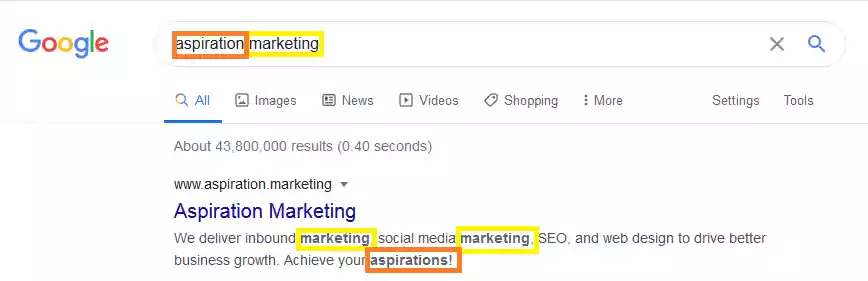
Title tags and meta descriptions go hand-in-hand, so it's good to adopt a similar approach when building them. Ensure you include your usual keywords (especially if some you couldn't fit in your title tag) and power words to maximize their selling power. Search engines will highlight terms in your meta description that match words in the search query, so keep that in mind when choosing which keywords to implement.
Watch out for non-alphanumeric characters in your meta description, like quotation marks, parentheses, and dashes. These are extremely useful in title tags since they buy you precious space for a low character cost. Still, meta descriptions will sometimes get truncated at these characters (especially quotation marks), so it's best to avoid them altogether. It would be a shame to make a good meta description and have it get cut off because you used the wrong characters.
3. Complement your title tag
Treating your meta description as a title tag is good, but you already have one. Sure, use keywords and power words, but avoid being redundant. Leveraging SEO tools can help you determine the best keywords to use.
Your title tag should be good enough, but you want to use your meta description to fill the spaces your title tag leaves. An excellent example of this is a call to action. Implementing them in title tags is hard, but meta descriptions were made for calls to action. Adding something like “Try now” or “Learn more” at the end of your meta description is easy and effective.
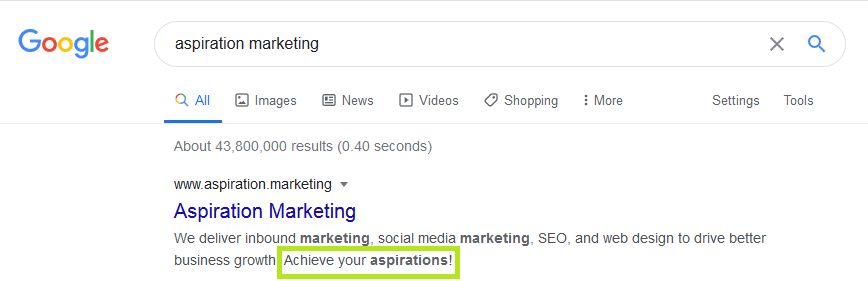
Calls to action are more engaging to readers and make your text less boring. You don't need many characters to write a small call to action, so if you can afford it, include one!
4. Keep your meta description honest
Writing a meta description that doesn't honestly describe your page's content can tempt users to click on your link. This isn't a good idea. First of all, it will surely increase the bounce rate of your page since users who may have clicked on your link because of the meta description won't find what they clicked for and will leave quickly. On top of that, search engines will eventually find out that you're using a dishonest meta description, which can negatively impact your ranking on SERPs.
5. One page, one meta description
Avoid reusing meta descriptions for multiple pages. If a user notices the same meta description for multiple pages, it can look lazy and distasteful, driving them away from your page. If your pages, title tags, and meta descriptions are automated, then there is a real risk that some meta descriptions are getting duplicated or reused. Suppose you can't afford to manually write a meta description for each page (which would be ideal). In that case, you can try to find your pages on a search engine and see if any meta descriptions appear multiple times - especially for your high-traffic pages!
6. Address the reader
Even though it's called a "meta description," you don't want it to be too impersonal and distant. If you can manage to inform the reader about the content of your page while simultaneously addressing them personally in an actionable way, then you've hit the sweet spot.
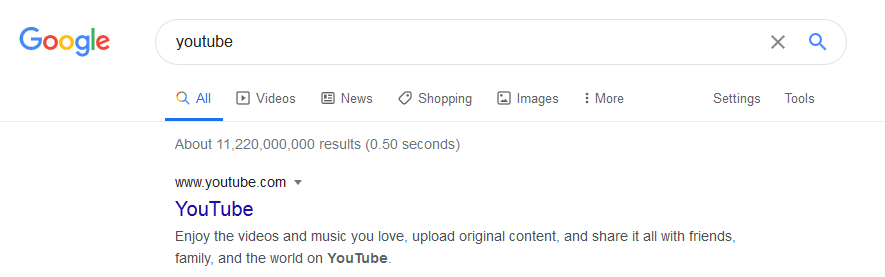
YouTube's meta description is a good example of addressing the reader while describing what the website offers.
AI Prompt
Generating relevant and impactful Meta Descriptions is a great use case for AI. AI will likely not create the perfect, copy-paste-ready Meta Description. However, if you opt for generating more than one suggestion, you'll likely get some good inspirations and will be on a good way with the following prompt:
"You are my SEO Expert. Give me three suggestions for meta descriptions, no more than 155 characters each, SEO-optimized for the keyword <Keyword> for the following web page: <InsertURL>."
"You are my SEO Expert. I am a <describe your business> targeting <buyer persona>. Give me three suggestions for meta descriptions to sell my <Services>, no more than 155 characters each, SEO-optimized for the keyword <Keyword> for the following web page: <InsertURL>."







Leave a Comment
Have thoughts on this article?
Share your feedback, ask questions, or join the discussion with our community.