





Elevate your B2B social media strategy with a powerful LinkedIn Company Page. A LinkedIn Company Page is a dedicated public profile on the LinkedIn platform that allows companies, organizations, and institutions to share information, post updates, list job opportunities, and build a community around their brand. This step-by-step guide will teach you how to create your page in minutes and optimize it for visibility, lead generation, and maximum impact.
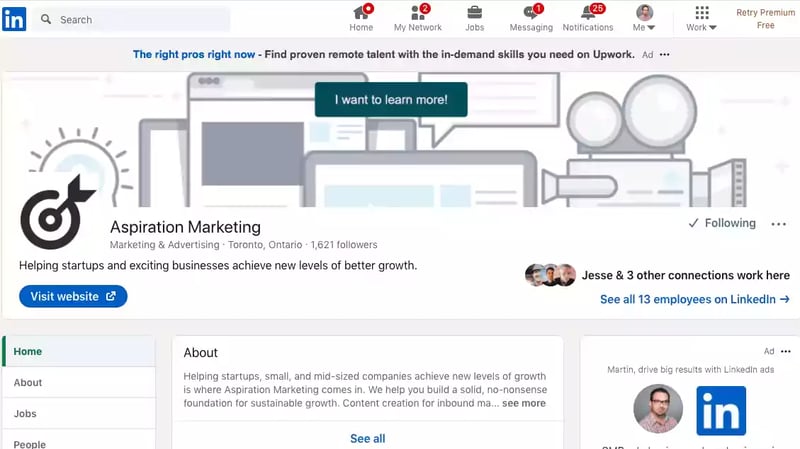
How do you create a LinkedIn Page?
The process of creating a LinkedIn Page is rather straightforward:
- Click the "For Business" icon in the upper-right corner of your LinkedIn homepage.
- Scroll down and click Create a Company Page.
- Select the Page type from one of the following:
- Company
- Showcase page
- Educational institution
- Enter your Page identity, Company or Institution details, and Profile information.
- Check the verification box to confirm that you have the right to act on behalf of the company or school.
- Click the Create page button.
- Click Start building your page! to finish building your LinkedIn Page.
The benefits of creating a LinkedIn Page
Branding, Branding, Branding
A considerable part of building a successful business is ensuring your brand, product, and content are well-recognized and trusted by your target audience and others in your industry. There are multiple ways to build your brand, primarily online. The good thing about having a well-optimized LinkedIn Company Page is that you can build your brand from a centralized place while affecting various groups you want to have exposure to your brand. The three main groups you want to expose your brand to are: your target audience, competition, and skilled individuals in your industry.
Since LinkedIn is a social media platform, there is a clear path to reaching your target audience. People who are curious about your company will look for you on social media, or they'll find whatever links you're providing on your websites. While Twitter and Facebook are there to display your personality, a LinkedIn Company Page is a great place to show people your achievements and goals. Many people working in service industries have a LinkedIn profile of their own anyway, so potential customers visiting your LinkedIn Company Page would not be unusual.
Regarding your competition, you want to aim to be on their radar; it's a good sign. Staying followed by other companies in your field demonstrates that you're worth paying attention to. It's an excellent and unofficial way to gauge how your company is progressing. Connecting with competition also allows for more than a simple battle over market share. It's a small step toward bringing your competition into your network, opening doors toward potential collaborations or partnerships.
Attract Top Talent
Having a LinkedIn Company Page is a fantastic resource for attracting potential employees. The site is a great place to look for jobs, and you can easily create job postings via your company page. LinkedIn is also a one-stop shop for people seeking employment since they can simultaneously apply for and check out your company. A well-made company page paired with a job posting will be much more attractive to skilled workers in your industry than a simple job posting. Having a LinkedIn Company Page lets you showcase your company's culture, values, and job openings to potential candidates.
Connecting With Employees
The odds are that most of your employees have a personal LinkedIn profile. Setting up a LinkedIn Company Page lets your employees connect with your business on the platform. From here, employees can do many things to help your company. First, they can tag your company page in the CV section of their profile. Even if they move on from working with you, that tag will stay. People reading your (ex-) employee's profile will have direct access to your company page, increasing your LinkedIn reach ever so slightly. Do that with every employee you have (regardless of your company's size), and you'll already have an excellent foundation for a healthy LinkedIn network.
Employees can also mention your company in their profile's "Experience" section if you have a company page to attach. It lets them comment positively on your company if you provide excellent and memorable experiences. Outside endorsements of your company are incredibly useful in building a trustworthy brand.
SEO And Branded SEO
SEO is one of the pillars of content marketing. A lot of SEO revolves around using specific keywords to attract traffic. Since character limits are low and buzzwords are everywhere, using the most valuable and relevant words in your SEO strategy has always been essential.
Something often overlooked is the possibility of turning your brand (specifically, your company name) into a keyword. If used correctly, your company name can be combined with keywords to create branded keywords. Branded keywords have the upside of being useful simultaneously from a branding and an SEO perspective.
LinkedIn company pages are a great way of strengthening your branded SEO strategies by helping you establish branded keywords.
A LinkedIn Company Page will likely appear in search queries about your company (probably closely after your official website). Your LinkedIn Company Page showing up on a SERP will crowd out other irrelevant links that may pop up when searching for your company. You want your brand to be extremely recognizable, so the more your brand dominates SERPs, the better.
A LinkedIn company page is also a great place to put your branded SEO strategies to the test. You can discuss products or content you launch that include branded keywords, share them with other industry colleagues, and compare them with other brands. Overall, it's a great place to start.
Staying up to Date
LinkedIn offers a "Notifications" feature to company pages, which sends email alerts when your company is mentioned in someone's personal LinkedIn profile or a post.
Additionally, when people mention your company, if you have a LinkedIn Company Page, LinkedIn will offer users the option to tag your company page in their posts directly. This is free branding for you. All you have to do is have a company page, and other users can redirect people to your page from their posts.
Curating Content
Out of all the social media platforms, LinkedIn is the most "professional." This isn't necessarily good or bad, but understanding LinkedIn culture can benefit how you structure and curate your content.
Since LinkedIn is the most "professional" platform, it also means it has the highest standards to live up to regarding content. Not necessarily standards in terms of the quality of the content, but standards regarding the tone and approach that are appropriate on LinkedIn. A quick look at fast-food chain Wendy's, LinkedIn, and Twitter demonstrates the difference in tone between the two platforms. This is where marketing on LinkedIn can be used as a benchmark test for your other social media platforms. If something can be posted on LinkedIn, it can most likely be posted anywhere else - other social media, blogs, websites, etc. Be careful not to mix things up the other way around: something that can be posted on Twitter (or other platforms) may not be appropriately posted on LinkedIn. Since LinkedIn is the "safest" platform, use that to your advantage.
This goes further than a company's LinkedIn and other social media pages. If something is posted on a company page, then your employees can feel safe reposting or sharing that post on their pages too. A company page that gives your employees the green light on what kind of content is endorsed by the company is a great way to help your employees distribute your content and build your brand.
LinkedIn company pages also allow you to spotlight your most essential pieces of content since it has the pin option. Pinning important posts makes them stay at the top of your company page's news feed, which helps you avoid the massive turnover of social media posts. Use the pin function to keep your best content at the center of your page.
Generate Leads
LinkedIn is a powerful lead-generation tool, and having a LinkedIn Company Page allows you to leverage this potential. You can use your page to showcase your products and services and provide a way for potential customers to contact you directly. You can also use LinkedIn's paid advertising options to reach targeted audiences and drive traffic to your page.
Marketing on LinkedIn is also great for connecting with other businesses, industry professionals, and potential customers. Having a LinkedIn Company Page lets you reach out to and engage with these individuals directly, building valuable relationships that can lead to new business opportunities.






Leave a Comment
Have thoughts on this article?
Share your feedback, ask questions, or join the discussion with our community.