





How many browser tabs do you currently have open to run a single marketing campaign?
If you manage demand generation, the answer is usually too many to count. Marketers spend a massive amount of time jumping between separate applications. You write copy in one application, build landing pages in another, schedule emails somewhere else, and manually assemble performance reports from isolated spreadsheets.
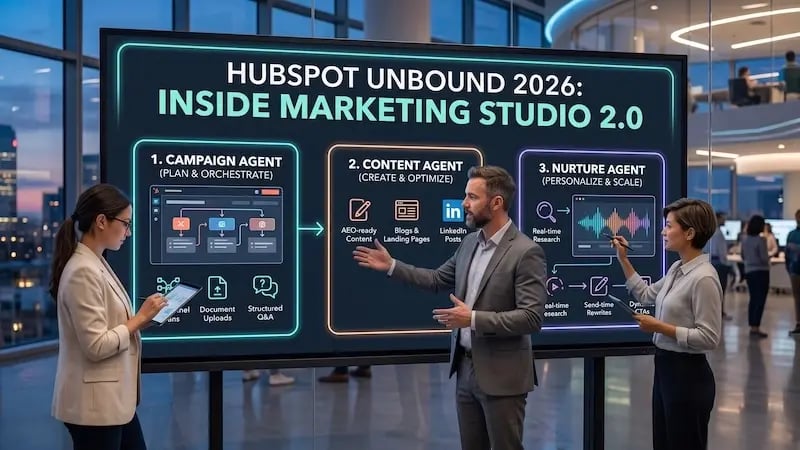 This fragmented approach exhausts your team and creates a broken buyer experience. When your tools don't communicate, your messaging becomes disjointed across channels.
According to Salesforce's State of Marketing benchmark, there are "high performers" and "underperformers" among marketing organizations. "High performers" are defined as marketing leaders who are completely satisfied with their marketing outcomes, whereas "underperformers" are moderately satisfied or less.
Their research found that,
High-performing marketing organizations are 1.5 times more likely than underperformers to have fully integrated marketing technology stacks.
As highlighted in our introduction to the HubSpot UNBOUND 2026: Introducing The New Agentic Customer Platform, modern growth requires moving beyond disconnected tools toward unified intelligence. It's about moving forward with GTM intelligence, relying on Growth Context, and upgrading and supercharging new tools.
This is why HubSpot is releasing its HubSpot Marketing Studio 2.0. Built directly on top of the HubSpot CRM platform, this unified workspace changes how multi-channel campaigns are planned, executed, and measured.
What Is HubSpot Marketing Studio 2.0?
HubSpot Marketing Studio 2.0 is a unified command center designed to help marketing teams build, execute, and optimize multi-channel demand generation campaigns from a single interface. This will be the marquee tool.
Instead of treating campaign management as a static visual planning canvas, HubSpot Marketing Studio 2.0 acts as a connected orchestration layer. It bridges high-level strategy and automated execution by drawing directly from your shared customer data.
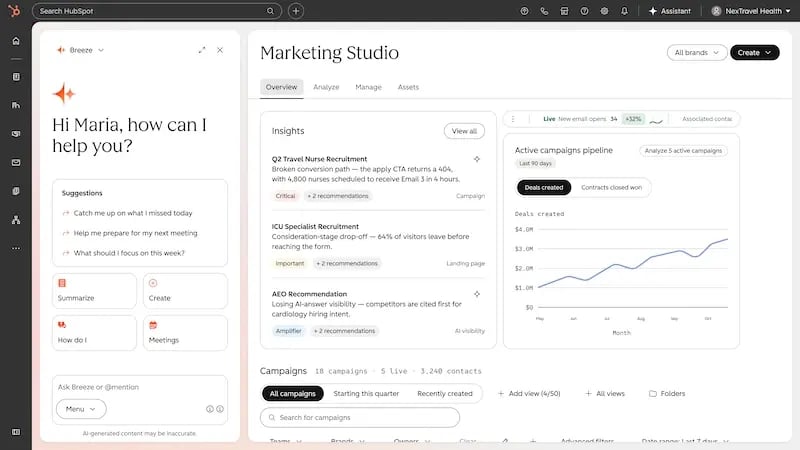
From Canvas to Command Center: What's New in Version 2.0
When the early version of Marketing Studio launched in 2024, it offered a basic visual canvas. However, marketing teams ran into three clear operational hurdles:
-
The user interface felt hard to navigate during fast-paced campaign launches.
-
Analytics lived in separate reporting tabs away from the actual execution tools.
-
Generative AI tools lacked native brand context and weren't super intuitive, resulting in generic copy that required extensive rewriting.
Marketing Studio 2.0 addresses these issues through a complete foundational rebuild.
Centralizing Your Growth Context
Traditional marketing automation platforms struggle because they lack a persistent business context. Marketers waste endless hours re-uploading campaign briefs, brand voice rules, and buyer persona decks into separate tools.
In Marketing Studio 2.0, your workspace connects directly to your platform's robust and shared Growth Context. The system automatically applies:
-
Ideal Customer Profiles (ICPs): Target buyer parameters and pain points.
-
Brand Voice Guidelines: Tone, style, and messaging standards.
-
Historical Performance Metrics: Channel attribution data from past successful campaigns.
-
Market Benchmarks: Performance standards tailored to your specific industry.
Unified Work Management and Execution
Instead of clicking through complex sub-menus to build assets, Marketing Studio centralizes project operations in a single, clean interface.
The unified interface provides:
-
A Unified "Create" Dropdown: Launch landing pages, marketing emails, forms, social ads, or complete multi-channel campaigns from a single button.
-
Centralized Work Management: Shared marketing calendars, task tracking, activity feeds, and approval queues keep everyone aligned.
-
Integrated Asset Library: Filter and organize pre-approved campaign assets across all active channels.
-
Real-Time Analytics Dashboard: Monitor top-line metrics—including attributed revenue, ROI, contacts influenced, and pipeline velocity—directly alongside active campaign work.
So if you wanted to start a campaign from scratch, you would go to create a campaign, and AI takes over with the Campaign Agent and takes you to the canvas. The agent will look at brand contexts, product contexts, past campaigns, and past performance, as well as any documents you want to add (transcripts, new briefs, etc), and will use all that to build out the campaign.
It'll come back with campaign types or directions you can start with, and you can direct it using plain language. Do you want to build an automation? Create social assets? Just ask the Campaign Agent AI in the Marketing Studio 2.0.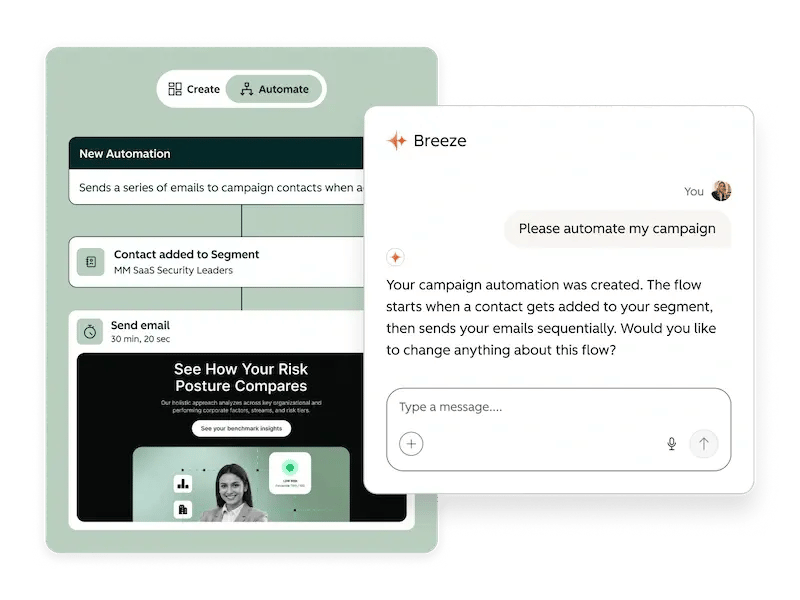
The AI Orchestration Triad: Campaign, Content, and Nurture Agents
Executing complex multi-channel campaigns manually limits your team's speed. Inside HubSpot Marketing Studio 2.0, Breeze Assistant works as your conversational partner, coordinating three specialized AI agents to execute campaigns faster.
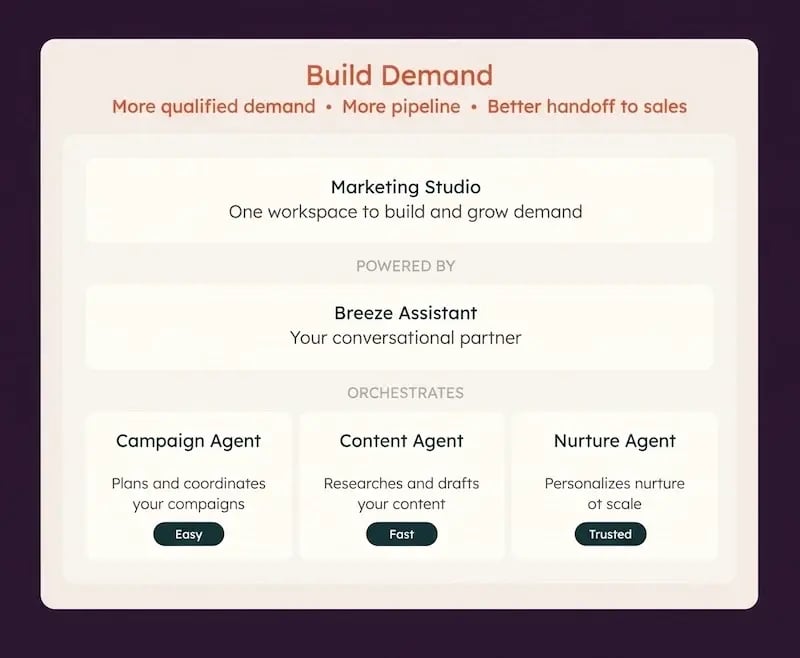
1. Campaign Agent: The Strategic Coordinator
The Campaign Agent manages initial campaign architecture. When you start a project, the agent evaluates your brand guidelines, product details, and historical data to draft a full campaign brief.
Starting a campaign is straightforward:
-
Upload briefing documents or sales call transcripts.
-
Complete a series of short Q&A prompts.
-
Discuss strategy directly using conversational chat.
Once guided, the Campaign Agent builds out your asset framework on the campaign canvas. It generates landing pages, marketing emails, forms, and call-to-action (CTA) buttons that match your brand identity.

Beyond creating assets, the agent helps automate campaign logistics. You can prompt Breeze to build custom automation workflows—such as setting form triggers and follow-up delays. The agent even flags setup issues automatically, such as inactive triggers or unlinked forms, and explains how to fix them.
.webp?width=800&height=500&name=HS%20AI%20Orchestration%20Triad%20(1).webp) 2. Content Agent: Answer Engine Optimization at Scale
2. Content Agent: Answer Engine Optimization at Scale
Drafting original content across multiple platforms can slow down execution. The Content Agent speeds up asset creation for blogs, landing pages, and social media posts.
Crucially, the Content Agent optimizes copy for Answer Engine Optimization (AEO). As conversational AI engines change how buyers research software, the Content Agent structures your content so AI engines can easily index and cite your brand.
3. Nurture Agent: 1-to-1 Personalization at Send Time
Basic personalization typically involves inserting simple property tokens, such as a contact's first name into an email subject line. Modern buyers expect far deeper relevance.
According to research from McKinsey & Company,
Companies that excel at personalization generate 40% more revenue from those activities than average players.
The Nurture Agent upgrades traditional automated email workflows:
-
Preserves Existing Workflow Logic: Your underlying automation triggers and drip timing stay completely intact.
-
Conducts Send-Time Research: Immediately before firing an email, the agent analyzes the recipient's CRM contact properties, site pageviews, form submissions, and company updates.
-
Adapts Copy Dynamically: It rewrites subject lines, preview text, body copy, and CTAs to speak directly to the lead's specific role—such as tailoring messaging for a Finance Controller versus a Software Engineer.
To protect sensitive messaging, marketers can lock specific content modules (such as pricing tables or legal disclaimers) to prevent AI modifications. Teams can also use rollout percentage sliders to split-test personalized sends against standard baselines, building confidence in automated performance.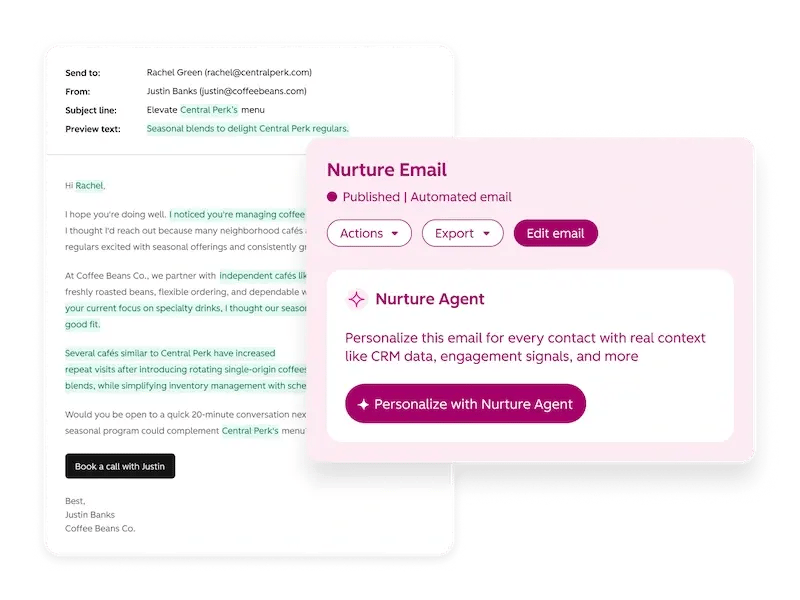
Turn AI into Measurable Outcomes: Key Metrics and Benchmarks
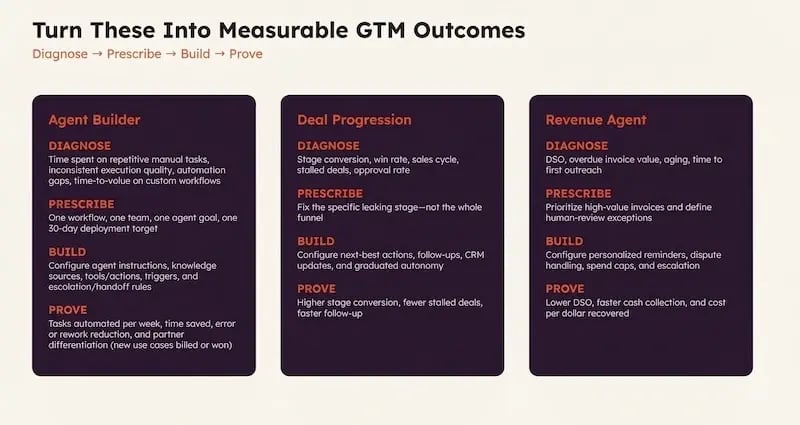
Deploying advanced automation requires clear, tracking-driven metrics. Inside HubSpot Marketing Studio 2.0, teams use a four-part evaluation model:
Diagnose -> Prescribe -> Build -> Prove
Metrics by Agent
Verified Impact Benchmarks
Data from HubSpot platform users demonstrates clear operational performance gains:
-
+81% Increase in Campaign Volume: Marketing teams build and launch significantly more campaigns without adding operational complexity.
-
+14% Increase in Marketing Reach: Brands that expand content distribution via Content Agent realize a 14% increase in reach and a +9% improvement in organic brand visibility.
-
Streamlined Reporting Workflows: Custom campaign reporting tasks that previously required 20+ hours can be consolidated into a single unified view.
Next-Gen Market Intelligence: The AI Search Sensor Widget
Buyer discovery habits are evolving quickly. Prospective customers increasingly rely on AI search engines like ChatGPT, Gemini, and Perplexity for product evaluations instead of traditional search bars.
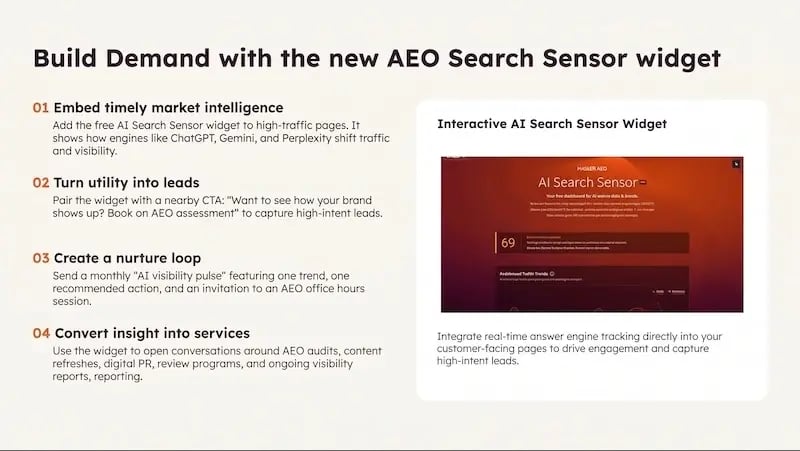
To help businesses adapt, HubSpot introduced the AI Search Sensor Widget. This embeddable tracking tool lets you monitor how conversational search engines cite and index your brand in real time.
The AEO Sensor Widget is an iframe you can embed in any high-traffic place. It shows in real time how engines like ChatGPT, Gemini, and Perplexity are shifting in terms of traffic and visibility. You can then pair this with a CTA like "Want to see how your brand visibility can show up?" This way, you can do a pulse check with trend and recommended actions. This can open the door to AEO, content building, and campaign-building communications with clients.
Marketing teams can use these insights to:
-
Identify specific product topics where brand visibility drops.
-
Deploy the Content Agent to quickly fill content gaps.
-
Turn visibility trend data into high-converting AEO assessment offers.
Beyond Demand: Extending Context to the Sales Pipeline
A successful marketing campaign requires a seamless transition to sales. Business context captured inside HubSpot Marketing Studio 2.0 flows directly into deal execution and revenue operations.
-
Deal Progression Engine: Works within Breeze Assistant to track buyer interactions across emails and sales calls. It pinpoints stage-to-stage conversion leaks (such as proposals stalling after a demo), identifies funnel bottlenecks between deal stages, and auto-drafts tailored follow-up responses directly inside Gmail and Outlook inboxes.
-
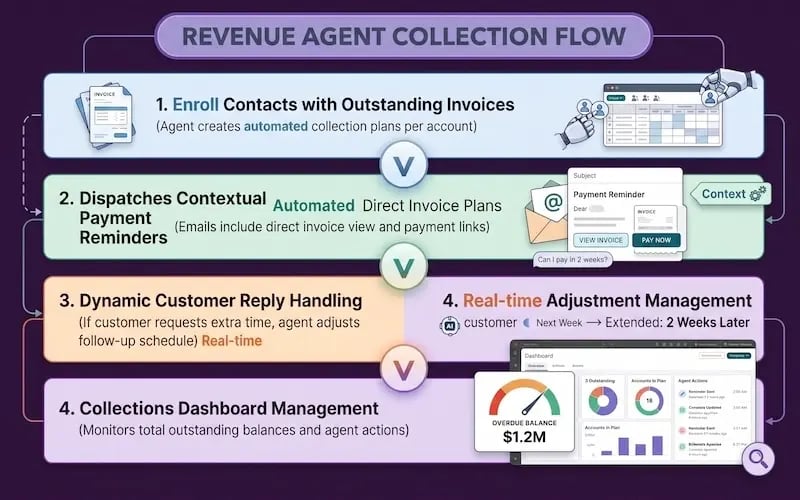
Revenue Agent Automation: This is an extension/addition to the existing Revenue Hub. This Agent addresses friction in accounts receivable by monitoring open invoices, sending personalized payment reminders, and updating payment timelines when customers request extensions. Sales and finance leaders can manage outstanding balances, scheduled actions, and enrolled accounts from a single Collections dashboard.
Systems Over Headcount: Building for Scale
Modern demand generation is no longer about adding extra headcount to manage separate applications. Sustainable growth depends on deploying unified systems that connect strategy directly to execution.
By uniting multi-channel asset generation, real-time email personalization, and integrated analytics within HubSpot CRM, HubSpot Marketing Studio 2.0 helps marketing leaders run context-driven campaigns at scale.
Optimizing your CRM architecture, configuring contextual data layers, and activating AI agent workflows requires experienced technical guidance. When it comes to moving into the age of Growth Context and Agentic Customer Platforms, it's not about the roster, but who's got the best plans and systems.
At Aspiration Marketing, we help growth-focused organizations audit their revenue operations, implement modern HubSpot platforms, and turn marketing tools into a provable revenue pipeline.
Ready to streamline your campaign operations? Reach out to the team at Aspiration Marketing to optimize your marketing technology stack for long-term growth.





Leave a Comment
Have thoughts on this article?
Share your feedback, ask questions, or join the discussion with our community.