





Why do so many growth-minded teams invest in powerful software, only to feel like they are driving a sports car in first gear? This frustration is a common symptom of marketing automation challenges, which are the operational roadblocks that prevent teams from fully leveraging their automation software. You set out to automate your pipeline, save time, and deliver personalized customer journeys. Instead, you end up managing broken triggers, chasing duplicate records, and sending the wrong email sequence to a warm lead.
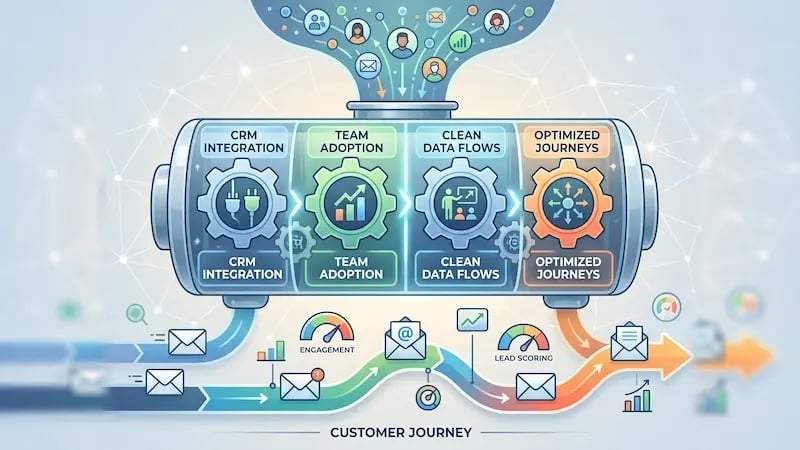 Marketing automation software is a tool that promises to transform your revenue operations. Yet, bridging the gap between promise and execution is notoriously tricky. When platforms grow complex, friction builds quickly across your systems, teams, and databases.
If you want to turn your platform into a predictable revenue driver, you have to address these roadblocks directly. Let's break down the four biggest marketing automation challenges, explore why they happen, and look at practical ways to fix them.
Challenge 1: Systems Integration and Data Silos
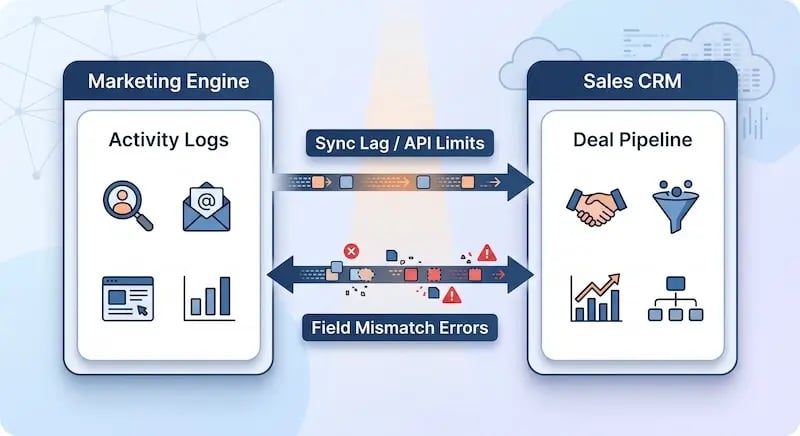
Systems integration and data silos are a significant marketing automation challenge where separate platforms, such as a marketing tool and a CRM, fail to communicate data effectively. Are your sales and marketing systems actually speaking the same language? Or are they constantly translating data back and forth with errors?
When your marketing automation platform sits on an island, isolated from your main CRM or customer database, seamless execution becomes nearly impossible. Information gets trapped in departmental silos. Your marketing team sees one version of a buyer's activity, while your sales reps see a completely different one.
 The Root Causes of Integration Friction
Integration issues usually stem from three core areas:
-
Bi-directional Sync Delays: Data takes too long to update across systems, resulting in outdated contact properties.
-
Inconsistent Field Mapping: Standard properties in one tool do not match custom fields in another.
-
Custom Object Failure: Special data structures (like trial usage or subscription tiers) fail to trigger time-sensitive workflows.
How big is this problem across the industry?
According to the Ascend2 Marketing Automation Report,
43% of marketing professionals identify system integration as the single most significant barrier to automation success.
.webp?width=800&height=436&name=Integration%20Barriers%20in%20Automation%20(Top%20Marketing%20Challenges).webp) Practical Solutions for Technical RevOps
Practical Solutions for Technical RevOps
To build a unified tech stack, you need to look beyond basic, out-of-the-box connectors. Modern revenue operations demand custom data routing.
-
Leverage Programmable Automation: Use custom code actions and webhooks within your workflows. This allows you to process dynamic data before it hits your CRM properties, ensuring custom objects update instantly.
-
Standardize Field Formatting: Map every property systematically. Ensure drop-down options, multi-select checkboxes, and single-line text fields align identically across all connected tools.
-
Connect Usage Data Directly: If you run a SaaS platform, connect product usage databases straight into your CRM workflows. When a trial user reaches a specific usage milestone, an automated onboarding sequence can trigger without delay.
Challenge 2: User Adoption and Internal Skill Gaps
User adoption and internal skill gaps are a marketing automation challenge that occurs when team members lack the training or confidence to fully utilize the platform, leading to manual workarounds and underperformance. What good is an enterprise automation tool if your team only uses it as an oversized email sender?
You can design the most sophisticated technical stack in the world. However, if your team lacks the training or confidence to use it, your return on investment will drop significantly. Internal skill gaps often lead team members to bypass automated workflows altogether, relying on manual workarounds that create more chaos.
Bridging the Knowledge Gap
Research published in the HubSpot State of Marketing Report reveals that,
Nearly 30% of teams cite a lack of training and internal expertise as a major obstacle when scaling their marketing tools.
When adoption stalls, you notice distinct warning signs:
-
Sales reps ignore automated lead scores and manually assign leads.
-
Marketers build duplicate workflows because they do not understand existing automation rules.
-
Key customer touchpoints are missed due to unclear team handoffs.
Adoption Problem |
Impact on Operations |
Operational Fix |
|---|---|---|
Manual Workarounds |
Creates data entry errors and missing records |
Build clear Standard Operating Procedures (SOPs) |
Workflow Duplication |
Overwhelms contacts with redundant emails |
Establish strict governance and naming protocols |
Siloed Handoffs |
Causes delays in sales follow-ups |
Deploy automated AI agents to manage lead assignment |
Building a Strong Training Culture
Fixing skill gaps requires a structured approach to internal enablement:
-
Create Standard Operating Procedures (SOPs): Document how workflows are built, named, and maintained. Every team member should know exactly how a lead moves from subscriber to opportunity.
-
Deploy AI Agents for Handoffs: Use automated AI agents to bridge the technical divide between marketing scoring and sales execution. An AI agent can analyze engagement data, qualify the lead, and assign it directly to the right sales rep with context, removing manual effort.
-
Run Regular Platform Audits: Review platform usage quarterly to identify areas where your team needs extra coaching or refresher training.
Challenge 3: Overly Complex or Broken Workflow Logic
Overly complex or broken workflow logic is a marketing automation challenge where automated customer journeys become a tangled web of overlapping, contradictory rules that overwhelm contacts. How do you keep automated customer journeys relevant without building a tangled web of overlapping, contradictory workflows?

It is easy to fall into the complexity trap. You start with a simple welcome email. Then you add a lead nurturing workflow, an event follow-up sequence, and a product re-engagement campaign. Before long, a single contact gets enrolled in three workflows at once, receiving four emails in a single day.
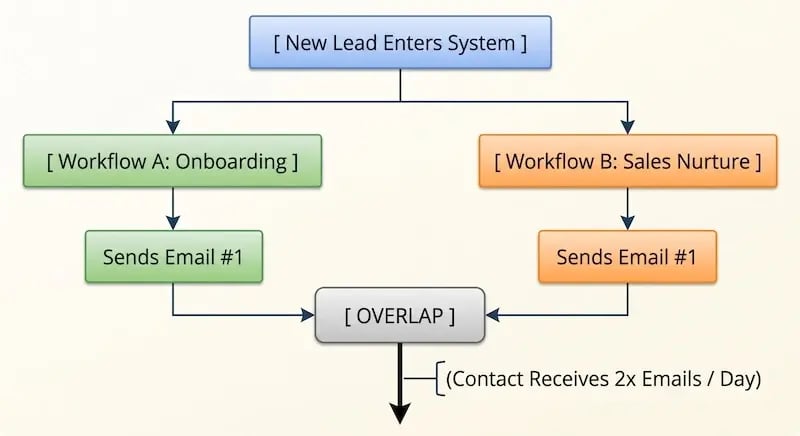 The Impact of Workflow Overlap
A study by Invesp highlights this common struggle:
While 80% of marketing automation users see an increase in leads, over 60% face major hurdles in managing multi-channel lead nurturing workflows efficiently.
When logic breaks down, your buyer's journey suffers. Common operational mistakes include:
-
Missing Suppression Lists: Failing to exclude existing customers or active sales deals from top-of-funnel promotional campaigns.
-
Rigid Single-Language Logic: Forcing global audiences into one-size-fits-all workflows instead of using dynamic, localized messaging.
-
Stale Content Rules: Allowing outdated offer links and messaging to stay live in automated nurture sequences for months or years.
Simplifying Your Customer Journeys
To fix complex logic issues, streamline your build process, and focus on the customer experience:
-
Adopt Comprehensive Journey Automation: Move away from isolated blast emails. Map out complete customer journeys that adapt dynamically based on real-time behavior, deal stages, and lifecycle milestones.
-
Refine Lead Nurturing Sequences: Set clear enrollment criteria, goals, and unenrollment triggers for every sequence. If a contact books a meeting, your system should automatically remove them from marketing nurture workflows.
-
Utilize Multilingual Tools: If you serve regional or global markets, deploy native multilingual automation tools. Manage localized email variations within a single master workflow to keep your system clean and organized.
-
Build Continuous Content Loops: Establish automated optimization routines that monitor email engagement metrics. Set up rules to automatically flag or update low-performing content, keeping your campaigns fresh.
Challenge 4: Data Hygiene and Governance Issues
Data hygiene and governance issues are a foundational marketing automation challenge where your automation tool's effectiveness is compromised by inaccurate, incomplete, or duplicate data. Is poor data quality quietly breaking your automated lead scoring and trigger logic?
Your automation tool is only as good as the data feeding it. If your database contains duplicate records, missing fields, or outdated contact details, your automated actions will fail. A workflow designed to route leads based on company size does not work if half of your forms allow invalid text inputs.
The True Cost of Dirty Data
According to research from Gartner,
Poor data quality costs organizations an average of $12.9 million annually.
Beyond the direct financial impact, bad data damages brand reputation and hurts email deliverability.
Poor data governance leads to several operational problems:
-
Format Mismatches: First names in ALL CAPS or missing capitalization disrupt email personalization tags.
-
Domain Reputation Damage: High bounce rates from old, unverified email lists lower your sender score, causing emails to hit spam folders.
-
Inaccurate Lead Scoring: Missing job titles or industry fields leads to inaccurate lead qualification, wasting valuable sales time.
Implementing Data Cleanup Automation
You do not need to clean every contact record manually. Instead, use your automation engine to maintain data health automatically.
-
Build Formatting Workflows: Set up background workflows to capitalize first names, standardize phone numbers, and fix state or country fields as soon as new form submissions arrive.
-
Enforce Drop-Down Options: Replace open text fields on web forms with standardized drop-down menus for job titles, industries, and company sizes.
-
Set Up Sunset Policies: Build an automated re-engagement workflow for unengaged contacts. If a subscriber does not open your emails for 90 days, enroll them in a win-back sequence. If they remain inactive, automatically archive or unenroll them to preserve your sender reputation.
Transforming Your Automation Strategy
Overcoming marketing automation challenges requires looking beyond basic software features. Success comes down to thoughtful workflow design, strong data governance, and strategic alignment across your revenue teams.
When you fix system integration delays, invest in team enablement, simplify complex logic, and maintain clean data, your marketing automation platform becomes what it was always meant to be: a scalable, predictable engine for continuous business growth.
Take Action Today
To move your platform from first gear into high performance, focus on these three strategic priorities:
-
Unify Your Tech Stack with Custom Data Routing: Move beyond basic out-of-the-box connectors. Utilize programmable data, custom code actions, and direct webhooks to keep your CRM and marketing tools in continuous, real-time sync.
-
Simplify Workflow Logic and Personalize at Scale: Stop building overlapping, rigid sequences. Shift toward dynamic customer journey mapping that incorporates smart enrollment criteria, unenrollment triggers, localized multilingual paths, and continuous content feedback loops.
-
Automate Data Governance and Team Enablement: Protect your deliverability and sales efficiency by deploying background data-cleaning workflows and setting up sunset policies for inactive contacts. Pair technical cleanup with clear SOPs and AI-driven sales handoffs to bridge the internal execution gap.
Turning Marketing Automation Challenges Into RevOps Opportunities
Navigating the landscape of marketing automation is rarely a plug-and-play effort. When platforms underperform, it is almost never because the technology itself is flawed. More often, it stems from structural friction—siloed integrations, unaddressed skill gaps, tangled workflow logic, and neglected data hygiene.
Addressing these four core challenges transforms your marketing automation platform from a source of daily operational frustration into what it was designed to be: a scalable, predictable engine for enterprise growth.
The Path Forward
Building and scaling enterprise-level workflows requires deep Revenue Operations expertise.
But, high-performing revenue operations do not happen by accident—they require deliberate alignment across your technology, processes, and people. By taking a systematic approach to auditing your systems, clearing technical debt, and refining your automated logic, you empower your team to focus on strategic execution rather than fixing broken triggers.
If you want to eliminate the tech debt and unlock the full potential of your CRM, partner with Aspiration Marketing. Our team helps you audit your HubSpot CRM ecosystem, fix complex data issues, and build automated customer journeys that drive measurable revenue growth.







Leave a Comment
Have thoughts on this article?
Share your feedback, ask questions, or join the discussion with our community.