





For many modern businesses, it can be tempting to think that more software is always better. The logic seems sound on the surface: if your operations face a new operational challenge, surely there is a purpose-built Software-as-a-Service (SaaS) solution available to solve it. However, the exact opposite is often true.
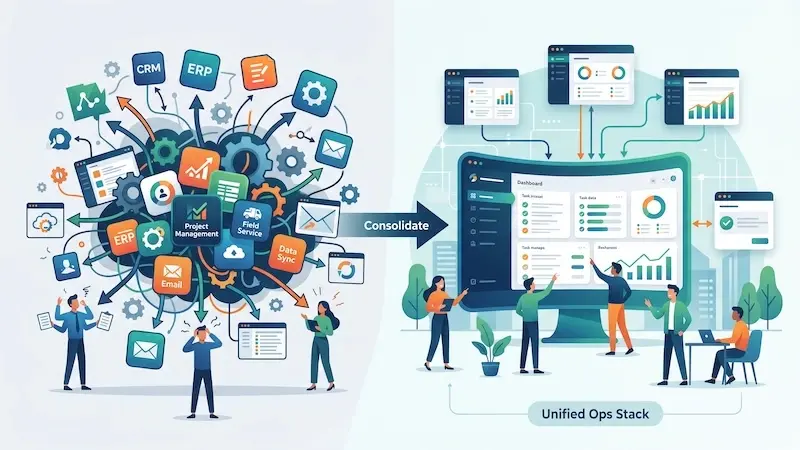 As operations scale and business demands become more sophisticated, new platforms, plugins, and practices are routinely adopted. But even though each individual application might solve a hyper-specific, localized problem, simply increasing the volume of software introduces severe hidden costs. Rather than accelerating performance, an expanding application footprint creates new operational bottlenecks, fragments team focus, and erodes profitability.
Growing software stacks increase the operational complexity of your organization, not just its capability. This expansion can have disastrous ripple effects on how your business functions day to day.
This is precisely why unified management platforms like Quickbase and other alternatives have soared in popularity. Leaders are searching for solutions that can satisfy multi-departmental requirements while systematically reducing the number of disconnected tools in use. Despite this trend, many organizations continue to struggle with "software bloat" without fully understanding how they ended up in this state or how to reverse it.
To cure tool overload, you first need to understand the underlying mechanics of software bloat—and why standard operating environments break down over time.
How Software Bloat Quietly Creeps Into Operations
Rarely does an organization sit down and intentionally design a cluttered, fragmented software landscape. Tool overload is almost never the result of a single bad decision; rather, it is the cumulative result of years of reactive problem-solving.
Software proliferation has reached an all-time high:
The average organization now manages upwards of 130 distinct SaaS applications, with large enterprises regularly running over 300 platforms simultaneously.
1. Reactive "Band-Aid" Procurement
The most common origin of software bloat is short-term problem-solving. When an operational bottleneck arises, a team manager looks for the fastest route to relief. They purchase a point solution to plug the immediate hole. The system goes live, and for a few weeks, it works.
However, when the market shifts or the next operational hurdle appears—one that the new tool wasn't designed to handle—the company repeats the cycle, buying another piece of software. Over time, the organization becomes a patchwork quilt of single-use applications that do not communicate with one another.
2. Departmental Silos and Shadow IT
In cross-functional environments where multiple teams must coordinate on complex projects, individual departments often take technology procurement into their own hands. Marketing buys its preferred work management platform; Engineering adopts another; Sales relies on a third.
Without centralized technology governance, departments introduce software built exclusively for their localized workflows. This practice—often referred to as Shadow IT—rapidly degrades inter-departmental communication, creates redundant licensing costs, and builds invisible walls between teams that ought to be working in lockstep.
3. The Legacy Software Trap
A major contributor to software sprawl is a lack of routine software audits. Legacy tools are left running in the background long after their primary champion has left the company or after a team's core workflow has evolved. Businesses routinely pay subscription fees for applications used by only a fraction of their staff, simply because no one has taken ownership of sunsetting them.
The Reality of Software Sprawl
When large enterprises use hundreds of distinct SaaS applications across their organizations, and mid-market companies manage dozens of overlapping apps, ongoing hyper-fragmentation creates a web of dependencies that burdens IT teams and confuses end users.
The Hidden Costs: How Tool Overload Sabotages Staff
Having access to an endless array of digital platforms might feel like an asset, but for the employees actually using these systems, it is an administrative headache. Here are the primary operational symptoms of poorly managed software stacks—and why consolidating your toolset is urgent.
Think of it this way:
Incremental Software Additions = Operational Bloat
That operational bloat leads to:
-
Data Silos & Lost Info
-
Friction in Collaboration
-
Productivity Stagnation
1. Critical Information Becomes Harder to Manage
One of the clearest warning signs that your company is suffering from software bloat is that staff members struggle to find, verify, and store the information they need to perform their daily duties.
When data lives in five different platforms, employees end up spending between 1.8 to 3.6 hours every single day simply searching for information and manually re-entering records across disparate applications.
When operational details are scattered across disparate email threads, project boards, enterprise chat systems, spreadsheet trackers, and specialized database apps, critical data becomes fragmented. Information silos naturally form, locking valuable knowledge inside specific departments or individual accounts.
-
Hours Wasted on Manual Data Transfer: Employees spend a significant portion of their workweek copying and pasting information between systems just to keep records up to date—a soul-crushing, low-value task that erodes morale.
-
Inconsistent Master Records: When data lives in multiple places, version control disappears. Team A relies on an updated spreadsheet, while Team B acts on outdated figures stored in a separate CRM.
-
Increased Human Error: Manual data re-entry dramatically increases the likelihood of typos, missed handoffs, and incomplete project records.
To eliminate these vulnerabilities, organizations must consolidate their operational intelligence into a unified platform. Standardizing records across teams ensures higher accuracy, auditability, and confidence in company data.
2. Inter-Departmental Collaboration Grows Unnecessarily Complex
Software bloat creates substantial friction between teams whose job descriptions require close alignment.
When departments operate on completely different technology stacks that lack native integration, simple cross-team requests turn into slow, administrative ordeals.
Consider a standard handoff between an operations team and a field team:
-
Operations uses an administrative enterprise platform to schedule and scope jobs.
-
The field team relies on a separate mobile application to record site notes and project completions.
-
Because System A and System B do not share real-time data, office staff must wait for field workers to manually export shift reports at the end of the day.
-
If an urgent project revision occurs at midday, the office team must resort to manual phone calls, text messages, or ad hoc emails to update the field team.
This information delay hurts overall project efficiency, causes missed deadlines, and drives up overhead expenses. Single, shared operating platforms eliminate these communication gaps by establishing a common ground where every stakeholder views the exact same workflow state in real time.

3. Productivity Stagnates Due to Context Switching
Tools are introduced to boost output and make employees faster. However, when software proliferation passes a certain threshold, it produces diminishing returns—and eventually leads to a net loss in productivity.
Research shows that constant toggling between apps—known as context switching—can consume up to 40% of an employee’s productive capacity each day, dramatically increasing cognitive fatigue while reducing overall output.
The Penalty of Context Switching
Every application added to an employee's tech stack represents a new interface to master, a new password to manage, and a new stream of notifications to monitor. CONSTANTLY switching between apps—a phenomenon known as cognitive context switching—forces the brain to continuously reorient itself.
Research in organizational psychology shows that switching between tabs and tools throughout the day can drain a significant percentage of a worker's cognitive capacity.
Research published in Harvard Business Review shows that,
Digital workers toggle between apps nearly 1,200 times a day—costing up to four hours every week in cognitive reorientation alone
The mental energy spent navigating a sea of open browser tabs is energy taken directly away from deep, high-value strategic work.
The Onboarding and Maintenance Friction
-
Extended Training Time: Onboarding new hires becomes a month-long process when they must learn six or seven distinct systems just to complete basic daily tasks.
-
Administrative Fatigue: Teams end up spending more time managing their software—updating statuses, re-tagging tickets, logging into portals—than performing actual operational execution.
4. Unseen Security Vulnerabilities and Overhead Costs
Beyond the immediate hit to daily productivity, software sprawl exposes businesses to significant financial and security risks that rarely show up on an initial software invoice.
For example:
Software sprawl creates severe governance gaps, with reports showing that up to 65% of active SaaS applications in the enterprise are unapproved 'Shadow IT' purchased by individual teams without central oversight.
Why this is dangerous:
-
Expanding the Attack Surface: Every active SaaS vendor represents a potential entry point for data breaches. Managing compliance, permission levels, and multi-factor authentication across dozens of platforms stretches IT departments thin and increases the likelihood of unauthorized access.
-
Deprovisioning Gaps: When an employee leaves the company, revoking access across a bloated software ecosystem is prone to oversight. Former staff may retain access to sensitive corporate data housed inside forgotten third-party applications.
-
Runaway SaaS Spend: Unused licenses, auto-renewed subscriptions, and redundant software tiers quietly drain corporate budgets. A consolidated stack provides operational clarity and substantial cost savings.
Action Plan: Auditing and Streamlining Your Operations Stack
Transitioning from a messy, fragmented software stack to an intentional technology footprint requires a strategic framework. Operations leaders can clean up their software environment by taking four concrete steps:
Step 1: Audit and Map Your Entire Ecosystem
Conduct an exhaustive audit of every platform, application, and digital utility currently in use across your organization. Document who holds licenses, how frequently the software is accessed, what data lives inside it, and what it costs annually. Be sure to look for unsanctioned tools used by individual teams. Your first priority should be CRM data hygiene.
Step 2: Classify and Evaluate
Categorize every discovered application into one of three buckets:
-
Core: Mission-critical platforms that power primary operations and integrate seamlessly with other core tools.
-
Redundant: Tools that overlap substantially with capabilities provided by your core software.
-
Sunset Candidate: Low-adoption software, legacy platforms, or applications that fail to demonstrate a clear return on investment (ROI).
Step 3: Unify Around Flexible, Comprehensive Solutions
Instead of maintaining separate tools for resource allocation, task management, reporting, and customer tracking, consider centralizing these functions on flexible ecosystem platforms. Modern management environments enable your ops, sales, and marketing teams to build tailored, cross-departmental workflows within a single secure ecosystem.
Step 4: Institute Strict Procurement Governance
Prevent future software bloat by establishing clear guidelines for adding new technology. Require business units to prove that an existing tool cannot solve their problem before approving the purchase of a new platform.
The Strategic Advantage of a Lean Tech Stack
In modern operations, less really is more. By intentionally streamlining your software footprint, consolidating operational data, and choosing flexible platforms over fragmented point solutions, you empower your staff to focus on what matters most: growing the business.
Ready to eliminate tool clutter and build an efficient, scalable technology strategy? The team at Aspiration Marketing specializes in helping organizations streamline their systems, align cross-functional teams, and drive operational performance.
Reach out to Aspiration Marketing today to audit your ops stack and optimize your digital strategy.







Leave a Comment
Have thoughts on this article?
Share your feedback, ask questions, or join the discussion with our community.