



为什么快速发展的营销团队总是感到不得不在这两者之间做出选择:是选择令人惊艳的网站设计,还是选择轻松获取潜在客户?
这是现代营销中一个常见的难题。你希望网站看起来像是由一家屡获殊荣的创意机构打造的,同时又需要它像一台自动化的销售机器一样高效运转。
 一边是 Webflow——深受追求绝对视觉控制权的网页设计师青睐;另一边是HubSpot Content Hub——这款专为推动销售线索直接增长而打造的一站式内容平台。
在 Webflow 和 HubSpot Content Hub 之间做出选择,不仅仅关乎软件功能。这更关乎你的团队日常的工作方式。你的营销团队能否直接控制着陆页?还是说,每次想要编辑页面标题或添加表单时,都必须向开发人员提交工单?
如果您正在评估内容管理系统(CMS)的迁移方案,本指南将详细剖析两者的核心差异。我们将从设计自主权、潜在客户捕获、动态内容以及运营速度等方面,对比分析 Webflow 与 HubSpot Content Hub 的表现。
什么是 Webflow?专为“设计优先”团队打造的可视化画布
Webflow让设计师在可视化编辑器中工作,同时生成简洁的代码。它将 CSS、HTML 和 JavaScript 转换为可视化画布。这使设计团队无需手动编写代码,即可构建自定义布局、流畅的动画和交互式网页元素。
根据 和W3Techs的数据,
Webflow 支撑着全球 0.9% 的网站,并在已知使用内容管理系统的网站中占据 1.2% 的市场份额。
该平台在创意机构、科技初创公司和数字设计工作室中广受欢迎。
Webflow 的优势所在
-
无与伦比的视觉自由度: 您可以精确到单个像素地调整内边距、网格布局、断点和悬停效果。
-
自定义动画: Webflow 内置动画编辑器。无需额外的 JavaScript 插件,即可构建基于滚动的复杂触发效果。
-
生成简洁的代码: 与老一代网站构建工具不同,Webflow 生成的代码简洁且符合语义规范,开箱即用即可保持网站加载速度快。
Webflow 中的隐藏瓶颈
Webflow 提供了出色的设计工具,但其运作模式如同内容孤岛。它未内置原生的客户关系管理(CRM)系统,也没有内置的电子邮件营销工具、潜在客户评分引擎或原生的收入归因功能。
要想将 Webflow 网站打造成潜在客户生成机器,就必须连接多个第三方工具。您需要分别安装用于表单路由、外部 CRM 同步、弹出窗口触发、分析跟踪以及 Zapier Webhook 的插件。
随着时间的推移,这种配置可能会导致工具泛滥。当某个第三方 webhook 出现故障时,潜在客户可能会因此流失。此外,由于 Webflow 依赖于 CSS 网格布局和自定义代码类,非技术背景的营销人员往往不愿亲自更新页面。结果,他们不得不依赖前端开发人员或 代理机构,仅仅是为了快速上线营销活动着陆页。
什么是 HubSpot 内容中心?一站式增长引擎
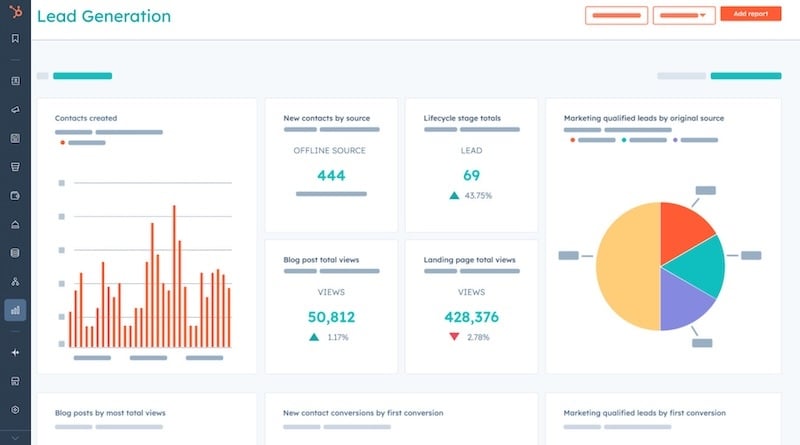 HubSpot 内容中心(Content Hub)是一款直接构建在HubSpot 智能 CRM 之上的企业级内容管理系统(CMS)。它不会将您的网站视为孤立的在线宣传册,而是将其视为销售和营销漏斗的动态延伸。
发布的《HubSpot ROI 基准报告》 显示,
迁移至 HubSpot 的团队在部署后的六个月内,网站流量平均增长了 110%,着陆页转化率平均提高了 83%。
为何在完成内容管理系统(CMS)迁移后,这些增长指标会如此显著地跃升?因为“内容中心”(Content Hub)弥合了内容发布与客户关系管理(CRM)数据之间的鸿沟。
HubSpot 内容中心的主要优势
-
原生 CRM 集成: 每次页面浏览、表单提交、内容下载和聊天对话都会即时关联到您 CRM 中的统一联系人记录。
-
智能内容与个性化: 您可以根据页面访问者的身份,自动替换文案、行动号召(CTA)、图片横幅或表单字段。您可以根据客户生命周期阶段、国家、行业或过往购买记录来定位访客。
-
营销人员自主权: Content Hub 采用灵活的主题和拖放式页面编辑功能。营销人员无需提交 IT 支持工单,即可在几分钟内构建并发布符合品牌规范的着陆页。
-
AI 驱动的内容扩展: 内置的 AI 助手可帮助营销人员拟定博客文章大纲、将长篇内容改编为社交媒体摘要、将页面翻译成多种语言,并自动修复 SEO 错误。

一份关于HubSpot 的《转化统计报告》 显示,
动态、个性化的智能CTA(行动号召)的转化率比静态、千篇一律的按钮高出202%。
内置的个性化CTA工具使增长团队能够立即获得绩效优势。
正面对比:Webflow 与 HubSpot Content Hub
为了帮助您做出正确的战略决策,让我们来看看这两个平台在关键运营领域的对比情况。
决策因素 |
Webflow |
HubSpot 内容中心 |
|---|---|---|
主要侧重 |
视觉设计灵活性与定制化网页布局 |
潜在客户开发、个性化及销售管道收入 |
原生CRM |
否(需要第三方集成) |
是(原生构建于 HubSpot 智能 CRM 之上) |
营销人员易用性 |
中等(需要了解 CSS/HTML 结构) |
高(直观的拖放式页面编辑) |
个性化引擎 |
有限(需要外部脚本或专用插件) |
高级(基于CRM记录和列表的智能内容) |
对开发人员的依赖程度 |
对于布局编辑和自定义更新,依赖程度较高 |
低(营销人员可管理日常着陆页) |
分析与报告 |
外部(需要 GA4、Google Tag Manager 或第三方工具) |
内置(归因报告、页面热力图、收入分析) |
1. 设计定制与品牌控制
如果您的主要目标是构建一个具有复杂 3D 视觉效果的独特数字画布,Webflow 表现尤为出色。它赋予网页设计师对每个 CSS 属性的完全自由。
然而,HubSpot Content Hub 通过结构化的主题框架提供了强大的设计能力。专业开发人员可以为您的团队构建自定义的拖放模块。一旦设计系统配置完成,您的营销团队便可在这些规范范围内享有完全的编辑自由。您的网站既能保持品牌一致性,团队又能灵活快速地构建新页面。
2. 潜在客户开发与动态个性化
在 Webflow 中,除非您编写自定义脚本或付费购买额外的第三方个性化插件,否则每位网站访问者看到的页面内容都完全相同。表单提交的数据要么存储在隔离的数据库中,要么通过 Webhook 传递到外部系统。
在 HubSpot Content Hub 中,潜在客户捕获是原生实现的。如果现有商机访问您的主页,Content Hub可以显示针对企业版演示的定向 CTA,而不是入门电子书。如果客户访问您的网站,Content Hub 可以向他们展示升级优惠或有用的支持资源。这种级别的个性化营销可以提高整个销售漏斗的转化率。
3. 营销速度与团队自主权
在快节奏的营销团队中,延迟会扼杀工作势头。当营销经理不得不等待前端开发人员花费数天时间来构建一个简单的着陆页时,营销活动的发布日期就会推迟。
Webflow 往往使团队受制于开发人员的进度安排,因为在不破坏视觉布局的前提下修改页面结构需要具备一定的技术知识。
HubSpot Content Hub 扭转了这种局面。前端开发人员先构建初始的灵活设计模板,然后将完全控制权移交给营销团队。营销人员可以自主添加版块、编辑文案、插入表单、运行 A/B 测试,并发布新页面。
评估您的网站迁移策略
如果您感到受制于对开发人员的依赖,或者希望将内容直接与封闭式销售流程关联,那么迁移至 HubSpot 内容中心是一条行之有效的出路。
成功的CMS迁移需要周密的规划,以保护您的自然搜索流量、保持域名权威度,并顺利迁移您的视觉品牌形象。
1. 进行全面的内容与 SEO 审计:
详细记录现有网站上所有已发布的URL、反向链接概况以及表现优异的关键词。尽早规划页面重定向(301重定向),以保留您的自然搜索权威性。
2. 建立全球设计体系:
在 HubSpot 中构建一个符合您品牌指南的灵活主题系统。创建模块化的拖放式构建块,以便您的营销团队在未来的所有着陆页中重复使用。
3. 整合 CRM 数据与智能资产:
配置原生表单、潜在客户分流规则、渐进式信息收集字段以及生命周期自动化工作流,确保每位新网站潜在客户都能即时分流至您的销售团队。
4. 执行质量测试与上线:
执行全面的跨设备响应式检查,测试表单处理程序连接,验证页面加载速度,并让您的全新HubSpot 网站在零停机时间的情况下正式上线。
最终结论:哪款平台更契合您的增长战略?
在 Webflow 和 HubSpot Content Hub 之间做出选择,关键取决于您的主要业务目标。
如果符合以下情况,请选择 Webflow:
-
您经营一家创意设计公司或视觉设计工作室,且像素级精准的样式设计是您的主要服务内容。
-
您的团队中有专职的前端开发人员,负责处理所有网页编辑和网站更新工作。
-
您并不高度依赖自动潜在客户评分、CRM个性化或多触点营销归因。
如果符合以下情况,请迁移至 HubSpot Content Hub:
-
您是一个正在成长的团队,需要将网站流量转化为合格的销售线索和可衡量的销售管道收入。
-
您希望营销团队无需提交开发工单,即可发布着陆页、修改文案、运行 A/B 测试并发布博客文章。
-
您希望通过统一的分析系统,将网站页面浏览量直接与 CRM 中的成交订单关联起来。
选择合适的内容管理系统(CMS)平台,可确保您的网站与业务目标同步发展。通过从孤立的可视化编辑器转向基于CRM的内容平台,您的团队能够打造个性化体验,将普通访客转化为忠实客户。
推进您的 CMS 迁移工作
决定将网站迁移到新平台,可能会让人觉得是一项艰巨的任务。保护搜索排名、保持用户体验以及映射自定义数据结构,都需要极高的技术精准度。
在Aspiration Marketing,我们专注于帮助以增长为导向的企业规划并执行向HubSpot内容中心(Content Hub)的无缝网站迁移。我们的团队将确保您的新网站融合视觉设计、清晰的品牌信息传递以及CRM自动化功能,从而从上线首日开始加速潜在客户的获取。
准备好消除开发瓶颈,将您的网站转变为营收引擎了吗?立即联系我们的策略团队,获取全面的网站迁移评估报告。







发表评论
对这篇文章有什么看法吗?
分享您的反馈、提出问题,或与我们的社区一起参与讨论。