



目前,为了运行一项营销活动,你需要同时打开多少个浏览器标签页?
如果你负责需求生成工作,答案通常是多得数不清。营销人员花费大量时间在不同的应用程序之间来回切换:在某个应用中撰写文案,在另一个应用中搭建落地页,在其他地方安排邮件发送,还要从孤立的电子表格中手动整理绩效报告。
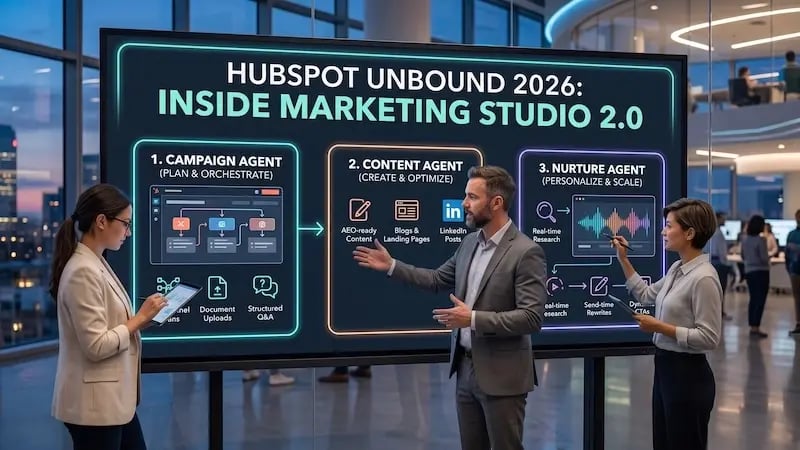
这种碎片化的工作方式不仅让团队疲于奔命,还会导致买家体验支离破碎。当工具之间无法互通时,跨渠道的信息传递就会变得支离破碎。
根据Salesforce 的《营销现状》基准报告,营销组织中存在“表现优异者”和“表现欠佳者”。“表现优异者”是指对营销成果完全满意的营销领导者,而“表现欠佳者”则仅表示中度满意或更低。
该研究发现,
正如我们在《HubSpot UNBOUND 2026:全新 Agentic 客户平台发布》的介绍中所强调的,现代增长需要突破孤立工具的局限,迈向统一智能。这意味着借助 GTM 智能(市场进入智能)不断前进,依托“增长背景”(Growth Context),并升级和增强新工具。
正因如此,HubSpot 正式发布了 HubSpot Marketing Studio 2.0。这一统一工作空间直接构建于HubSpot CRM 平台之上,将彻底改变多渠道营销活动的规划、执行和效果衡量方式。
什么是 HubSpot Marketing Studio 2.0?
HubSpot Marketing Studio 2.0 是一个统一的指挥中心,旨在帮助营销团队通过单一界面构建、执行和优化多渠道需求生成营销活动。这将成为一款标志性工具。
HubSpot Marketing Studio 2.0 不再将营销活动管理视为静态的可视化规划画布,而是作为相互连接的协调层发挥作用。它通过直接调用共享的客户数据,将高层次战略与自动化执行有机结合。
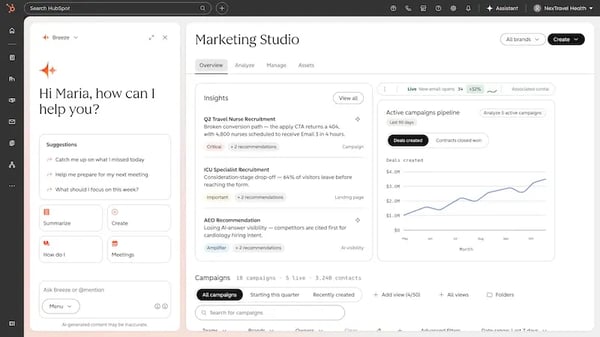
从画布到指挥中心:2.0 版本的新功能
2024 年Marketing Studio 早期版本发布时,仅提供了一个基础的可视化画布。然而,营销团队在实际操作中遇到了三个明显的障碍:
- 在快节奏的活动启动过程中,用户界面操作起来较为困难。
- 分析功能位于独立的报告标签页中,与实际执行工具分离。
- 生成式 AI 工具缺乏原生的品牌语境,且不够直观,导致生成的文案千篇一律,需要大量修改。
Marketing Studio 2.0 通过全面的基础架构重构解决了这些问题。
集中管理您的增长背景
传统营销自动化平台之所以难以发挥作用,是因为它们缺乏持久的业务背景。营销人员不得不花费大量时间,将营销活动简报、品牌语调规范和买家画像资料反复上传到不同的工具中。
在 Marketing Studio 2.0 中,您的工作区可直接连接到平台强大且共享的“增长背景”。系统会自动应用:
- 理想客户画像(ICPs):目标买家的参数和痛点。
- 品牌语调指南:语气、风格和信息传达标准。
- 历史绩效指标:来自以往成功营销活动的渠道归因数据。
- 市场基准:针对您所在行业量身定制的绩效标准。
统一的工作管理与执行
Marketing Studio 摒弃了通过复杂子菜单逐级点击来创建素材的方式,将项目运营集中于单一、简洁的界面中。
该统一界面提供:
- 统一的“创建”下拉菜单:只需点击一个按钮,即可发布落地页、营销邮件、表单、社交广告,或启动完整的多渠道营销活动。
- 集中化工作管理:共享的营销日历、任务跟踪、活动动态和审批队列,确保团队步调一致。
- 集成化素材库:可筛选并整理所有活跃渠道中已获批准的营销活动素材。
- 实时分析仪表盘:在处理活跃营销活动的同时,直接监控核心指标——包括归因收入、投资回报率(ROI)、受影响的联系人以及销售漏斗流速。
因此,如果您想从零开始启动一个营销活动,只需进入“创建营销活动”页面,AI 就会通过“营销活动助手”接管,并引导您进入设计画布。 该助手将分析品牌背景、产品背景、过往营销活动及历史表现,并结合您希望添加的任何文档(如对话记录、新简报等),利用所有这些信息来构建营销活动。
它将提供可供参考的营销活动类型或方向,您可通过自然语言对其进行指导。是想构建自动化流程?还是创建社交媒体素材?只需向 Marketing Studio 2.0 中的“营销活动助手”AI 提出请求即可。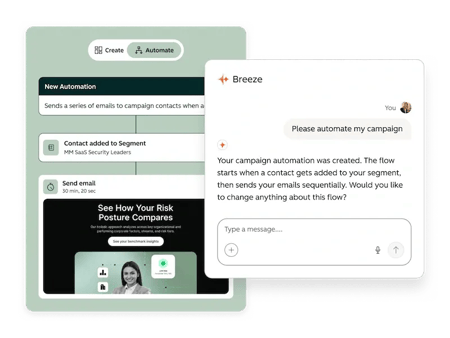
AI 协调三驾马车:营销活动、内容和客户培育助手
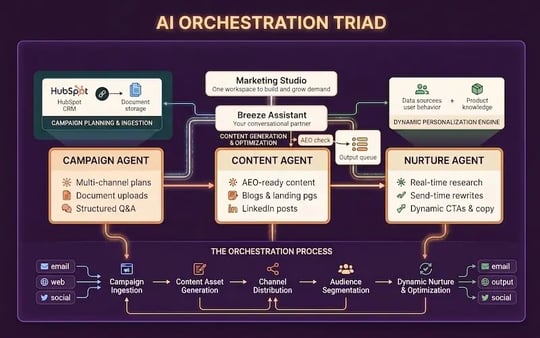
手动执行复杂的多渠道营销活动会限制团队的执行速度。在 HubSpot 营销工作室 2.0 中,Breeze Assistant作为您的对话伙伴,协调三个专业 AI 代理,以更快地执行营销活动。
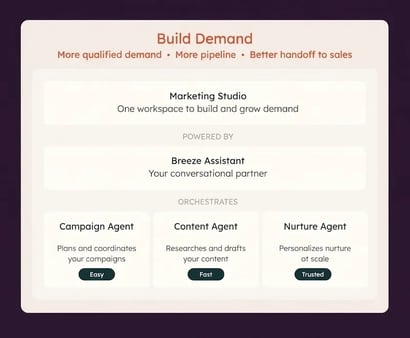
1. 活动代理:战略协调员
活动代理(Campaign Agent)负责管理活动的初始架构。当您启动项目时,该代理会评估您的品牌指南、产品详情和历史数据,以起草完整的活动简报。
启动营销活动非常简单:
- 上传简报文档或销售通话记录。
- 完成一系列简短的问答提示。
- 通过对话式聊天直接讨论策略。
在您的指导下,营销活动代理将在活动画布上构建您的素材框架。它会生成符合您品牌形象的落地页、营销邮件、表单以及行动号召(CTA)按钮。

除了创建素材外,该代理还能帮助自动化营销活动的后勤工作。您可以指示 Breeze 构建自定义自动化工作流——例如设置表单触发器和跟进延迟。该代理甚至会自动标记设置问题(如未激活的触发器或未关联的表单),并说明如何解决。
 2. 内容代理:大规模优化答案引擎
在多个平台上撰写原创内容可能会拖慢执行进度。内容代理(Content Agent)可加速博客、着陆页和社交媒体帖子的素材创建。
关键在于,内容代理能针对“答案引擎优化”(AEO)对文案进行优化。随着对话式 AI 引擎改变买家研究软件的方式,内容代理会重新构建您的内容结构,使 AI 引擎能够轻松索引并引用您的品牌。
3. 培育代理:发送时的1对1个性化
基础个性化通常仅涉及插入简单的属性占位符,例如将联系人的名字放入电子邮件主题行中。而现代买家则期待更深入的相关性。
根据麦肯锡公司的研究,
在个性化方面表现卓越的企业,通过这些活动产生的收入比行业平均水平高出 40%。
培育代理(Nurture Agent)升级了传统的自动化邮件工作流:
- 保留现有工作流逻辑:您底层的自动化触发条件和滴灌时间安排完全保持不变。
- 进行发送时点分析:在发送电子邮件的前一刻,该代理会分析收件人的 CRM 联系人属性、网站页面浏览情况、表单提交信息以及公司动态。
- 动态调整文案:该代理会重写邮件主题、预览文本、正文内容及行动号召(CTA),以直接针对潜在客户的具体职位进行沟通——例如,针对财务总监与软件工程师分别定制不同的信息。
为保护敏感信息,营销人员可锁定特定内容模块(如定价表或法律免责声明),以防止AI进行修改。团队还可使用投放比例滑块,将个性化邮件与标准基准进行A/B测试,从而增强对自动化效果的信心。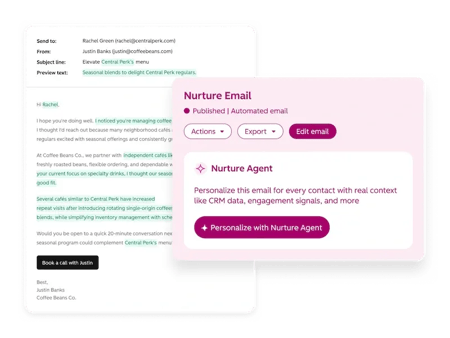
将 AI 转化为可衡量的成果:关键指标与基准
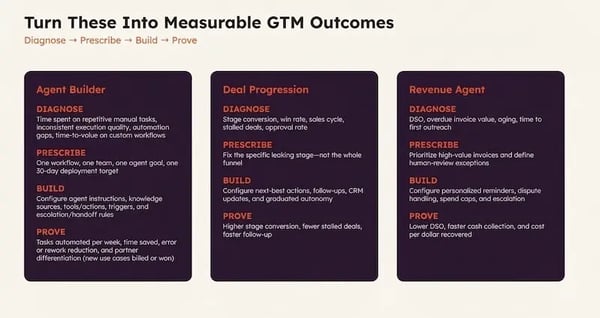
部署高级自动化需要明确且基于跟踪的数据指标。在 HubSpot Marketing Studio 2.0 中,团队采用一个由四个部分组成的评估模型:
诊断 → 建议 → 构建 → 验证
按代理划分的指标
| 代理 | 诊断 | 建议 | 构建 | 验证 |
|---|---|---|---|---|
| 营销活动代理 | 营销活动简报与目标 | 营销活动计划与素材 | 营销活动素材创建 | 营销活动素材质量 |
| 内容代理 | 内容清单 | 内容计划 | 内容创建 | 内容质量 |
| 培育代理 | 潜在客户数据库质量 | 培育计划 | 培育流程创建 | 培育流程质量 |
经验证的影响基准
HubSpot 平台用户的数据表明,运营绩效显著提升:
- 营销活动数量增长 81%:营销团队在无需增加运营复杂性的前提下,构建并启动了数量显著更多的营销活动。
- 营销覆盖率提升 +14%:通过 Content Agent 扩大内容分发的品牌,其覆盖率提升了 14%,自然品牌可见度提高了 9%。
- 简化的报告工作流程:此前需要 20 多个小时才能完成的自定义营销活动报告任务,现可整合到一个统一视图中。
新一代市场情报:AI 搜索传感器小部件
买家的发现习惯正在迅速演变。潜在客户在评估产品时,越来越依赖 ChatGPT、Gemini 和 Perplexity等 AI 搜索引擎,而非传统的搜索栏。
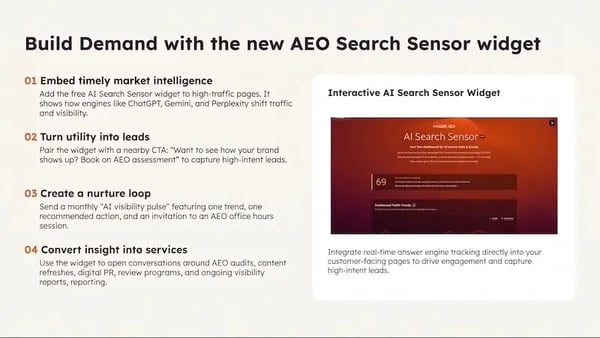
为帮助企业适应这一变化,HubSpot推出了AI搜索传感器小工具。这款可嵌入的追踪工具让您能够实时监控对话式搜索引擎如何引用和索引您的品牌。
AEO 传感器小工具是一个 iframe,您可以将其嵌入任何高流量位置。它实时展示 ChatGPT、Gemini 和 Perplexity 等引擎在流量和可见性方面的变化趋势。 随后,您可以将其与“想了解您的品牌可见度表现如何?”等行动号召(CTA)结合使用。通过这种方式,您可以结合趋势分析和推荐措施,对品牌状况进行实时监测。这将为您开启与客户就 AEO、内容建设及营销活动策划进行沟通的大门。
营销团队可以利用这些洞察来:
- 识别品牌可见度下降的具体产品主题。
- 部署“内容代理”快速填补内容空白。
- 将曝光度趋势数据转化为高转化率的 AEO 评估方案。
超越需求:将背景信息延伸至销售管道
成功的营销活动需要与销售环节无缝衔接。在 HubSpot Marketing Studio 2.0 中捕获的业务背景信息将直接流向交易执行和营收运营环节。
- 交易推进引擎:在Breeze Assistant中运行,用于追踪买家在电子邮件和销售电话中的互动情况。它能精准定位各阶段间的转化流失(例如演示后提案陷入停滞),识别交易阶段间的漏斗瓶颈,并直接在Gmail和Outlook收件箱中自动起草个性化的跟进回复。
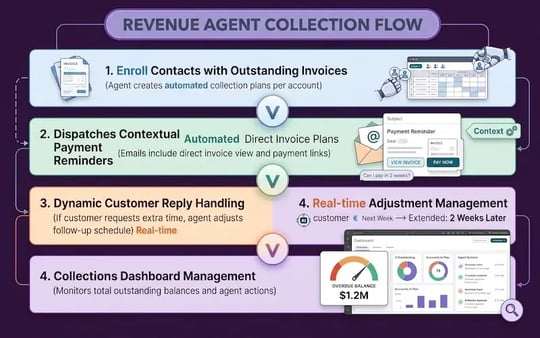
- 收入代理自动化:这是对现有收入中心(Revenue Hub)的扩展与补充。该代理通过监控未结发票、发送个性化付款提醒,以及在客户申请延期时更新付款时间表,从而解决应收账款中的摩擦问题。销售和财务负责人可通过单一的催收仪表盘管理未结余额、计划操作以及已注册账户。
系统优先于人力:构建可扩展架构
现代需求生成不再依赖于增加人手来管理独立的应用程序。可持续增长取决于部署能够将战略直接与执行相连接的统一系统。
通过在 HubSpot CRM 中整合多渠道资产生成、实时电子邮件个性化以及集成分析功能,HubSpot Marketing Studio 2.0 帮助营销负责人大规模开展基于情境的营销活动。
优化 CRM 架构、配置情境数据层以及激活 AI 代理工作流,都需要经验丰富的技术指导。在迈向“增长情境”和“代理式客户平台”时代的过程中,关键不在于人员名单,而在于谁拥有最佳的计划和系统。
在 Aspiration Marketing,我们帮助以增长为导向的企业审核其营收运营,部署现代化的 HubSpot 平台,并将营销工具转化为可验证的营收渠道。
准备好简化您的营销活动运营了吗?请联系 Aspiration Marketing 团队,优化您的营销技术栈,实现长期增长。







发表评论
对这篇文章有什么看法吗?
分享您的反馈、提出问题,或与我们的社区一起参与讨论。