





Are you navigating the challenge of rapid business growth? If you are, you know that relying on scattered spreadsheets and siloed data simply cannot keep pace with your ambitions. You need a system that can scale.
When leaders in the software and technology space talk about scaling technology, two acronyms dominate the conversation: ERP and CRM.
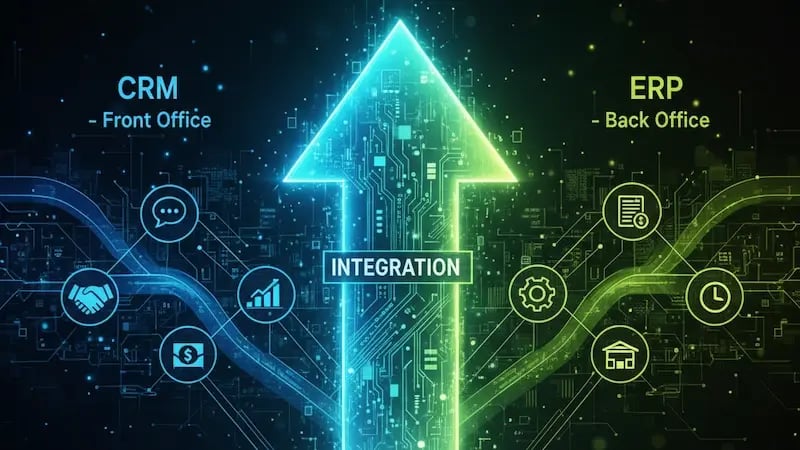
It is common to confuse these terms. Many business leaders mistakenly view Enterprise Resource Planning (ERP) and Customer Relationship Management (CRM) as interchangeable tools—or, worse, as competing software that forces a difficult choice. However, misunderstanding their distinct functions or prioritizing the wrong one first can easily create operational bottlenecks and stall growth.
This guide will eliminate the confusion. We define the fundamental differences between ERP vs. CRM, explore the distinct strategic advantages each offers, and provide a clear, data-backed roadmap. By the end, you will know precisely which system your business needs to prioritize right now for maximum impact.
I. Decoding the Acronyms: Front Office vs. Back Office
To understand the difference between an ERP and a CRM, you must first clarify their core purpose. Think of your business operations as a restaurant: the CRM is the smiling face and host at the front door; the ERP is the complex cooking and inventory system in the kitchen.
What is Customer Relationship Management (CRM)? (The Front Office Focus)
A Customer Relationship Management (CRM) is a system specifically designed to manage all interactions and relationships with customers and potential customers. It is your company's intelligence hub for the entire customer journey, from first touchpoint to loyal advocate.
The core purpose of a CRM is straightforward: to improve customer relationships, streamline sales processes, and enhance marketing efforts. It focuses on maximizing customer lifetime value (CLV).
Key Functions and Examples:
Contact and Lead Management: A CRM organizes all prospect information, ensuring your team has a full customer history.
Sales Pipeline Tracking and Forecasting: A CRM moves deals through defined stages, giving leadership accurate sales predictions.
Customer Service and Support: A CRM manages service tickets and communication logs to ensure quick, satisfying resolutions.
Marketing Automation: A CRM runs personalized email campaigns and tracks audience engagement.
The data a CRM focuses on is external-facing and relational: customer profiles, communication history, purchase patterns, and lead scoring. Simply put, the CRM is your "Sales Floor" – the place where you build relationships, close deals, and manage the customer experience.
What is Enterprise Resource Planning (ERP)? (The Back Office Focus)
An Enterprise Resource Planning (ERP) system is an integrated software suite used to manage and seamlessly connect the core business processes of a company across various departments.
The core purpose of an ERP is internal: to increase operational efficiency, reduce costs, and ensure compliance. It achieves this by creating a single, unified source of data for the entire organization—a concept often referred to as the "single source of truth." It focuses on optimizing the use of business assets.
Key Functions and Examples:
Financial Management: An ERP handles the general ledger, accounts payable and receivable, and financial reporting.
Inventory and Warehouse Management: An ERP tracks stock levels, locations, and material requirements in real time.
Supply Chain and Procurement: An ERP automates purchasing, manages vendor relationships, and optimizes logistics.
Human Resources (HR): An ERP manages payroll, employee data, and talent acquisition.
The data an ERP focuses on is internal, operational, and transactional: costs, inventory levels, order history, and production capacity. The ERP is your "Engine Room"—the complex, central mechanism that keeps all operational processes running efficiently.
II. The Strategic Divide: Customers vs. Resources
While both systems are vital data repositories, their primary functions are distinct. They exist at opposite ends of the business workflow, and this difference defines their strategic role.
The Fundamental Divide in Focus
The most significant distinction between an ERP and a CRM is where they focus their efforts and what metrics they prioritize. A Customer Relationship Management (CRM) system is focused on revenue growth, while an Enterprise Resource Planning (ERP) system is focused on cost reduction and efficiency.
| System | Primary Metrics |
|---|---|
| Customer Relationship Management (CRM) | Sales velocity, lead conversion, and customer retention. |
| Enterprise Resource Planning (ERP) | Operational cost reduction, production efficiency, and financial accuracy. |
Here is an illustrative example:
A salesperson uses the CRM to track a prospect's communication history, noting their recent product interest to craft a personalized pitch.
Conversely, the Finance team uses the ERP to gather data on the cost of goods sold, profit margins, and inventory to close the quarterly books and calculate tax liabilities.
Same company, two entirely different priorities.
Data Ownership and Flow
CRM and ERP also manage different types of data, and the flow is critical:
CRM Data Flow: Customer data in a CRM starts with an external touchpoint (a website visit, a form submission, a sales call). The CRM tracks fluid, often qualitative information about the relationship, moving the customer from prospect to closed deal.
ERP Data Flow: Financial and inventory data in an ERP is transactional, tracking tangible assets and financial movements—the purchase order, the precise inventory count, the vendor invoice. This information is quantitative and compliance-focused.
The CRM knows who bought what and how they like to be engaged. The ERP knows what it costs to produce, where the raw materials are currently stored, and when the company needs to reorder them.
Primary Users and Daily Impact
The primary users who rely on each system also highlight the difference in focus between an ERP and a CRM. Customer-facing teams use a CRM, while internal operations teams use an ERP.
| System | Primary Users | Daily Focus |
|---|---|---|
| Customer Relationship Management (CRM) | Sales Teams, Marketing Departments, Customer Service Reps | Lead nurturing, deal closing, customer satisfaction, and marketing campaign performance. |
| Enterprise Resource Planning (ERP) | Finance & Accounting, Operations & Supply Chain, Human Resources | Financial accuracy, inventory management, production efficiency, and employee data. |
.webp?width=800&height=688&name=ERP%20vs%20CRM%20chart%20(1).webp)
III. The Data-Driven Power of Each System
The value of an enterprise system is not in its complexity, but in the measurable results it delivers. The statistics clearly demonstrate that both CRM and ERP investments yield significant and distinct returns for businesses.

CRM's Impact on Revenue and Customer Loyalty
A CRM converts scattered customer activity into focused, actionable intelligence, directly impacting the revenue stream and strengthening customer loyalty. This is the power of being customer-centric.
Revenue Return is Strong: A well-implemented CRM offers an exceptional return.
For every dollar a company spends on CRM implementation, the average return on investment (ROI) is a massive $8.71.
You do not speculate; you track results directly.
Boosting Productivity and Sales: Your team is currently spending time on administrative tasks instead of engaging with prospects. A CRM changes that. Businesses that leverage CRM software can increase sales productivity by up to 34% and boost overall sales revenue by up to 29%. This means sales teams spend less time on administrative tasks and more time closing deals.
Conversion Rate Power: When sales teams use CRM tools to manage leads effectively, they gain clarity. This focus on process can lead to a 300% increase in lead conversion rates. Imagine tripling your conversions simply by organizing your process and following up strategically.
ERP's Impact on Efficiency and Cost Reduction
An ERP system streamlines the entire internal business engine. By eliminating manual tasks and redundant data entry across departments, the ERP enables a leaner and more efficient operation.
Clear Productivity Gains: The efficiency is measurable.
Following ERP implementation, approximately 74% of businesses report increased productivity and improved operational efficiency.
You can do more with the same resources.
Stronger Cost Management: Real-time visibility stops capital waste. Roughly 62% of companies report reduced operational costs after implementing an ERP system, particularly in areas such as purchasing and inventory control. This is the difference between knowing exactly what stock you have and making an educated guess.
Breaking Down Silos: The ERP acts as the "single source of truth." This benefit is felt across the organization, with 77% of companies reporting that an ERP system helped them break down previous data silos. This integration enables faster and more accurate strategic decision-making by providing everyone with access to the same, verified financial and operational data.
IV. Choosing Your Essential Tool: Which System Do You Need Now?
The decision of which system to implement first depends entirely on the most urgent bottleneck in your current business process. It is a strategic question, not a technical one.
When a CRM is the Clear Starting Point
A CRM should be your priority when your external, customer-facing processes are creating the most chaos. This is especially true for service-based businesses, software companies, or any organization whose primary asset is its customer relationships, rather than its physical inventory.
Signs that you need a CRM first:
Sales Process: Your sales reps are using scattered spreadsheets, missing critical follow-up opportunities, or failing to track lead movement accurately.
Marketing Inefficiency: Your marketing efforts lack personalization, and you struggle to attribute revenue to specific campaigns accurately.
Customer Experience: Your customer service teams lack a quick, consolidated view of a client's entire purchase and communication history.
When an ERP Becomes Non-Negotiable
An ERP becomes the urgent priority when your internal operational complexity is actively costing you money and overwhelming your ability to deliver products or services profitably. This is common for manufacturing, logistics, or high-volume product companies.
Signs that you need ERP first (or urgently):
Logistics and Inventory: You deal with significant inventory, complex multi-site warehousing, or critical supply chain logistics.
Financial Strain: Your financial close takes more than a week, or your team spends excessive time reconciling conflicting data from multiple sources.
Scaling Challenges: You are growing rapidly and must consolidate multi-entity, multi-currency financial reporting.
V. The Ultimate Solution: Integration is the True Goal
In modern, scaling businesses, ERP vs. CRM is a false choice. The question is not which one to use, but how to use them together. The true competitive advantage comes from connecting these two powerful systems.
The Power of Synergy: Integrating your CRM and ERP systems—connecting the front office to the back office—creates a powerful engine for growth.
Connecting ERP data (real-time inventory, order fulfillment status) with CRM data (customer profiles and sales history) empowers your sales and service teams.
Your sales representative can instantly check if an item is in stock while speaking with a customer. This improves the buyer's experience.
Your accounting team gets instant customer context for invoicing and collections, simplifying the billing process.
This seamless connection creates an unparalleled, profitable customer experience. The result is higher satisfaction and better internal controls.
VI. A Strategic Path to Business Synergy
We have established that CRM focuses on maximizing customer value, while ERP focuses on optimizing internal resource value. Both systems are essential pillars of a scaling organization. Your strategic business needs must dictate which one you prioritize.
Understanding the ERP v. CRM dynamic is only the first step. The real challenge—and where the true ROI is realized—is in selecting the right-fit platform, customizing it to your specific workflows, and ensuring organization-wide adoption to capture those powerful metrics.
Ready to move past the ambiguity of "which one" and start deploying the strategic software that drives your next stage of growth?
This is where expert guidance is crucial. Work with Aspiration Marketing to define your strategic software roadmap. We help you select the best-fit platforms, implement them effectively, and seamlessly integrate your front and back offices. We empower your business to achieve unparalleled efficiency and predictable revenue growth.




Leave a Comment
Have thoughts on this article?
Share your feedback, ask questions, or join the discussion with our community.